




Nvidia Gaming PC Performance Benchmarks for UK Gamers
Budget Nvidia Gaming PC Performance Comparison
Building a gaming pc with a Nvidia graphics card on a budget doesn’t mean sacrificing performance or reliability. With the right components, particularly from Nvidia’s Geforce and RTX line-ups, you can achieve smooth gameplay at both 1080p and 1440p without overspending. Ginger6 systems are crafted with quality hardware, expert configuration, and UK-based customer support backed by a three-year warranty.
This page provides a clear breakdown of how budget-friendly Nvidia gaming PCs perform in real-world conditions, helping you identify the best value for your money while ensuring your system is ready for future titles. Read on for a budget Nvidia gaming PC performance comparison.
Nvidia GPUs for Budget Gaming PCs
Selecting the right Nvidia GPU can truly define your journey into gaming if you’re aiming for a budget build. The ever-expanding Nvidia Geforce lineup, including the sought-after RTX card series, offers a wide range of choices that accommodate both affordability and performance. When planning a budget gaming PC, weighing specs like CUDA core count, VRAM size, and power draw against your budget graphics goals can help achieve the perfect balance.
Ginger6, with decades of experience and detailed knowledge of specs Nvidia fans crave, ensures that your custom PC only features high-quality Nvidia Geforce or RTX card options worthy of a high-value, reliable system.
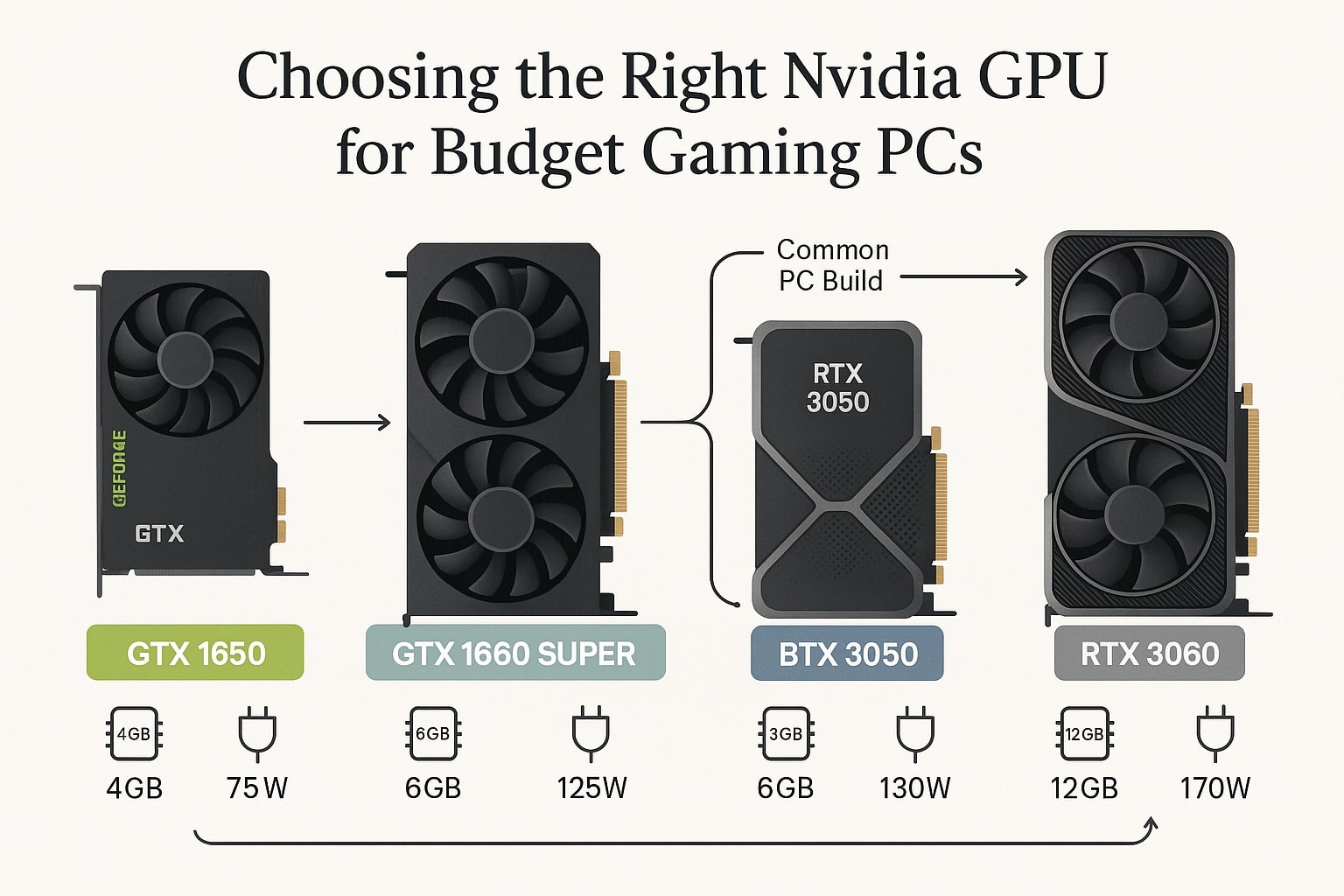
Choosing the Right Nvidia GPU for a Budget Build
Selecting the right graphics card is the foundation of any gaming system. Nvidia offers two ranges that appeal to cost-conscious gamers:
-
Geforce GTX (Entry-Level Options):
Cards such as the GTX 1650 and GTX 1660 provide dependable 1080p performance. They’re ideal if your main goal is affordability, consistent frame rates, and modest power requirements. -
RTX Series (Future-Ready Choices):
Stepping up to the RTX 3050 or RTX 3060 gives you access to ray tracing, DLSS, and higher VRAM, making them better suited for visually demanding games and potential upgrades to higher resolutions later.
When choosing between GTX and RTX, consider your gaming habits, target resolution, and whether you want advanced features like AI upscaling. At Ginger6, every build is configured with carefully selected, stress-tested components to ensure value and reliability.
Gaming Performance Benchmarks: 1080p vs. 1440p
Performance testing is critical when comparing affordable Nvidia systems. Our benchmark results highlight what to expect:
-
1080p Gaming:
GTX cards such as the 1650 and 1660 deliver smooth performance across modern titles, running well on medium-to-high settings. -
1440p Gaming:
Entry-level RTX cards offer a clear step up, maintaining fluid frame rates even under heavier loads thanks to DLSS technology and larger VRAM pools.
These benchmarks reflect repeatable, real-world testing on stress-validated builds from Ginger6. Whether your goal is sharp visuals or consistent frame pacing, the right card ensures gameplay feels responsive across popular titles.
Why RTX Cards Provide More Long-Term Value
Budget RTX cards deliver advantages that extend beyond immediate frame rate gains:
-
Ray Tracing: Introduces more realistic lighting and shadows.
-
DLSS (Deep Learning Super Sampling): Uses AI to upscale frames, offering near-native quality while lowering GPU workload.
-
Higher Efficiency: With improved cooling and power usage, RTX systems perform more smoothly during extended sessions.
These features mean your PC can handle today’s games and stay relevant for upcoming titles. For gamers planning a longer-term investment, RTX cards are a smart choice, offering both efficiency and headroom for growth.
Upgrade Safety and Warranty Considerations
When upgrading components in your Ginger6 system, such as memory, storage, or even the GPU, you should check the warranty terms first. Ginger6 provides a three-year Bronze warranty as standard, where the first year covers parts, labour and postage, while the following two years cover labour only.
Changes such as overclocking, removing serial numbers, or altering critical parts may void warranty. The good news: Ginger6 offers guidance to help you maintain coverage while making upgrades. Always consult support before making major changes.
Prebuilt and Custom Paths: Which to Choose?
Ginger6 offers two straightforward approaches to buying: Prebuilt Next Day systems and custom builds. Prebuilt machines are tested and ready to dispatch quickly, with the same warranty and lifetime technical support.
Custom builds let you choose every part, CPU, GPU (Nvidia or AMD), memory, storage, with expert support in selecting balanced components. Either path benefits from Ginger6’s stress testing, quality components, and UK-based aftercare.
Tested, Trusted, and Supported by Ginger6
Every Ginger6 gaming PC undergoes a 24-hour stress test, far exceeding industry standards. This ensures that performance is consistent and dependable, not just a one-off benchmark result.
Additional benefits include:
-
UK-based support and a three-year warranty for peace of mind.
-
Custom-built systems using carefully selected, quality components.
-
Upgrade options to keep your system flexible as gaming evolves.
If you’re ready to balance cost, performance, and reliability, Ginger6 has a system tailored to your gaming ambitions.
Browse our Nvidia gaming PCs or custom gaming PCs, or contact our team today to find the best budget Nvidia gaming PC for your needs. Whether you prefer a prebuilt system ready for dispatch or a custom design tailored to your exact specifications, Ginger6 ensures every build is stress-tested, backed by a three-year warranty, and supported by UK experts who care about your gaming experience.