




Photography Editing Workstations for Lightroom Classic, Photoshop, and Capture One
Ginger6 builds custom photography editing workstations for professional photographers, retouchers, and studios who need fast catalogue navigation, quick RAW import, and smooth batch export without waiting for their machine to catch up. Every build is hand-assembled in Wolverhampton, stress-tested for 24 hours, and backed by a 3-year warranty.
Photography workstations are consistently mis-specced, buyers upgrade CPU first when the bottleneck is almost always storage speed and RAM. A fast NVMe SSD for the Lightroom catalogue and cache is the single biggest performance upgrade for most photographers, and it costs less than a CPU tier jump.
Browse the builds below or call Kevin on 01902 714533. Tell him your editing software, your library size, and your budget, and he will confirm the right workstation for your workflow.
.jpg)

Grid List
4 Item(s)
-

G6 Slate — Entry Professional Workstation
An entry-level professional workstation for AutoCAD 2D, Fusion 360, Lightroom Classic, and Photoshop.
Intel Core Ultra 5 245K
16GB DDR5 RAM
Nvidia RTX 5060 8GB
1TB NVMe SSD
3-Year Warranty£1,561.29
£1,444.99
G6 Slate — Entry Professional Workstation£1,561.29
£1,444.99
An entry-level professional workstation for AutoCAD 2D, Fusion 360, Lightroom Classic, and Photoshop.
Intel Core Ultra 5 245K
16GB DDR5 RAM
Nvidia RTX 5060 8GB
1TB NVMe SSD
3-Year Warranty
-
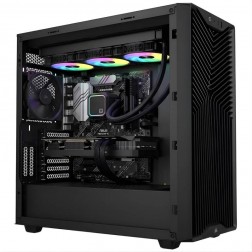
G6 Quartz — Photography and Graphic Design Workstation
An entry creative workstation for Lightroom Classic, Photoshop, Illustrator, and 4K H.264 video editing — Lightroom catalogue configured on the dedicated second NVMe as standard.
Intel Core Ultra 7 265K
32GB DDR5 RAM
Nvidia RTX 5060 Ti 16GB
1TB NVMe + 2TB NVMe (Lightroom drive)
Windows 11 Home
3-Year Warranty£2,640.78
£2,479.99
G6 Quartz — Photography and Graphic Design Workstation£2,640.78
£2,479.99
An entry creative workstation for Lightroom Classic, Photoshop, Illustrator, and 4K H.264 video editing — Lightroom catalogue configured on the dedicated second NVMe as standard.
Intel Core Ultra 7 265K
32GB DDR5 RAM
Nvidia RTX 5060 Ti 16GB
1TB NVMe + 2TB NVMe (Lightroom drive)
Windows 11 Home
3-Year Warranty
-
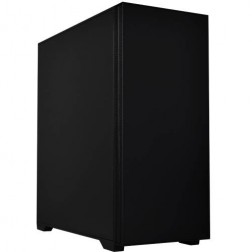
G6 Onyx — Video Editing and Creative Workstation
A mid-range creative workstation for 4K H.264/H.265 video editing in DaVinci Resolve and Premiere Pro, After Effects, GPU rendering, and graphic design — built in Wolverhampton.
Intel Core Ultra 7 265K
64GB DDR5 RAM
Nvidia RTX 5070 12GB
2TB NVMe + 2TB NVMe
Windows 11 Pro
3-Year Warranty£3,320.30
£3,094.99
G6 Onyx — Video Editing and Creative Workstation£3,320.30
£3,094.99
A mid-range creative workstation for 4K H.264/H.265 video editing in DaVinci Resolve and Premiere Pro, After Effects, GPU rendering, and graphic design — built in Wolverhampton.
Intel Core Ultra 7 265K
64GB DDR5 RAM
Nvidia RTX 5070 12GB
2TB NVMe + 2TB NVMe
Windows 11 Pro
3-Year Warranty
-
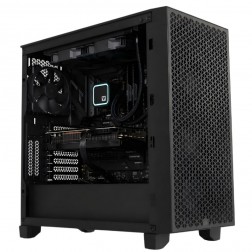
G6 Obsidian — Professional CAD and BIM Workstation
A high-performance professional workstation for SolidWorks large assemblies, Revit multi-discipline BIM, DaVinci Resolve, and orchestral music production — built in Wolverhampton.
Intel Core i9-14900KF
64GB DDR5 RAM
Nvidia RTX 5070 12GB
2TB NVMe + 2TB NVMe
Windows 11 Pro
3-Year Warranty£3,583.06
£3,364.99
G6 Obsidian — Professional CAD and BIM Workstation£3,583.06
£3,364.99
A high-performance professional workstation for SolidWorks large assemblies, Revit multi-discipline BIM, DaVinci Resolve, and orchestral music production — built in Wolverhampton.
Intel Core i9-14900KF
64GB DDR5 RAM
Nvidia RTX 5070 12GB
2TB NVMe + 2TB NVMe
Windows 11 Pro
3-Year Warranty
Grid List
4 Item(s)
What a Photography Editing Workstation Actually Needs
Storage speed and RAM are the primary performance levers in Lightroom Classic. A fast NVMe SSD for the catalogue and cache makes a more immediate difference than a CPU upgrade for most photographers. Get those right first.
How a Ginger6 Photography Workstation Handles Your Workflow
Performance descriptors reflect typical catalogue sizes and workflow configurations. Actual performance depends on catalogue size, preview settings, and image count.
Performance descriptors are indicative. Actual performance depends on project complexity, settings, and system configuration.
Lightroom's Bottleneck Is Almost Always Storage, Not CPU
The conversation about photography workstation performance usually starts with CPU speed and ends with a machine that still feels sluggish in Lightroom because no one changed the storage configuration. Lightroom Classic reads from and writes to the catalogue file continuously during a normal editing session, when you rate an image, when you apply a preset, when you switch between photos, when you generate previews. The speed of those read and write operations is determined entirely by the drive the catalogue sits on.
A SATA SSD running at 500MB/s places the catalogue in a position where Lightroom's panel response is noticeably slower than it should be. An NVMe SSD running at 3500MB/s or above removes that bottleneck entirely. The difference is immediate and measurable, not in a benchmark, but in the actual experience of scrolling through a library of 80,000 images. Kevin places the Lightroom catalogue, the preview cache, and the camera raw cache on the fastest NVMe drive in every photography workstation build, as a default configuration rather than an optional upgrade.
RAM is the second lever. Lightroom holds preview data and the active editing state in memory. A 32GB machine handles a catalogue of 50,000 to 80,000 images comfortably, with Lightroom using 8 to 12GB under normal editing conditions. For photographers with catalogues above 100,000 images, or who keep Photoshop open alongside Lightroom for complex retouching, 64GB removes the risk of Lightroom paging to disk during peak memory use. If you do substantial Photoshop work on large composite or retouching files, the spec overlaps with the graphic design workstation, Kevin accounts for both workloads when advising on the right RAM amount.
Colour accuracy for photo editing depends on the monitor and its calibration, not the GPU. A high-quality IPS or OLED monitor with a wide colour gamut and a hardware calibration profile accurately represents the colours in your RAW files. The GPU outputs the signal, it does not determine whether that signal is accurate. Kevin can advise on monitor options and calibration approaches alongside the workstation spec, because the two are complementary purchases for a professional photographer.
Every Ginger6 photography workstation is built with the practical demands of a photo editing session in mind. The 24-hour stress test confirms stable performance under sustained CPU load, the kind of load produced during a long batch export. BIOS settings are confirmed, and Photoshop's scratch disk is configured to the fastest available NVMe drive as part of the build process. The machine arrives ready to use, not requiring post-delivery configuration to perform correctly.
Kevin is available after delivery. If a Lightroom major update changes catalogue behaviour, if a new camera model requires updated raw support, or if the library grows beyond what the original spec anticipated, he is the first call. The 3-year warranty covers parts and return postage. Lifetime technical support is included, and for a photographer working to client delivery deadlines, that direct relationship with the person who built the machine has practical value.
Photography editing overlaps with graphic design on Photoshop and with video editing on export and preview performance.
For professional photo editing, a calibrated wide-gamut monitor determines colour accuracy, not the GPU. Kevin can advise on monitor options alongside the workstation spec.
01902 714533Photography Workstation Buyers at Ginger6
A catalogue covering multiple seasons of wedding or event photography benefits from fast NVMe storage and 32GB RAM as a starting point. If your catalogue exceeds 80,000 images, 64GB removes the risk of Lightroom slowdowns during peak editing. A Core i7 or i9 reduces batch export time for client delivery. Kevin will confirm the storage and RAM combination for your catalogue size and shooting volume.
Capture One tethered shooting requires fast preview generation on import. An NVMe drive for the session catalogue and a Core i7 with 32GB RAM produces near-instant preview display for high-megapixel cameras. GPU acceleration in Capture One benefits from an RTX 5060 Ti for preview rendering and adjustment response on large RAW files.
Detailed portrait retouching in Photoshop with frequency separation, dodge-and-burn, and composite work on high-resolution files benefits from 64GB RAM and a fast NVMe scratch disk. Photoshop needs scratch disk space to handle large file operations, placing this on NVMe rather than a slower drive keeps retouching fluid. The spec overlaps with a graphic design workstation at this level of Photoshop use.
Stock photography workflows involve large catalogues, batch keyword tagging, and high-volume export to multiple formats and sizes. A Core i9 reduces batch export time significantly for large volumes. NVMe storage for the catalogue is non-negotiable at this scale. A second NVMe drive for the raw file library keeps I/O separate from catalogue operations.
Slow preview generation on a laptop is usually storage-limited. A desktop workstation with NVMe storage for the catalogue and cache removes the most common laptop Lightroom bottleneck entirely. The step from a laptop with a SATA SSD to a desktop with NVMe storage is measurable in seconds per image during preview building.
No charge for the conversation. No pressure to buy.
- The software you use and the version
- Your catalogue size and typical shoot volume
- Whether you do heavy Photoshop retouching alongside Lightroom
- Your approximate budget
What Workstation Buyers Say About Ginger6
93% of Ginger6 customers leave five-star reviews on Trustpilot, compared to 80% for PCSpecialist and 84% for Chillblast. The person who advises you on the spec is the same person who builds the workstation and supports it afterwards.
"From the start of buying the pc to the delivery fantastic service. When we had a problem they sorted it fast and efficiently with no problems. I have used the company for years now as they are really good on all fronts."
"Custom built to my requirements. Everything worked out of the box and the machine is as quiet as I could have hoped."
"Kevin at Ginger was extremely helpful and looked at various options based on my needs. The machine was delivered and is working perfectly. I would highly recommend using them."
"The PC is excellent, with much speedier processing than I was previously experiencing. I have used Ginger 6 several times previously and will not hesitate to use them again as their service and follow up support is excellent."
Ginger6 has been building custom workstations from the same Wolverhampton workshop since 2001. Same phone number. Same approach. Same focus on getting the right spec into the right hands.
Photography Workstation Questions Answered
Lightroom Classic performance is dominated by catalogue and cache storage speed. If your catalogue sits on a SATA SSD or HDD, preview loading, panel response, and export speed will be slower than necessary regardless of CPU speed. A Ginger6 photography workstation places the catalogue, preview cache, and camera raw cache on a fast NVMe SSD as a default, which removes the primary bottleneck. The difference is immediate in day-to-day Lightroom use.
32GB is comfortable for catalogues up to around 80,000 images under normal editing conditions. For catalogues above 100,000 images, or for photographers who keep Photoshop open alongside Lightroom for detailed retouching, 64GB removes the risk of Lightroom paging to disk during peak use. The catalogue size and your Photoshop usage are the two variables Kevin will ask about.
Lightroom Classic performs well on both platforms. A Ginger6 Windows workstation at a comparable price typically delivers more RAM and faster NVMe storage than a Mac Studio equivalent. Component upgrades are straightforward, adding more RAM or a larger NVMe drive later does not require replacing the machine. For photographers committed to macOS, a Windows workstation is not the right choice. For those open to Windows, a Ginger6 build offers better spec per pound and a direct support relationship that Apple's retail experience does not match.
Colour accuracy in photo editing depends entirely on the monitor and its calibration. The GPU outputs a signal, it does not determine whether that signal accurately represents the colours in your RAW files. A wide-gamut IPS or OLED monitor with a hardware calibration device and accurate ICC profile is the deciding factor in colour-accurate editing. Kevin can advise on monitor options that complement the workstation spec.
Yes. The spec overlap is significant. A machine with 64GB RAM, a Core i7 or i9, fast NVMe storage, and an RTX 5060 Ti covers both Lightroom catalogue management and Photoshop retouching on large files comfortably. Kevin will confirm the right RAM amount based on the scale of your Photoshop work alongside Lightroom.
Builds are completed in 3 to 5 working days from order confirmation. The 24-hour stress test runs before dispatch. Delivery is free to UK mainland addresses.
Every Ginger6 workstation includes a 3-year warranty covering parts and return postage, plus lifetime technical support.
Ready to Make Lightroom Feel Fast?
Whether you know exactly what your catalogue size and retouching workflow need or want expert guidance on the right storage, RAM, and CPU combination, Ginger6 is here to help. No sales pressure. No upselling. Honest advice from a team that has been building custom workstations in Wolverhampton since 2001.
Browse Photography Workstations
Browse our ready-configured photography editing workstations for Lightroom Classic, Photoshop, and Capture One. Each one lists the full spec.
Browse the BuildsTalk to Kevin
Tell him your editing software, catalogue size, and budget. He will confirm the right storage, RAM, and CPU combination for your workflow. No pressure to buy.
Call 01902 714533Email or Callback
Include your software, catalogue size, and budget. Kevin will come back with a recommendation and a quote.
Email Kevin