




Accounting PCs for Sage 50, Xero, and QuickBooks
Accounting software is more demanding than most office PCs are specced for. Ginger6 builds desktop computers in Wolverhampton specifically for accountants, bookkeepers, and finance managers running Sage 50, Xero, QuickBooks, and HMRC Making Tax Digital tools. Every build is stress-tested for 24 hours and backed by a 3-year warranty.
Sage 50 with a large client database, concurrent payroll runs, and multiple company files open at year-end behaves differently on a fast multi-core processor with 32GB RAM than on a budget machine. The difference is not visible on day one — it becomes visible at the moments that matter most.
Browse the builds below or call Kevin on 01902 714533. Tell him the software you use, your typical client database size, and your budget, and he will confirm the right build.
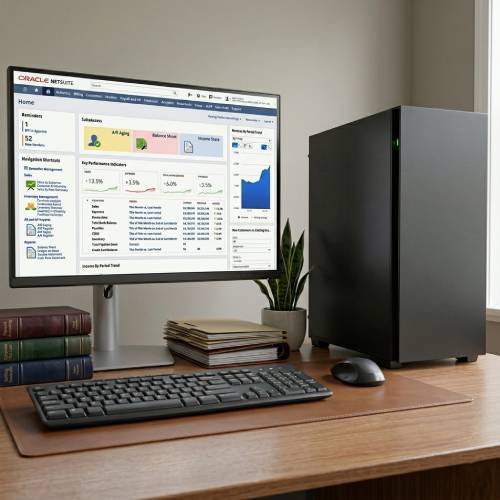




What an Accounting PC Actually Needs
Accounting software is not demanding by gaming standards, but it is more demanding than a generic office PC is built to handle — particularly at year-end and payroll periods when the load peaks at exactly the wrong moment.
How a Ginger6 Accounting PC Handles Your Software
Performance descriptors reflect typical accounting workload patterns. Actual performance depends on database size, the number of company files open simultaneously, and concurrent application load.
Performance descriptors are indicative. Actual performance depends on project complexity, settings, and system configuration.
Sage 50 Is Not Demanding Until You Have 500 Clients and a Payroll Deadline
The standard office PC sold by a high street retailer handles Sage 50 with a small client list without difficulty. The problem arrives eighteen months later when the practice has grown, the database is larger, the year-end falls on the same day as a payroll run, and the machine that was adequate at purchase now pauses for ten seconds every time Sage calculates a report. By that point the machine is embedded in the workflow and replacing it mid-cycle is disruptive. The right time to spec correctly is before the problem arrives.
The specification that determines accounting software performance at peak load is RAM. A machine running Sage 50 with a large client database, two company files open, QuickBooks in a browser tab for a second client, Outlook with several attachments open, Teams for a client call, and Excel for a reconciliation spreadsheet is asking for 24 to 28GB of RAM from Windows and the applications alone. A 16GB machine manages this by paging — writing memory contents to the SSD and reading them back as required. This introduces the familiar symptom: the machine responds, but with a half-second pause that did not exist when the software was first installed.
32GB removes the paging constraint entirely for most accounting practice workloads. If your practice runs CATIA large multi-company configurations or uses additional financial planning software alongside Sage, Kevin will advise on whether 64GB provides meaningful benefit for your specific workload. The conversation costs nothing and it happens before the order is placed, not after a complaint. For practices also dealing with multi-monitor setups to view client files alongside working documents, the multi-monitor office PCs page covers how the GPU configuration changes for two or more displays.
Storage is the second variable that affects Sage performance specifically. Sage 50 accesses its data file repeatedly during processing. A fast NVMe SSD makes this access near-instantaneous. A slow spinning drive or older SATA SSD makes it measurable — and during a payroll run or period-end process, measurable means frustrating. Ginger6 fits NVMe storage as standard, and Kevin configures a second drive for archive data and backups where the data volume warrants it. BIOS settings are configured before dispatch to ensure the system maintains its rated performance under the sustained load patterns of an accounting workload, not just at idle.
The 3-year warranty and lifetime technical support are particularly relevant for a practice where the PC is a production tool. If Sage 50 releases a major version update that changes its performance characteristics, Kevin will advise. If a Windows update causes a conflict with accounting software, Kevin is the person to call. Practices investing in a machine that supports their client-facing work need continuity of support, not a call centre that has no record of the original build. The same person who advises you before the order is the same person who answers the phone two years later.
If your work extends beyond accounting software, one of these categories covers the full picture.
The right RAM and storage configuration for Sage 50 depends on how large your client database is today and where it will be in two years. Kevin will advise before the order is placed.
01902 714533Accounting PC Buyers at Ginger6
Your Sage 50 database has grown significantly since you set up the practice. Period-end and payroll processing take longer than they used to, and the machine pauses when multiple company files are open. 32GB RAM and a fast NVMe SSD resolves this directly. Kevin will advise on the right processor tier based on your client count and payroll frequency.
Browser-based accounting platforms like Xero and QuickBooks Online are more RAM-intensive than most users expect. Multiple client accounts open across tabs, alongside email, calendar, and communication tools, adds up to significant memory use. 32GB ensures the browser does not need to reload tabs mid-session. A fast NVMe drive keeps everything responsive even when multiple browser-based tools are running.
Payroll software alongside Excel financial models with cross-sheet lookups and large datasets requires a machine that handles both without slowdown. 32GB RAM covers the concurrent load comfortably. A Core i7 with a high single-core frequency handles the CPU-bound calculations in both Sage and Excel quickly. For managers also dealing with complex VBA macros or large pivot table refreshes, Kevin will advise on whether additional processor spec is worthwhile.
A machine that works adequately for ten clients may struggle as the list grows to thirty or fifty. Sage 50 and QuickBooks both increase their data file size and processing requirements as the client base grows. Speccing correctly now avoids the disruptive situation of needing to replace the machine mid-year as the practice becomes established.
Kevin will advise on a consistent spec across multiple seats for a practice team. Where some users have larger databases or heavier concurrent workloads, he will identify where higher spec is justified and where the standard accounting build is sufficient. Team orders are discussed before placement to confirm the configuration is right for each user's workload.
No charge for the conversation. No pressure to buy.
- The software you use and the version
- Your typical client database size or number of company files
- Whether you need to run multiple applications simultaneously and which ones
- Your approximate budget
What Business Buyers Say About Ginger6
93% of Ginger6 customers leave five-star reviews on Trustpilot, compared to 80% for PCSpecialist and 84% for Chillblast. For an accounting practice, post-sale support from a person who knows the build is as important as the hardware itself.
"Great friendly service, added bonus of personal delivery as they are so local which means they can be on hand if there are any issues. No problems with the computer hardware we've purchased, very professional and thorough addressing our requirements. Highly recommended."
"Great service and prices. Just had 2 new desktops built for the office. Kevin and the team were great advising me on the spec I would need for our needs."
"The price of my custom built PC was far less than the equivalent off the shelf PC from larger companies. Customer service is first rate and calls are answered expeditiously."
"The PC is excellent, with much speedier processing than I was previously experiencing. I have used Ginger 6 several times previously and will not hesitate to use them again as their service and follow up support is excellent."
Ginger6 has been building custom business PCs from the same Wolverhampton workshop since 2001. The same people who build the machine support it afterwards.
Accounting PC Questions Answered
Sage 50 with a small to medium client database runs adequately on 16GB alongside standard office tools. As the database grows — more clients, more transaction history, larger payroll — the RAM requirement increases. For a practice with a large client base running Sage 50, QuickBooks, Excel, and Outlook concurrently, 32GB removes the paging constraint that causes mid-session slowdown. Kevin will advise on the right amount based on your current client count and where the practice will be in two to three years.
Yes, noticeably. Sage 50 period-end and payroll processing are constrained by two things: single-core processor speed and storage read/write speed. A fast NVMe SSD reduces data access time during processing. A high-frequency current-generation processor handles the calculation workload faster. If your current machine pauses during payroll runs or year-end processing, both upgrades are likely to produce a visible improvement in processing time.
Yes. QuickBooks Online runs in a browser and benefits from the same RAM and NVMe storage combination as all browser-based accounting tools. QuickBooks Desktop is a local application and benefits from fast storage for data file access and sufficient RAM to run alongside other open applications. Kevin will confirm the right configuration for the specific QuickBooks version you are running.
Yes. There is no conflict between running Sage 50 as a local application and Xero in a browser simultaneously. The combined RAM demand is the consideration — 32GB handles both alongside standard office tools without paging. Kevin will advise if your specific combination of software and concurrent usage requires a higher RAM spec.
Builds are typically completed in 3 to 5 working days from order confirmation. The 24-hour stress test runs before dispatch. Delivery is free to UK mainland addresses. Kevin will give you a specific timeframe when you confirm the order. If you have a deadline such as a year-end period approaching, flag this when you call so Kevin can advise on timing.
Every Ginger6 accounting PC includes a 3-year warranty, with labour covered for 3 years and parts and return postage for the first year. Lifetime technical support is included. If a Sage update causes a configuration issue or a Windows update affects how the software runs, Kevin is the person to call — not a call centre. For a practice where the PC is a critical production tool, that direct support matters at the moments when the machine needs attention.
Many accountants find dual-monitor setups significantly improve workflow — viewing a client file on one screen while completing a tax return on the other, or comparing two periods without switching windows. If you are considering two or more monitors, the multi-monitor office PCs page covers how the GPU configuration supports multiple displays. Kevin will confirm the right output configuration for your monitor setup.
Ready to Spec Your Accounting PC?
Whether you run Sage 50 with a large client database or manage bookkeeping across multiple platforms, Ginger6 will confirm the right spec before the order is placed. No sales pressure. Honest advice from a team building custom business PCs in Wolverhampton since 2001.
Browse Accounting PCs
Browse our configured accounting and finance desktops. Each lists the full spec — RAM, processor, and storage — for straightforward comparison.
Browse the BuildsTalk to Kevin
Tell him your software, your client database size, and your budget. He will confirm the right spec. No pressure to buy.
Call 01902 714533Email or Callback
Include your software, database size, and budget. Kevin will come back with a recommendation and a quote.
Email Kevin