




Music Production Workstations for Ableton Live, FL Studio, and Pro Tools
Ginger6 builds custom music production workstations for producers, composers, and recording engineers who need a machine that handles large session files with heavy plugin loads without audio dropouts. Every build is hand-assembled in Wolverhampton, tested for low DPC latency before dispatch, and backed by a 3-year warranty.
Audio dropouts caused by thermal throttling or DPC latency spikes are the most frustrating failure mode in music production. A machine that looks fast on a benchmark can still produce dropouts if it is not configured correctly for audio work. Ginger6 configures and tests specifically for music production workloads, not generic computing benchmarks.
Browse the builds below or call Kevin on 01902 714533. Tell him your DAW, how many tracks and plugins you typically run, and your budget, and he will confirm the right workstation for your production workflow.
.jpg)

Grid List
3 Item(s)
-
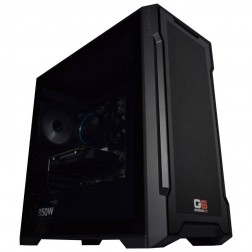
G6 Slate — Entry Professional Workstation
An entry-level professional workstation for AutoCAD 2D, Fusion 360, Lightroom Classic, and Photoshop.
Intel Core Ultra 5 245K
16GB DDR5 RAM
Nvidia RTX 5060 8GB
1TB NVMe SSD
3-Year Warranty£1,561.29
£1,444.99
G6 Slate — Entry Professional Workstation£1,561.29
£1,444.99
An entry-level professional workstation for AutoCAD 2D, Fusion 360, Lightroom Classic, and Photoshop.
Intel Core Ultra 5 245K
16GB DDR5 RAM
Nvidia RTX 5060 8GB
1TB NVMe SSD
3-Year Warranty
-
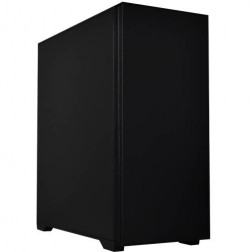
G6 Granite — CAD and Architecture Workstation
A mid-range professional workstation for SolidWorks, AutoCAD 3D, Revit, and multi-application creative use — built and stress-tested in Wolverhampton.
Intel Core Ultra 7 265K
32GB DDR5 RAM
Nvidia RTX 5060 Ti 8GB
1TB NVMe + 1TB NVMe
3-Year Warranty£2,257.02
£2,119.99
G6 Granite — CAD and Architecture Workstation£2,257.02
£2,119.99
A mid-range professional workstation for SolidWorks, AutoCAD 3D, Revit, and multi-application creative use — built and stress-tested in Wolverhampton.
Intel Core Ultra 7 265K
32GB DDR5 RAM
Nvidia RTX 5060 Ti 8GB
1TB NVMe + 1TB NVMe
3-Year Warranty
-
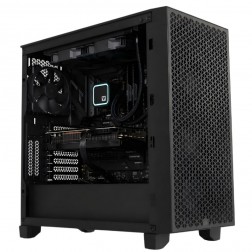
G6 Obsidian — Professional CAD and BIM Workstation
A high-performance professional workstation for SolidWorks large assemblies, Revit multi-discipline BIM, DaVinci Resolve, and orchestral music production — built in Wolverhampton.
Intel Core i9-14900KF
64GB DDR5 RAM
Nvidia RTX 5070 12GB
2TB NVMe + 2TB NVMe
Windows 11 Pro
3-Year Warranty£3,583.06
£3,364.99
G6 Obsidian — Professional CAD and BIM Workstation£3,583.06
£3,364.99
A high-performance professional workstation for SolidWorks large assemblies, Revit multi-discipline BIM, DaVinci Resolve, and orchestral music production — built in Wolverhampton.
Intel Core i9-14900KF
64GB DDR5 RAM
Nvidia RTX 5070 12GB
2TB NVMe + 2TB NVMe
Windows 11 Pro
3-Year Warranty
Grid List
3 Item(s)
What a Music Production Workstation Actually Needs
Music production needs reliable, stable performance with low DPC latency, not raw benchmark speed. A machine that throttles thermally under a heavy plugin load, or that has driver conflicts producing latency spikes, is not a music production workstation regardless of its spec sheet.
How a Ginger6 Music Production Workstation Handles Your Session
Performance descriptors reflect typical session configurations. Actual performance depends on VST plugin count, sample library size, and buffer size setting.
Performance descriptors are indicative. Actual performance depends on project complexity, settings, and system configuration.
The Machine That Causes Audio Dropouts Is Not a Music Production Workstation
The most common failure mode in music production workstations is not raw processing power, it is DPC latency. Deferred Procedure Calls are interrupts from device drivers that temporarily block the audio engine from processing its buffer. When a DPC latency spike exceeds the buffer size in use, the audio engine misses its deadline and produces a click, pop, or dropout. A machine with an inadequate driver configuration, a poorly selected USB controller, or a power management setting that lets the CPU enter low-power states during playback will produce these spikes regardless of how fast the processor is on a benchmark.
Ginger6 configures every music production workstation specifically to minimise DPC latency before it leaves Wolverhampton. Power management settings that cause CPU frequency fluctuation during audio processing are disabled. USB controller configuration is checked to ensure audio interface traffic does not share bandwidth with other high-interrupt devices. The machine is tested with a DPC latency analyser before dispatch, confirming that the configuration is stable for the buffer sizes that matter for real-time recording monitoring. For producers using Ableton, FL Studio, Pro Tools, and Cubase, this is the configuration difference that separates a music production workstation from a generic PC with the same components.
RAM for music production scales with sample library size, not with track count. A producer using software synthesisers and Ableton's built-in instruments runs comfortably on 32GB. A composer loading a full orchestral template from Spitfire Audio, East West, or Vienna Symphonic Library, strings, brass, woodwind, and percussion with multiple articulation patches, can fill 64GB before the session even starts. Kontakt's streaming mode reduces RAM by loading samples from disk during playback, but fast NVMe storage is required for streaming to work without artefacts. The sample drive and the RAM spec are not independent decisions, Kevin accounts for both when advising on the right configuration. If your workflow also involves video scoring or post-production, see the video editing workstations page for how the spec changes when timeline work sits alongside audio production.
Ginger6 builds every music production workstation with acoustic environment in mind as well as performance. A quiet case and low-speed fan configuration reduce ambient noise in a recording environment. The 24-hour stress test confirms the machine is thermally stable at low fan speeds under sustained plugin load, confirming that quiet operation does not come at the cost of thermal performance.
Kevin is available after delivery. If a Windows update introduces a driver that raises DPC latency, if a new audio interface requires a configuration change, or if the session complexity grows beyond what the original spec anticipated, he is the first call. The 3-year warranty covers parts and return postage. Lifetime technical support is included, and for a producer working to release deadlines, that access to a direct conversation with the person who built the machine has real value.
Video scoring and post-production combine audio with video editing requirements. Photography editing shares storage and RAM priorities.
The USB controller configuration affects DPC latency. Tell Kevin your audio interface model and he will confirm the right motherboard and USB configuration before the order.
01902 714533Music Production Workstation Buyers at Ginger6
A Core i7 with 32GB RAM and a dedicated NVMe project drive covers most electronic music production workflows in Ableton Live and FL Studio. If you use large third-party VST instruments, or if your sessions run to 60 or more tracks with heavy plugin chains, 64GB RAM and a Core i9 give more headroom. USB controller configuration for your audio interface is confirmed before the order.
Full orchestral templates from Spitfire Audio, East West Hollywood, or Vienna Symphonic Library need 64GB RAM minimum to hold core patches in memory. A dedicated NVMe sample drive reduces Kontakt streaming latency. A Core i9 with multiple cores distributes the polyphony load across threads, reducing the per-core demand that causes dropouts in large orchestral sessions.
Pro Tools demands stable, low-latency CPU performance for 64-track sessions with plugin processing on every channel. A Core i9 with 64GB RAM and a machine configured for minimal DPC latency handles professional tracking sessions at 64 sample buffers without underruns. Kevin confirms USB and Thunderbolt configuration based on your Pro Tools interface.
Scoring to picture combines sample library demand with video playback. A machine with 64GB RAM, a Core i9, a fast NVMe sample drive, and a GPU capable of smooth video preview covers both the audio and video components of a score session. The DPC latency configuration for audio takes priority in the build.
A laptop producing dropouts under heavy VST load is usually thermal throttling, not underpowered on paper. A desktop workstation with proper thermal management and a dedicated power supply eliminates the constraint. The same CPU that produces dropouts in a thermally throttled laptop runs the same session without issues in a properly configured desktop build.
No charge for the conversation. No pressure to buy.
- The software you use and the version
- Your sample libraries and typical track count with plugins
- Whether you need to run multiple applications simultaneously
- Your approximate budget
What Specialist Buyers Say About Ginger6
93% of Ginger6 customers leave five-star reviews on Trustpilot, compared to 80% for PCSpecialist and 84% for Chillblast. The person who advises you on the spec is the same person who builds the workstation and supports it afterwards.
"Many thanks to Kevin and his team. With his guidance, I got the exact spec computer I required for my online flight simulator needs. Excellent courteous service with on-time delivery. Would recommend Ginger6 to anybody with specialist computer requirements or not."
"Nothing was too much trouble and it was evident that they were not trying to sell me anything I didn't really need. The PC was delivered promptly and is perfect for what I required."
"I have used Ginger6 several times both for myself, on behalf of my friends and my wife's business. Their prices are extremely good and their service is likewise. It's a strong recommend from me!"
"Didn't know what I was buying and the help and advice was amazing. Would 100% recommend them to anyone."
Ginger6 has been building custom workstations from the same Wolverhampton workshop since 2001. Same phone number. Same approach. Same focus on getting the right spec into the right hands.
Music Production Workstation Questions Answered
Yes, with the right spec and configuration. A Core i9 with 64GB RAM and a machine configured for low DPC latency handles 80-track sessions with heavy plugin chains at buffer sizes that are practical for mixing. The specific track and plugin count matters, tell Kevin what you run and he will confirm which spec covers it comfortably rather than estimating from a general description.
32GB covers most production workflows using software synthesisers and moderate third-party libraries. For full orchestral templates from Spitfire Audio, East West, or Vienna Symphonic Library with multiple articulation patches per instrument, 64GB is the practical minimum to keep core patches in RAM without purging. The combination of library size and how many patches you keep loaded simultaneously determines the right amount, Kevin will advise based on your specific libraries.
Kevin reviews the motherboard's USB controller layout before confirming the spec. A motherboard with multiple independent USB controllers is preferable to one where all ports share a single controller, which can produce DPC latency spikes when high-interrupt USB devices share bandwidth. If you use a Thunderbolt audio interface, Kevin confirms Thunderbolt support and chipset compatibility before the order is placed.
Pro Tools runs on both Windows and macOS. A Ginger6 Windows workstation is configured specifically for low DPC latency and Pro Tools compatibility at a price point that typically delivers more RAM and storage than a Mac equivalent. For studios committed to macOS, a Windows workstation is not the right choice. For studios open to Windows, a Ginger6 build delivers equivalent or better performance with component upgrade options that Apple hardware does not support.
Yes. Every music production workstation is tested with a DPC latency analyser before dispatch to confirm the configuration is stable for the buffer sizes relevant to real-time recording and monitoring. Power management settings are confirmed and driver configuration is checked as part of the pre-dispatch process.
Every Ginger6 workstation includes a 3-year warranty covering parts and return postage, plus lifetime technical support. If a Windows update introduces a driver that affects DPC latency, Kevin is the first call.
Ready to Produce Without Dropouts?
Whether you know exactly what your DAW and sample libraries need or want expert guidance on the right CPU, RAM, and USB configuration, Ginger6 is here to help. No sales pressure. No upselling. Honest advice from a team that has been building custom workstations in Wolverhampton since 2001.
Browse Music Production Workstations
Browse our ready-configured music production workstations for Ableton, FL Studio, Pro Tools, and Cubase. Each one lists the full spec.
Browse the BuildsTalk to Kevin
Tell him your DAW, your sample libraries, and your audio interface. He will confirm the right CPU, RAM, and USB configuration. No pressure to buy.
Call 01902 714533Email or Callback
Include your DAW, sample libraries, track counts, and budget. Kevin will come back with a recommendation and a quote.
Email Kevin