




CAD Workstations for AutoCAD, SolidWorks, and Fusion 360
Ginger6 builds custom CAD workstations for mechanical engineers, industrial designers, and product designers who need hardware that keeps up with professional parametric modelling software. Every build is hand-assembled in Wolverhampton, stress-tested for 24 hours, and backed by a 3-year warranty.
Whether you run large assembly files in SolidWorks, 3D part design in Fusion 360, 2D and 3D drafting in AutoCAD, or complex surface modelling in CATIA, the spec matters. Single-core CPU speed, RAM capacity, and GPU compatibility with your software determine day-to-day performance far more than benchmark scores.
Browse the builds below or call Kevin on 01902 714533. Tell him your software, your typical assembly size, and your budget, and he will confirm the right workstation for your workflow.
.jpg)

Grid List
4 Item(s)
-
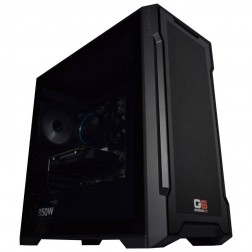
G6 Slate — Entry Professional Workstation
An entry-level professional workstation for AutoCAD 2D, Fusion 360, Lightroom Classic, and Photoshop.
Intel Core Ultra 5 245K
16GB DDR5 RAM
Nvidia RTX 5060 8GB
1TB NVMe SSD
3-Year Warranty£1,561.29
£1,444.99
G6 Slate — Entry Professional Workstation£1,561.29
£1,444.99
An entry-level professional workstation for AutoCAD 2D, Fusion 360, Lightroom Classic, and Photoshop.
Intel Core Ultra 5 245K
16GB DDR5 RAM
Nvidia RTX 5060 8GB
1TB NVMe SSD
3-Year Warranty
-
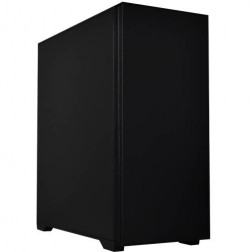
G6 Granite — CAD and Architecture Workstation
A mid-range professional workstation for SolidWorks, AutoCAD 3D, Revit, and multi-application creative use — built and stress-tested in Wolverhampton.
Intel Core Ultra 7 265K
32GB DDR5 RAM
Nvidia RTX 5060 Ti 8GB
1TB NVMe + 1TB NVMe
3-Year Warranty£2,257.02
£2,119.99
G6 Granite — CAD and Architecture Workstation£2,257.02
£2,119.99
A mid-range professional workstation for SolidWorks, AutoCAD 3D, Revit, and multi-application creative use — built and stress-tested in Wolverhampton.
Intel Core Ultra 7 265K
32GB DDR5 RAM
Nvidia RTX 5060 Ti 8GB
1TB NVMe + 1TB NVMe
3-Year Warranty
-
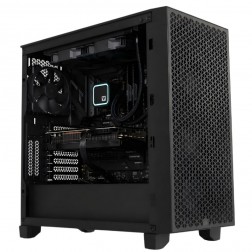
G6 Forge S — RTX A1000 Professional Workstation for SolidWorks and AutoCAD
An entry ISV-certified professional workstation for SolidWorks RealView, AutoCAD, and CATIA — with Nvidia professional GPU drivers and ECC GPU memory.
Intel Core Ultra 7 265KF
32GB DDR5 RAM
Nvidia RTX A1000 8GB (ECC, ISV Certified)
1TB NVMe + 1TB NVMe
Windows 11 Pro
3-Year Warranty£2,441.49
£2,294.99
G6 Forge S — RTX A1000 Professional Workstation for SolidWorks and AutoCAD£2,441.49
£2,294.99
An entry ISV-certified professional workstation for SolidWorks RealView, AutoCAD, and CATIA — with Nvidia professional GPU drivers and ECC GPU memory.
Intel Core Ultra 7 265KF
32GB DDR5 RAM
Nvidia RTX A1000 8GB (ECC, ISV Certified)
1TB NVMe + 1TB NVMe
Windows 11 Pro
3-Year Warranty
-
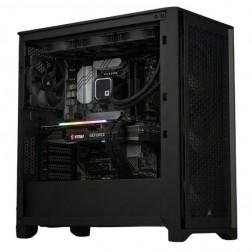
G6 Forge M — RTX 2000 Ada Mid Professional Workstation for SolidWorks Large Assemblies and CATIA
A mid-tier ISV-certified workstation for SolidWorks large assemblies, CATIA, ANSYS Mechanical, and COMSOL — with 12GB ECC VRAM and a professional GPU driver stack.
Intel Core Ultra 9 285KF
64GB DDR5 RAM
Nvidia RTX 2000 Ada 12GB (ECC, ISV Certified)
2TB NVMe + 2TB NVMe
Windows 11 Pro
3-Year Warranty
G6 Forge M — RTX 2000 Ada Mid Professional Workstation for SolidWorks Large Assemblies and CATIA
A mid-tier ISV-certified workstation for SolidWorks large assemblies, CATIA, ANSYS Mechanical, and COMSOL — with 12GB ECC VRAM and a professional GPU driver stack.
Intel Core Ultra 9 285KF
64GB DDR5 RAM
Nvidia RTX 2000 Ada 12GB (ECC, ISV Certified)
2TB NVMe + 2TB NVMe
Windows 11 Pro
3-Year Warranty
Grid List
4 Item(s)
What a CAD Workstation Actually Needs
CAD is a CPU and RAM workload. The spec priorities differ significantly from gaming or GPU rendering — understanding the difference saves money and avoids buying hardware that does not improve CAD performance.
How a Ginger6 CAD Workstation Handles Your Software
Performance descriptors are based on typical workflow configurations at each spec tier. Actual performance depends on assembly complexity, file size, and project configuration.
Performance descriptors are indicative. Actual performance depends on project complexity, settings, and system configuration.
A Gaming PC Cannot Replace a CAD Workstation
The most common spec mistake in CAD workstations is buying a machine optimised for gaming performance metrics and expecting it to behave like a professional CAD workstation. Gaming hardware prioritises GPU frame output and peak burst performance. CAD software prioritises single-core CPU clock speed, sustained thermal stability under continuous load, and GPU driver certification for the specific application being run.
The specification that defines CAD performance is single-core processor frequency, not core count. When you move a part in SolidWorks or rebuild a parametric history in Fusion 360, that calculation runs on a single thread. A processor with a high base clock and a high boost frequency handles this faster than a processor with sixteen cores at a lower clock. Most CAD software cannot distribute a viewport rebuild across multiple cores, so adding cores does not improve the experience the way it would in a rendering or simulation workload.
RAM is the second defining spec, and it is the one that causes the most frustration when under-specced. A 2D AutoCAD layout with three xrefs attached runs comfortably on 16GB. A SolidWorks assembly with 800 parts and multiple mates, open alongside SOLIDWORKS PDM and a browser session, will push a 32GB machine to its limit and cause paging to disk. Paging to disk in a CAD environment means the machine pauses to write and read from storage instead of processing the model. 64GB removes this constraint for most professional workflows and eliminates the most common cause of mid-session slowdown.
GPU certification is relevant for SolidWorks and CATIA in particular. These applications have certification programmes that validate specific GPU models and driver versions for professional use. A gaming GPU running standard consumer drivers may produce correct results in most cases, but it will produce warnings in the software and can introduce instability in specific viewport operations. Kevin confirms the GPU recommendation for SolidWorks and CATIA buyers before the order is placed, not after. If your workflow combines CAD modelling with rendering output, see the 3D rendering workstations page for how the GPU spec shifts when rendering time is the primary constraint.
Every Ginger6 CAD workstation is built with sustained CAD load in mind. Cable management inside the case supports airflow that keeps the CPU core temperature stable during long modelling sessions, reducing thermal throttling. BIOS settings and memory profiles are configured and confirmed before dispatch to ensure the processor maintains its rated clock speeds under continuous load. The 24-hour stress test runs the machine under sustained CPU and memory load, confirming thermal performance and component stability before the workstation leaves Wolverhampton. For architects running Revit large BIM models rather than mechanical CAD, the architecture workstations page covers the RAM and viewport requirements specific to BIM workflows.
Kevin is available by phone after delivery. If SolidWorks produces a driver warning, if a BIOS update changes behaviour, or if an assembly file grows beyond what the original spec comfortably handles, he will advise on what to do. The 3-year warranty covers parts and postage, and lifetime technical support means you are not left alone when a production machine needs attention. For a professional buying hardware that supports their work rather than replacing it every eighteen months, that continuity matters. Engineers running FEA simulation in ANSYS or COMSOL alongside CAD should look at the engineering workstations page, where the spec priorities shift toward core count and ECC memory.
If your workflow combines CAD with rendering or simulation, you may need a different spec balance.
These applications recommend ISV-certified GPU drivers for production use. Call Kevin before ordering to confirm the right GPU for your specific software version.
01902 714533CAD Workstation Buyers at Ginger6
Your assemblies run to hundreds of parts with complex mate relationships. You need a Core i9 or Ryzen 9 for viewport responsiveness and 64GB RAM to avoid paging to disk mid-session. GPU certification for SolidWorks is relevant — Kevin will confirm the right card for your version before the order is placed.
Fusion 360 is less RAM-intensive than SolidWorks but benefits from single-core CPU speed for parametric rebuilds. 32GB RAM covers most Fusion 360 workflows. AutoCAD 2D and 3D runs well on a Core i7 with a mid-range NVMe SSD. A good starting point for product designers working across both tools.
If you render product visualisations in KeyShot alongside your CAD work, the spec balance shifts toward GPU. An RTX 5070 or RTX 5070 Ti reduces render times significantly for client-facing visuals. The CPU spec for the CAD viewport remains the same. Kevin can configure a build that covers both workloads without over-spending on either.
If you are speccing for a team, Kevin can advise on a consistent spec that works across SolidWorks and AutoCAD seat licences without over-spending on GPU tier for seats that do not need visualisation output. Budget and team size noted — call to discuss before ordering.
A gaming PC used for CAD will perform adequately for light 2D work. It will struggle with large assemblies in SolidWorks, produce driver warnings in CATIA, and throttle thermally under continuous modelling sessions. A workstation built to CAD spec eliminates all three issues.
No charge for the conversation. No pressure to buy.
- The software you use and the version
- Your typical assembly or file sizes
- Whether you need GPU certification for SolidWorks or CATIA
- Your approximate budget
What Workstation Buyers Say About Ginger6
93% of Ginger6 customers leave five-star reviews on Trustpilot, compared to 80% for PCSpecialist and 84% for Chillblast. The person who advises you on the spec is the same person who builds the workstation and supports it afterwards.
"Great friendly service, added bonus of personal delivery as they are so local which means they can be on hand if there are any issues. No problems with the computer hardware we've purchased, very professional and thorough addressing our requirements. Highly recommended."
"Great service and prices. Just had 2 new desktops built for the office. Kevin and the team were great advising me on the spec I would need for our needs."
"Kevin has been above and beyond customer care taking the time to answer a problem I had installing a third party program which was at my end and nothing to do with the product which btw works and runs extremely well. Very satisfied and highly recommend."
"The PC is excellent, with much speedier processing than I was previously experiencing. I have used Ginger 6 several times previously and will not hesitate to use them again as their service and follow up support is excellent."
Ginger6 has been building custom workstations from the same Wolverhampton workshop since 2001. Same phone number. Same approach. Same focus on getting the right spec into the right hands.
CAD Workstation Questions Answered
32GB is the practical minimum for SolidWorks assemblies of up to 500 parts. For assemblies of 500 to 1000 parts with multiple configurations open, 64GB removes the main bottleneck. Above 1000 parts or for CATIA large-scale assemblies, 128GB is appropriate. Kevin will advise on the right amount based on your typical file sizes.
SolidWorks and CATIA have ISV certification programmes that validate specific GPU models and driver versions for professional use. A gaming GPU running consumer drivers will work in many cases but may produce driver warnings in SolidWorks RealView and can introduce instability in specific viewport operations. Kevin confirms the right GPU recommendation for your software version before the order is placed.
A Ginger6 workstation is configured specifically for your software and workflow rather than built to a generic specification. Dell Precision workstations are competent machines but they are configured for a general market. Kevin's conversation before the order ensures the CPU clock speed, RAM, and GPU are matched to what AutoCAD actually demands from your assembly sizes and drafting workflow. Price per spec is also typically better than branded workstation equivalents at the same hardware tier.
Yes. Both applications run on the same machine without conflict. The spec requirements for SolidWorks are higher than for Fusion 360, so a machine specced for SolidWorks will run Fusion 360 comfortably. Fusion 360 is cloud-based for storage and collaboration but processes locally, so the workstation spec still determines viewport and simulation performance.
Both are capable platforms for professional CAD. Intel Core i9 processors typically have a higher single-core boost frequency which benefits viewport responsiveness in SolidWorks and AutoCAD 3D. AMD Ryzen 9 processors have competitive single-core performance and typically offer better value per core at the same price tier. Kevin will recommend the specific processor that matches your software and budget rather than defaulting to a platform.
Builds are typically completed in 3 to 5 working days from order confirmation. The 24-hour stress test runs before dispatch, so the machine arrives confirmed and ready to use. Delivery is free to UK mainland addresses. Kevin will give you a specific timeframe when you confirm the order.
Every Ginger6 workstation includes a 3-year warranty covering parts and return postage. Lifetime technical support is included — if a driver update causes a problem two years after purchase, Kevin is still the person to call. For professional environments where the workstation is a production tool, that continuity matters.
Ready to Spec Your CAD Workstation?
Whether you know exactly what spec you need or want expert guidance on matching hardware to your CAD software, Ginger6 is here to help. No sales pressure. No upselling. Honest advice from a team that has been building custom workstations in Wolverhampton since 2001.
Browse CAD Workstations
Browse our ready-configured CAD workstations for AutoCAD, SolidWorks, Fusion 360, and CATIA. Each one lists the full spec.
Browse the BuildsTalk to Kevin
Tell him your software, your typical project scale, and your budget. He will confirm the right spec or suggest a better fit. No pressure to buy.
Call 01902 714533Email or Callback
Include your software, typical project scale, and budget. Kevin will come back with a recommendation and a quote.
Email Kevin