




Architecture Workstations for Revit, ArchiCAD, and Rhino
Ginger6 builds custom architecture workstations for architects, BIM coordinators, and structural designers who need hardware that handles large federated model files without viewport stalling or out-of-memory failures. Every build is hand-assembled in Wolverhampton, stress-tested for 24 hours, and backed by a 3-year warranty.
Revit is one of the most RAM-intensive professional applications in common use. A machine with 32GB RAM will struggle with a large multi-discipline model that a machine with 64GB handles without stalling. The spec conversation Kevin has before an order is placed starts with your model sizes, not the price point.
Browse the builds below or call Kevin on 01902 714533. Tell him your software, your typical model size, and your budget, and he will confirm the right workstation for your workflow.
.jpg)

Grid List
4 Item(s)
-
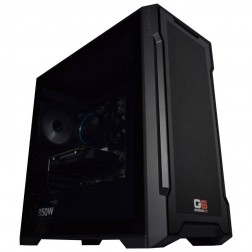
G6 Slate — Entry Professional Workstation
An entry-level professional workstation for AutoCAD 2D, Fusion 360, Lightroom Classic, and Photoshop.
Intel Core Ultra 5 245K
16GB DDR5 RAM
Nvidia RTX 5060 8GB
1TB NVMe SSD
3-Year Warranty£1,561.29
£1,444.99
G6 Slate — Entry Professional Workstation£1,561.29
£1,444.99
An entry-level professional workstation for AutoCAD 2D, Fusion 360, Lightroom Classic, and Photoshop.
Intel Core Ultra 5 245K
16GB DDR5 RAM
Nvidia RTX 5060 8GB
1TB NVMe SSD
3-Year Warranty
-
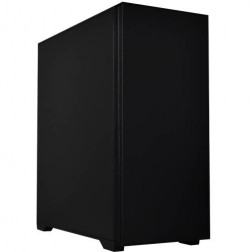
G6 Granite — CAD and Architecture Workstation
A mid-range professional workstation for SolidWorks, AutoCAD 3D, Revit, and multi-application creative use — built and stress-tested in Wolverhampton.
Intel Core Ultra 7 265K
32GB DDR5 RAM
Nvidia RTX 5060 Ti 8GB
1TB NVMe + 1TB NVMe
3-Year Warranty£2,257.02
£2,119.99
G6 Granite — CAD and Architecture Workstation£2,257.02
£2,119.99
A mid-range professional workstation for SolidWorks, AutoCAD 3D, Revit, and multi-application creative use — built and stress-tested in Wolverhampton.
Intel Core Ultra 7 265K
32GB DDR5 RAM
Nvidia RTX 5060 Ti 8GB
1TB NVMe + 1TB NVMe
3-Year Warranty
-
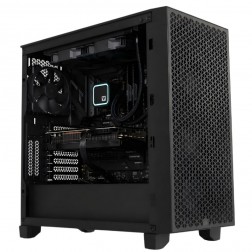
G6 Forge S — RTX A1000 Professional Workstation for SolidWorks and AutoCAD
An entry ISV-certified professional workstation for SolidWorks RealView, AutoCAD, and CATIA — with Nvidia professional GPU drivers and ECC GPU memory.
Intel Core Ultra 7 265KF
32GB DDR5 RAM
Nvidia RTX A1000 8GB (ECC, ISV Certified)
1TB NVMe + 1TB NVMe
Windows 11 Pro
3-Year Warranty£2,441.49
£2,294.99
G6 Forge S — RTX A1000 Professional Workstation for SolidWorks and AutoCAD£2,441.49
£2,294.99
An entry ISV-certified professional workstation for SolidWorks RealView, AutoCAD, and CATIA — with Nvidia professional GPU drivers and ECC GPU memory.
Intel Core Ultra 7 265KF
32GB DDR5 RAM
Nvidia RTX A1000 8GB (ECC, ISV Certified)
1TB NVMe + 1TB NVMe
Windows 11 Pro
3-Year Warranty
-
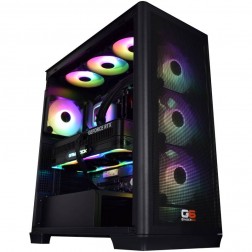
G6 Forge H — RTX 4000 Ada High Professional Workstation for ANSYS Fluent, CATIA, and COMSOL
A top-tier ISV-certified workstation for ANSYS Fluent GPU solver, CATIA V5/V6 complex surface modelling, COMSOL GPU-accelerated solver, and very large federated BIM.
Intel Core Ultra 9 285KF
128GB DDR5 RAM
Nvidia RTX 4000 Ada 20GB (ECC, ISV Certified)
2TB NVMe + 4TB NVMe
Windows 11 Pro
3-Year Warranty
G6 Forge H — RTX 4000 Ada High Professional Workstation for ANSYS Fluent, CATIA, and COMSOL
A top-tier ISV-certified workstation for ANSYS Fluent GPU solver, CATIA V5/V6 complex surface modelling, COMSOL GPU-accelerated solver, and very large federated BIM.
Intel Core Ultra 9 285KF
128GB DDR5 RAM
Nvidia RTX 4000 Ada 20GB (ECC, ISV Certified)
2TB NVMe + 4TB NVMe
Windows 11 Pro
3-Year Warranty
Grid List
4 Item(s)
What an Architecture Workstation Actually Needs
BIM software, particularly Revit, is primarily a RAM and single-core CPU workload. The GPU matters for real-time visualisation but not for core BIM processing. Getting RAM right is the single most important decision in an architecture workstation build.
How a Ginger6 Architecture Workstation Handles Your Software
Performance descriptors reflect typical configurations at each spec tier. Actual performance depends on model complexity, discipline scope, and linked file count.
Performance descriptors are indicative. Actual performance depends on project complexity, settings, and system configuration.
Revit Runs on RAM. Under-Speccing It Is the Most Expensive Mistake in an Architecture Workstation
The architecture practices that contact Ginger6 for a second workstation often do so because the first machine, bought from a retail supplier without a proper spec conversation, runs out of RAM when the project reaches a certain scale. A 32GB machine that handles a small residential project comfortably will stall on a large multi-discipline federated model. The model does not fail gracefully, Revit slows, the viewport becomes unresponsive, and the machine eventually crashes or forces a save. That lost time costs more than the difference between 32GB and 64GB.
The defining spec for an architecture workstation is RAM, but the correct amount depends entirely on what you model. A sole-practitioner architect working on residential projects in ArchiCAD needs a different spec from a BIM coordinator managing a large multi-discipline Revit model shared across eight link files. Kevin's conversation before the order identifies which scenario applies before a spec is recommended. The goal is not to sell the most RAM, it is to confirm the amount at which the constraint disappears for your actual workflow.
Single-core CPU speed matters for Revit viewport responsiveness in the same way it does for parametric CAD software. When Revit regenerates a view, rebuilds a section cut, or resolves linked model geometry, that operation runs primarily on a single CPU thread. A Core i9 with a high boost frequency handles this faster than a processor with more cores at a lower clock. For practices that also use Rhino with Grasshopper for computational design, the multi-core picture changes, Grasshopper definitions can be parallelised, and more cores reduce computation time for complex parametric scripts. Kevin accounts for both tools when speccing a machine used for both workflows. See also the 3D rendering workstations page if Enscape or Lumion rendering time is a primary concern alongside BIM.
Ginger6 builds every architecture workstation with sustained modelling session load in mind. An architect working through a design development phase runs Revit continuously for eight hours. The thermal configuration inside the case keeps the CPU at its rated frequency throughout that session rather than throttling under sustained load. BIOS settings and memory profiles are confirmed before dispatch so the machine operates correctly from the first day of use. The 24-hour stress test confirms thermal performance and component stability before the workstation leaves Wolverhampton.
Kevin is available after delivery. For a practice where the workstation is the primary production tool, a problem mid-project has a direct cost. The 3-year warranty covers parts and return postage. Lifetime technical support means Kevin is still the first call when a Revit update changes memory behaviour or a Navisworks file grows beyond what the original spec anticipated.
Architecture combines BIM with rendering and often with CAD documentation. Each workload has its own spec priorities.
Tell Kevin your software, your typical model size, and whether you use linked files across disciplines. He will confirm the right RAM tier before you order.
01902 714533Architecture Workstation Buyers at Ginger6
You work with federated models linking architectural, structural, and MEP disciplines simultaneously. 64GB RAM is the minimum for this scale; 128GB is appropriate for very large projects. A Core i9 for single-core viewport speed and fast NVMe for linked model loading rounds out the spec. Kevin will confirm based on your typical file count and model complexity.
Enscape real-time visualisation is GPU-accelerated. A build combining a Core i9 with an RTX 5070 covers both the Revit RAM requirement and the GPU performance needed for smooth Enscape walkthroughs. This is the most common architecture workstation configuration at Ginger6 for practices doing in-house client presentation work.
Rhino 8 with complex Grasshopper definitions benefits from both single-core speed for interactive operations and multi-core count for parallelised computation. A Core i9 with a high core count handles both. 64GB RAM covers large mesh operations and data-heavy Grasshopper scripts without paging to disk.
If your current machine stalls on model load or struggles with linked files, the bottleneck is almost certainly RAM. A machine with 64GB RAM, a Core i7, and NVMe storage removes the constraint for most small practice workflows at a price point that is straightforward to justify. Kevin will confirm whether you need to step up to a Core i9 based on your specific model sizes.
Urban-scale work in Rhino involves large mesh datasets and complex site models. A machine with strong single-core CPU performance, 64GB RAM, and a capable GPU for SketchUp viewport rendering covers all three tools. If you also use Grasshopper for parametric urban analysis, the multi-core spec becomes relevant.
No charge for the conversation. No pressure to buy.
- The software you use and the version
- Your typical project scale and linked file count
- Whether you need real-time visualisation alongside BIM
- Your approximate budget
What Workstation Buyers Say About Ginger6
93% of Ginger6 customers leave five-star reviews on Trustpilot, compared to 80% for PCSpecialist and 84% for Chillblast. The person who advises you on the spec is the same person who builds the workstation and supports it afterwards.
"Great friendly service, added bonus of personal delivery as they are so local which means they can be on hand if there are any issues. No problems with the computer hardware we've purchased, very professional and thorough addressing our requirements. Highly recommended."
"Custom built to my requirements. Everything worked out of the box and the machine is as quiet as I could have hoped."
"From the start of buying the pc to the delivery fantastic service. When we had a problem they sorted it fast and efficiently with no problems. I have used the company for years now as they are really good on all fronts."
"I have been a customer for over 12 years because of the fast delivery at the best price. Ginger 6 found the solution and emailed me with the fix within a couple of hours."
Ginger6 has been building custom workstations from the same Wolverhampton workshop since 2001. Same phone number. Same approach. Same focus on getting the right spec into the right hands.
Architecture Workstation Questions Answered
64GB is the practical minimum for serious Revit work with multi-discipline linked models. A large federated model combining architectural, structural, and MEP links regularly pushes 32GB to its limit and causes Revit to page to virtual memory, producing slowdowns and instability. 128GB is appropriate for very large models or for practices running Navisworks and other applications alongside Revit simultaneously. Kevin will confirm based on your project scale.
A Ginger6 workstation is configured specifically for your Revit model scale and software combination before the order is placed. Dell Precision workstations are capable machines built to a general professional market specification. Kevin's conversation before the order ensures the RAM, CPU, and storage are matched to what your practice actually runs. Price per spec is typically better than branded workstation equivalents at the same hardware tier, and the support relationship after delivery is direct rather than through a call centre.
Revit itself does not require a certified professional GPU, a gaming RTX card handles Revit viewport operations correctly. ArchiCAD recommends certified GPU drivers for some configurations; Kevin confirms whether this applies to your ArchiCAD version before the order. For Enscape and Lumion real-time visualisation, a gaming-class RTX 5070 or above performs very well. The distinction between gaming and certified professional GPUs matters most for SolidWorks and CATIA, not for BIM software.
Yes. A Core i9 with 64GB RAM and an RTX 5070 covers both workloads effectively. Revit benefits from the RAM and single-core CPU speed; Enscape benefits from the GPU. The two applications do not compete for resources in a way that requires compromise between them at this spec level.
Yes, with the right spec. Rhino and Grasshopper run well on the same machine as Revit. Complex Grasshopper definitions benefit from multi-core CPU performance, which aligns with the Core i9 spec recommended for large Revit models. The RAM requirement does not change significantly, 64GB covers both workflows comfortably for most practices.
Builds are completed in 3 to 5 working days from order confirmation. The 24-hour stress test runs before dispatch. Delivery is free to UK mainland addresses.
Every Ginger6 workstation includes a 3-year warranty covering parts and return postage, plus lifetime technical support. Kevin is still the first call two years after delivery if a software update or new project scale changes what the machine needs to do.
Ready to Spec Your Architecture Workstation?
Whether you know exactly what RAM tier your Revit models need or want expert guidance on the right spec for your practice, Ginger6 is here to help. No sales pressure. No upselling. Honest advice from a team that has been building custom workstations in Wolverhampton since 2001.
Browse Architecture Workstations
Browse our ready-configured architecture workstations for Revit, ArchiCAD, Rhino, and AutoCAD. Each one lists the full spec.
Browse the BuildsTalk to Kevin
Tell him your software, your model scale, and your budget. He will confirm the right RAM tier and CPU spec for your practice. No pressure to buy.
Call 01902 714533Email or Callback
Include your software, typical project scale, and budget. Kevin will come back with a recommendation and a quote.
Email Kevin