




AI and Machine Learning Workstations for PyTorch, TensorFlow, and Local Model Training
Ginger6 builds custom AI workstations for researchers, data scientists, and developers who need high VRAM GPUs for local model training, fine-tuning, and inference without relying on cloud compute. Every build is hand-assembled in Wolverhampton, stress-tested for 24 hours under sustained GPU load, and backed by a 3-year warranty.
VRAM is the hard constraint in AI and ML workloads. A model that exceeds the GPU's VRAM cannot train locally regardless of system RAM or CPU speed. Kevin identifies the right GPU tier based on your model sizes and framework before the order, not after a failed training run.
Browse the builds below or call Kevin on 01902 714533. Tell him your framework, your model sizes, and your budget, and he will confirm the right GPU tier and system RAM for your workload.
.jpg)

Grid List
4 Item(s)
-

G6 Graphite — Engineering and Developer Workstation
A 16-core professional workstation for microservices development, engineering simulation, large data science workflows, and AI/ML entry-level fine-tuning — built in Wolverhampton.
AMD Ryzen 9 9950X (16 Cores)
64GB DDR5 RAM
Nvidia RTX 5060 Ti 16GB
2TB NVMe SSD
Windows 11 Pro
3-Year Warranty£3,187.00
£2,994.99
G6 Graphite — Engineering and Developer Workstation£3,187.00
£2,994.99
A 16-core professional workstation for microservices development, engineering simulation, large data science workflows, and AI/ML entry-level fine-tuning — built in Wolverhampton.
AMD Ryzen 9 9950X (16 Cores)
64GB DDR5 RAM
Nvidia RTX 5060 Ti 16GB
2TB NVMe SSD
Windows 11 Pro
3-Year Warranty
-
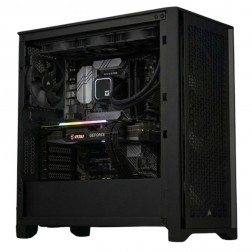
G6 Titanium — AI/ML and High VRAM Workstation
A high-VRAM professional workstation for PyTorch LoRA fine-tuning, large GPU rendering scenes, 8K video editing, and GPU-intensive development — powered by the Nvidia RTX 5080.
AMD Ryzen 9 9950X (16 Cores)
64GB DDR5 RAM
Nvidia RTX 5080 16GB VRAM
2TB NVMe + 2TB NVMe
Windows 11 Pro
3-Year Warranty£4,527.93
£4,249.99
G6 Titanium — AI/ML and High VRAM Workstation£4,527.93
£4,249.99
A high-VRAM professional workstation for PyTorch LoRA fine-tuning, large GPU rendering scenes, 8K video editing, and GPU-intensive development — powered by the Nvidia RTX 5080.
AMD Ryzen 9 9950X (16 Cores)
64GB DDR5 RAM
Nvidia RTX 5080 16GB VRAM
2TB NVMe + 2TB NVMe
Windows 11 Pro
3-Year Warranty
-

G6 Cobalt — RTX 5090 AI and Rendering Workstation
A flagship 32GB VRAM workstation for training 13B+ parameter AI models and production-scale GPU rendering — powered by the Nvidia RTX 5090.
AMD Ryzen 9 9950X (16 Cores)
64GB DDR5 RAM
Nvidia RTX 5090 32GB VRAM
2TB NVMe + 4TB NVMe
Windows 11 Pro
3-Year Warranty
G6 Cobalt — RTX 5090 AI and Rendering Workstation
A flagship 32GB VRAM workstation for training 13B+ parameter AI models and production-scale GPU rendering — powered by the Nvidia RTX 5090.
AMD Ryzen 9 9950X (16 Cores)
64GB DDR5 RAM
Nvidia RTX 5090 32GB VRAM
2TB NVMe + 4TB NVMe
Windows 11 Pro
3-Year Warranty
-
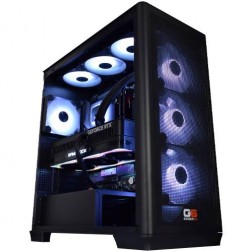
G6 Cobalt Max — RTX 5090 AI Workstation with CPU Offloading
A maximum-specification AI workstation with RTX 5090 32GB VRAM and 128GB system RAM for DeepSpeed ZeRO and PyTorch FSDP — training models beyond single-GPU VRAM capacity.
AMD Ryzen 9 9950X (16 Cores)
128GB DDR5 RAM
Nvidia RTX 5090 32GB VRAM
2TB NVMe + 4TB NVMe
Windows 11 Pro
3-Year Warranty
G6 Cobalt Max — RTX 5090 AI Workstation with CPU Offloading
A maximum-specification AI workstation with RTX 5090 32GB VRAM and 128GB system RAM for DeepSpeed ZeRO and PyTorch FSDP — training models beyond single-GPU VRAM capacity.
AMD Ryzen 9 9950X (16 Cores)
128GB DDR5 RAM
Nvidia RTX 5090 32GB VRAM
2TB NVMe + 4TB NVMe
Windows 11 Pro
3-Year Warranty
Grid List
4 Item(s)
What an AI and ML Workstation Actually Needs
GPU VRAM is the primary spec for AI and ML workloads. Every other component serves the GPU. Get the VRAM right first, then confirm system RAM, CPU, and storage around it.
How a Ginger6 AI Workstation Handles Your Pipeline
Performance descriptors reflect typical configurations for each workload type. Actual throughput depends on model architecture, batch size, and dataset characteristics.
Performance descriptors are indicative. Actual performance depends on model architecture, quantisation, batch size, and dataset characteristics.
VRAM Is the Constraint That Determines What You Can Train Locally
The decision to buy an AI workstation is usually a decision to stop paying cloud compute bills for workloads that could run locally, or to gain the iteration speed of local training without waiting for cloud job queues. Both are sound reasons, and both lead to the same question: how much VRAM do you actually need for your model sizes and framework?
GPU VRAM is the hard limit for AI training. When a model, its gradients, and its optimiser states exceed the available VRAM, training fails. System RAM, CPU speed, and NVMe storage are all important supporting components, but none of them substitute for VRAM headroom. A 7B parameter model in fp16 precision requires approximately 14GB for weights alone, before accounting for activations and the Adam optimiser state, which roughly doubles the requirement. QLoRA with 4-bit quantisation reduces this significantly and makes fine-tuning larger models feasible on 16GB VRAM, but the technique has constraints that affect the training quality for some use cases. Kevin works through the model size and technique with buyers before recommending a GPU tier, because the right answer depends on the specific workflow rather than a general rule.
The RTX 5090 with 32GB VRAM is the highest-specification consumer GPU available for local AI work in 2026. It covers fine-tuning models up to 13B parameters in fp16, running inference on larger models with quantisation, and GPU-accelerated data science with RAPIDS cuDF and cuML. For research teams running experiments that currently hit VRAM limits on cloud instances, a local RTX 5090 removes the constraint and adds the iteration speed of immediate local access. For teams also running 3D rendering pipelines, the VRAM overlap with the 3D rendering workstations tier is worth noting, since the same GPU covers both workloads efficiently.
System RAM matters more for AI workloads than it does for most other workstation types. PyTorch and TensorFlow data loading pipelines use multiple CPU workers to preprocess and batch data between GPU steps. Each worker consumes memory. Large datasets loaded into memory for fast access during training consume memory. The Python process itself, with its frameworks and dependencies loaded, consumes memory. 64GB is the practical starting point for AI workloads; 128GB benefits researchers working with very large datasets or using CPU offloading to train models larger than their VRAM alone can accommodate.
Every Ginger6 AI workstation is built with sustained GPU load in mind. Training runs that last hours or days run the GPU at high utilisation throughout. Thermal management, BIOS power delivery settings, and case airflow are configured for sustained GPU compute rather than peak burst output. The 24-hour stress test runs at the sustained GPU utilisation profile of a training run, confirming stable performance before dispatch. For data scientists whose work also spans Python data analysis and statistical modelling, the data science workstations page covers the CPU and RAM priorities for non-GPU workflows.
Kevin is available after delivery. If a framework update changes VRAM requirements, if a new model architecture needs a different configuration, or if the research direction shifts toward larger model sizes, he is the first call. The 3-year warranty covers parts and return postage. Lifetime technical support is included, and for researchers working on tight experiment timelines, a direct conversation with the person who built the machine is faster than any support ticket queue.
AI and ML workloads overlap with data science on CPU preprocessing and with 3D rendering on high-VRAM GPU requirements.
The right GPU tier depends on your model sizes, precision, and whether you use quantisation techniques. Kevin will work through the calculation before recommending a GPU.
01902 714533AI and ML Workstation Buyers at Ginger6
LoRA and QLoRA fine-tuning on 7B models fits within 16GB VRAM with appropriate quantisation. An RTX 5080 covers this tier comfortably. For full fp16 fine-tuning of larger models, or for researchers who want VRAM headroom for future model scale, the RTX 5090 with 32GB removes the constraint. Kevin will confirm which tier covers your specific model sizes and training approach.
Local LLM serving for development and testing eliminates cloud API latency and cost during the iteration phase. An RTX 5080 with 16GB VRAM handles quantised models up to around 13B parameters for local serving. The RTX 5090 with 32GB allows larger models to run without quantisation, which matters for applications where quantisation degrades output quality.
CNN training for image classification and object detection scales with CUDA core count and VRAM. Stable Diffusion XL and Flux model training and fine-tuning requires 12GB to 16GB VRAM depending on batch size and technique. An RTX 5080 with 16GB covers most computer vision training workloads without compromise on batch size.
If your current workflow uses scikit-learn and pandas and you want to add GPU-accelerated training in PyTorch or XGBoost GPU, the workstation spec shifts toward VRAM for the GPU component while maintaining the CPU and RAM that your existing Python pipelines need. Kevin can configure a build that covers both workloads without over-speccing either.
Building applications that call local models rather than cloud APIs requires a machine that runs those models reliably. An RTX 5080 with 16GB VRAM handles development and testing for most application-scale models. The local setup removes API costs during development and allows offline operation, which matters for privacy-sensitive applications.
No charge for the conversation. No pressure to buy.
- The software and frameworks you use
- Your typical model sizes and precision
- Whether you train, fine-tune, or run inference primarily
- Your approximate budget
What Buyers Say About Ginger6
93% of Ginger6 customers leave five-star reviews on Trustpilot, compared to 80% for PCSpecialist and 84% for Chillblast. The person who advises you on the spec is the same person who builds the workstation and supports it afterwards.
"Great service and prices. Just had 2 new desktops built for the office. Kevin and the team were great advising me on the spec I would need for our needs."
"Kevin listened to what I wanted and talked me through all of my best options. I've ended up with a fantastic system, very powerful, quiet and remarkably fast."
"I have used Ginger6 several times both for myself, on behalf of my friends and my wife's business. Their prices are extremely good and their service is likewise. It's a strong recommend from me!"
"Ginger 6 are always good! I have recommended them to various colleagues and friends over the years, they have always been happy with the products, service and pricing too."
Ginger6 has been building custom workstations from the same Wolverhampton workshop since 2001. Same phone number. Same approach. Same focus on getting the right spec into the right hands.
AI and ML Workstation Questions Answered
It depends on the model size and technique. QLoRA with 4-bit quantisation on a 7B parameter model fits within 8 to 10GB VRAM, making an RTX 5070 Ti viable. Full LoRA fine-tuning of a 7B model in fp16 needs around 16GB. Training a 13B model with LoRA in fp16 requires 24GB or more. The RTX 5090 with 32GB VRAM covers the widest range of fine-tuning scenarios without quantisation trade-offs. Kevin will work through the calculation for your specific model and approach.
For researchers and developers running experiments regularly over months, a local workstation typically becomes cost-effective compared to cloud GPU hours within a few months. The break-even depends on how much compute you use. A workstation also provides consistent availability, faster iteration without job queuing, and no data egress costs. For occasional large training runs, cloud compute remains the right choice. Kevin can help you work through whether local or cloud is the better fit for your usage pattern.
Multi-GPU training with PyTorch (using DistributedDataParallel or model parallelism) is possible on a consumer platform, but VRAM cannot be pooled between cards for a single model in the standard configuration. Each card is effectively an independent VRAM space unless you use specific parallelism strategies. Adding a second GPU increases throughput for data-parallel training but does not increase the maximum model size you can fit on a single GPU. Kevin will confirm whether the motherboard and PSU support a second GPU at the spec stage.
The RTX 5080 has 16GB VRAM; the RTX 5090 has 32GB VRAM. For most fine-tuning and inference tasks up to 7B to 13B parameter models with quantisation, the RTX 5080 is sufficient. The RTX 5090 matters when you need to run larger models without quantisation, when VRAM headroom is needed for large batch sizes, or when the researcher anticipates working with larger architectures over the life of the machine. The CUDA core count difference also gives the 5090 higher raw training throughput for the same model.
Builds are completed in 3 to 5 working days from order confirmation. The 24-hour stress test runs at sustained GPU load before dispatch. Delivery is free to UK mainland addresses.
Every Ginger6 workstation includes a 3-year warranty covering parts and return postage, plus lifetime technical support. Kevin is still the first call when a CUDA update or driver change affects training performance.
Ready to Train Models Locally Without VRAM Limits?
Whether you know exactly which GPU tier covers your model sizes or want help working through the VRAM calculation, Ginger6 is here to help. No sales pressure. No upselling. Honest advice from a team that has been building custom workstations in Wolverhampton since 2001.
Browse AI Workstations
Browse our ready-configured AI and ML workstations with RTX 5080 and RTX 5090 GPU options. Each one lists the full spec.
Browse the BuildsTalk to Kevin
Tell him your framework, your model sizes, and whether you train, fine-tune, or run inference. He will confirm the right VRAM tier and system configuration. No pressure to buy.
Call 01902 714533Email or Callback
Include your framework, model sizes, and budget. Kevin will come back with a GPU recommendation and a quote.
Email Kevin