




Custom Gaming PC Airflow Optimization: Best Setup Tips
Optimal airflow inside your Custom Gaming PC is fundamental to unlocking peak performance and longevity. Poor airflow can lead to overheating, reduced component lifespan, and missed gaming potential. Whether you’re planning your first build or fine-tuning an existing system, understanding how to direct cool, efficient airflow makes all the difference. Learn expert-backed techniques, configuration tips, and best practices honed from over 22 years of Ginger6 craftsmanship to ensure your high-end hardware always runs at its best, no matter how intense your gaming sessions become.
Understanding Airflow Principles in Custom Gaming PC Builds
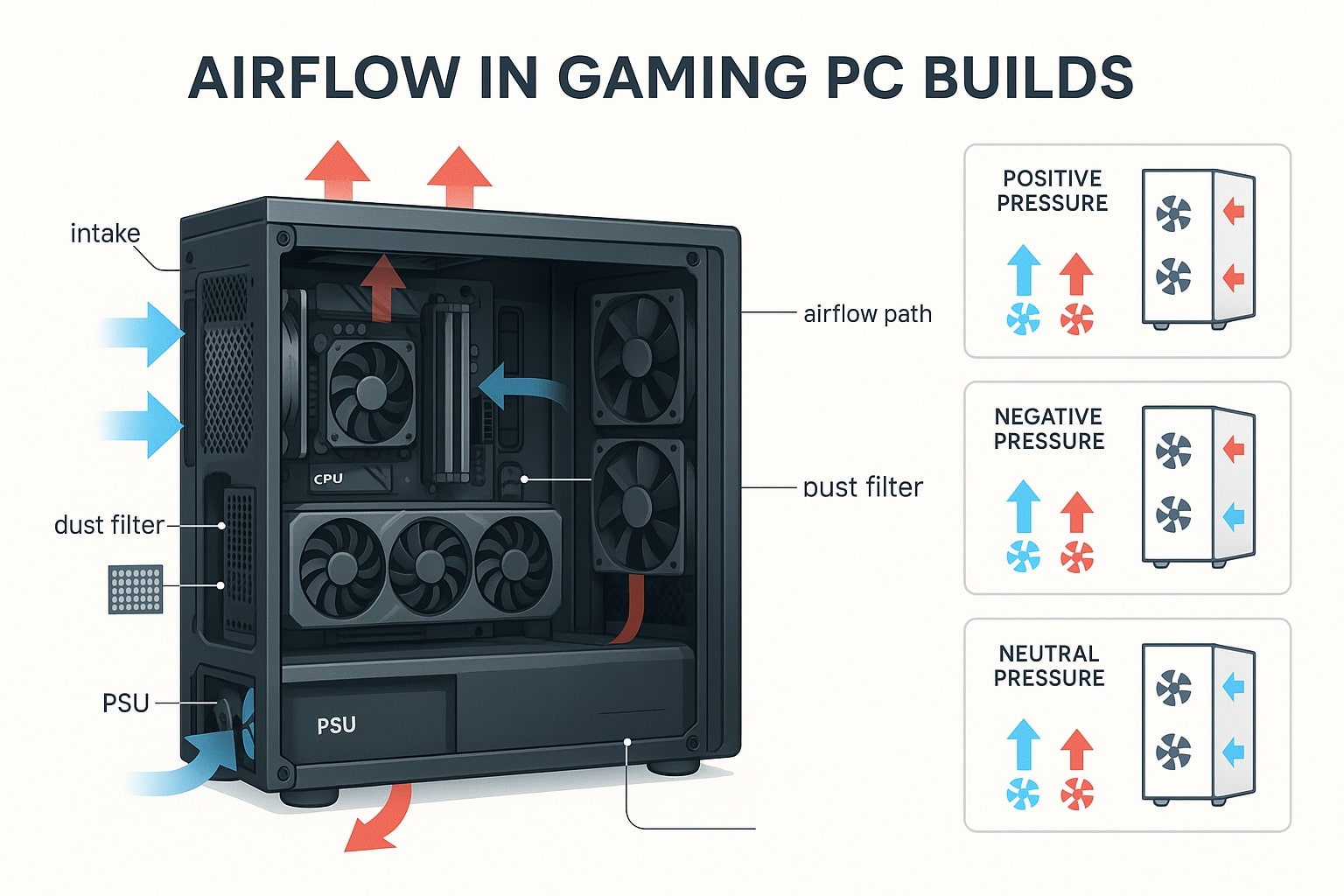
Getting airflow optimisation right in a custom gaming PC is the difference between a reliable, high-performing system and one that succumbs to overheating or noise issues. Any gaming enthusiast considering a custom build wants to ensure their system draws in cool air efficiently, expels hot air effectively, and lets each component perform at its very best. Proper airflow supports long-term cooling performance, saves you headaches during intense gaming sessions, and extends the lifespan of your custom gaming setup. Ginger6’s approach centres on the science of airflow, combining expert craftsmanship and high-quality hardware to provide seamless solutions for all your cooling challenges in the gaming world.
The Importance of High-Quality Components and Professional Assembly
When it comes to airflow optimisation in your custom gaming computer, the choice of components and the skill of the assembly team are both substantial factors that directly impact cooling performance and system lifespan. High-quality fans, heatsinks, and cases are foundational for optimal air movement. Fans with good static pressure and carefully engineered blade designs allow better air intake and exhaust, ensuring each part of your gaming PC receives adequate airflow. Similarly, ventilated case panels and well-placed dust filters keep air flowing smoothly without introducing unnecessary contaminants, maintaining cooling performance over time.
Expert assembly is equally important. Let’s consider Ginger6’s approach, a culmination of 22+ years of custom gaming experience. Building a custom gaming rig isn't just about slotting parts together; it’s about understanding how air moves across and around every component. Each Ginger6 system undergoes professional assembly and rigorous 24-hour stress testing. This process is crucial as it reveals even minute airflow bottlenecks or sources of turbulence inside the chassis. Our team routes cables meticulously to avoid obstructing fan paths and strategically positions components to maximise unimpeded air circulation. That means your system draws in cool air and effectively expels hot air, delivering the maximum benefit from all installed cooling hardware.
Airflow optimisation is, in the end, a matter of both the parts you select and how they're brought together. Whether you’re looking to maintain low temperatures under gaming loads or to future-proof your custom gaming PC for upcoming titles, trusting seasoned professionals with your build ensures consistently strong cooling performance. With Ginger6’s dedication to quality hardware and best-in-industry assembly, you’re not just getting a custom gaming machine, you’re getting peace of mind that every air channel and fan has been expertly considered for exceptional in-game performance and longevity.
Choosing the Optimal Case Fan Configuration for Maximum Cooling
The next step in perfecting the airflow of your custom gaming PC is finding the optimal configuration for your case fans. Fan setup significantly affects the balance of air within your system, promoting both better cooling and reduced noise. Selecting the right number, size, and positioning of case fans will ensure cool air is brought in precisely where it’s needed and hot air is expelled without delay. At Ginger6, our focus remains on creating a fine-tuned setup where both intake and exhaust complement each other to maintain an optimal cooling environment that meets the intense demands of gaming marathons.
Strategies for Selecting and Placing Case Fans in Your System
Designing the ideal case fan configuration for your custom gaming rig demands careful consideration of airflow paths, component heat output, and mechanical efficiency. Start by evaluating your case’s available mounting points, these dictate how many case fans you can slot in and the range of sizes (such as 120mm or 140mm) compatible with your chassis. Larger fans generally move air more quietly, making them a popular choice for noise-conscious gaming environments. At Ginger6, we recommend a balanced approach: configure more intake case fans towards the front and bottom of the case to draw in cool air, and slightly fewer exhaust case fans at the rear and top to expel warm air efficiently. This positive pressure setup helps prevent dust accumulation and primes your gaming components for optimal cooling across the system.
When deciding on placement, consider the typical heat sources inside a gaming PC: graphics cards, the CPU, and power supply are all hotspots that benefit from direct airflow. Strategically position intake fans to deliver a steady stream of fresh air over these high-priority areas. Coordinating exhaust fans to remove rising hot air is equally important, ensuring the interior doesn’t become stagnant. Try to keep cable routing clear of fan paths, supporting both air velocity and a neat build. Always use quality case fans, lower-grade fans may fail to move sufficient air or develop unwanted rattling, especially after extended use with demanding gaming loads.
Optimal cooling also means accounting for unique configurations, such as liquid cooling radiators or custom GPU placements. Radiators typically act as exhausts, but, in some high-end custom gaming PCs, these can be positioned for intake depending on the desired airflow path. With Ginger6’s expert assembly, you’ll benefit from a professional eye pairing component placement with the right case fans, guaranteeing your gaming PC receives the best possible airflow. Whether you’re a first-time builder or refining an enthusiast-level system, investing time in tailored fan selection and setup directly translates to stable temperatures and uninterrupted gaming enjoyment for years to come.
Controlling Fan Speed for Efficient and Quiet Operation
Achieving optimal airflow in your custom gaming PC isn’t just about the quantity and placement of fans; fan speed control is equally significant for maintaining both effective cooling and quiet operation. Getting this balance right means your hardware components remain cool during marathon gaming sessions without producing excessive noise that disrupts your immersion. At Ginger6, we employ proven techniques and quality hardware to ensure fan speed settings contribute to a refined, user-centred gaming experience.
Start by reviewing the fan speed profiles available through your motherboard’s BIOS or dedicated fan controllers. Most modern systems allow granular adjustment of individual fan curves, meaning you can set fans to ramp up gradually as system temperatures rise. This approach helps prevent unnecessary noisiness during light workloads, such as browsing or streaming, while still offering potent cooling when the action heats up. For critical airflow, ensure that both intake and exhaust fan speeds are balanced. If your exhaust fan is underperforming compared to the intakes, warm air may linger inside, reducing cooling efficiency. Conversely, setting your exhaust fan to run slightly faster than your intake can encourage more effective removal of hot air, a principle often favoured in Ginger6 builds after extensive stress testing.
Quiet operation also depends on the quality of your fans and their bearings. Premium fans are designed to move more air at lower speeds, minimising acoustic footprint. Carefully selecting PWM (pulse-width modulation) fans allows for dynamic speed adjustments, further reducing unnecessary noise. Tooling with fan speed curves, coordinated with fan placement, especially the exhaust fan, enables you to proactively manage airflow, ensuring your system remains both cool and whisper-quiet. Trust Ginger6’s years of expertise and rigorous testing phases to configure these parameters with precision, so your custom gaming PC never compromises on performance or peace of mind.
Ready to experience superior cooling and consistent performance from your custom gaming PC? At Ginger6, every custom gaming PC is built with proven airflow strategies and high-quality components, thorough testing, and years of expertise to deliver systems built for demanding gameplay. Read what our customers say in our Ginger6 reviews. Benefit from our dedicated support and expert knowledge as you configure your perfect build. Invest in a custom solution that keeps temperatures low and frame rates high, contact Ginger6 today for tailored advice, exclusive savings, or to start your stress-free buying journey. Take control of your gaming experience now and trust the specialists in custom-built gaming computers.