




Ryzen 9 vs Intel i9 for Gaming in 2026: Which Is Better?
The short answer: for pure gaming frame rates, an AMD Ryzen 9 with 3D V-Cache (the 9950X3D) is the faster chip: its stacked cache is exactly what games love. An Intel flagship (the i9 14900K, or its successor the Core Ultra 9 285K) is level for mixed work like editing and rendering, and slightly behind for gaming. At 1440p and 4K the two feel identical in most games, because the graphics card decides most of your frames. We build both, here in Wolverhampton, and recommend whichever genuinely fits how you play.
Kevin builds every PC himself in Wolverhampton and answers the phone himself too. Call 01902 714533 and he’ll tell you straight whether Ryzen 9 or Intel i9 is right for your games, monitor and budget.

What Is the Difference Between AMD Ryzen 9 and Intel i9?
Both are flagship processors and both are rapid. Four areas separate them, and only one matters most for gaming.
Architecture & 3D V-Cache
Ryzen 9 is built on AMD’s Zen architecture with a chiplet design. The gaming-focused X3D models add 3D V-Cache, extra cache stacked on the die that games access constantly, which is the single biggest reason AMD leads gaming right now. Intel uses a hybrid layout of performance and efficiency cores. For games specifically, the V-Cache advantage usually wins.
Cores & Threads
The top Ryzen 9 (9950X3D and 9950X) has 16 cores and 32 threads; the 9900X3D and 9900X have 12 cores and 24 threads. The Intel i9 14900K has 24 cores and 32 threads, while the newer Core Ultra 9 285K has 24 cores but drops hyper-threading to 24 threads. All of them have far more cores than gaming alone needs: the extra count pays off in editing, rendering and streaming.
Gaming vs Productivity
This is the honest split. For raw frame rates a Ryzen 9 X3D chip is generally the fastest gaming CPU you can buy in 2026. For heavy multi-threaded professional work (big renders, code compiles, batch exports), the 16-core parts on both sides trade blows, and Intel’s Core Ultra 9 285K is strong. Decide which of the two you do more of.
Platform & Socket
Ryzen 9 sits on AMD’s AM5 socket, which AMD has committed to supporting for years, good news for a future CPU upgrade on the same board. The Core Ultra 9 285K uses Intel’s current LGA1851 socket; the older i9 14900K uses LGA1700. Both families use DDR5 memory. Socket longevity is a genuine tick in AMD’s column.
Ryzen 9 vs Intel i9: The Quick Picture
Cores, clock speeds, gaming performance, power use and value, side by side.
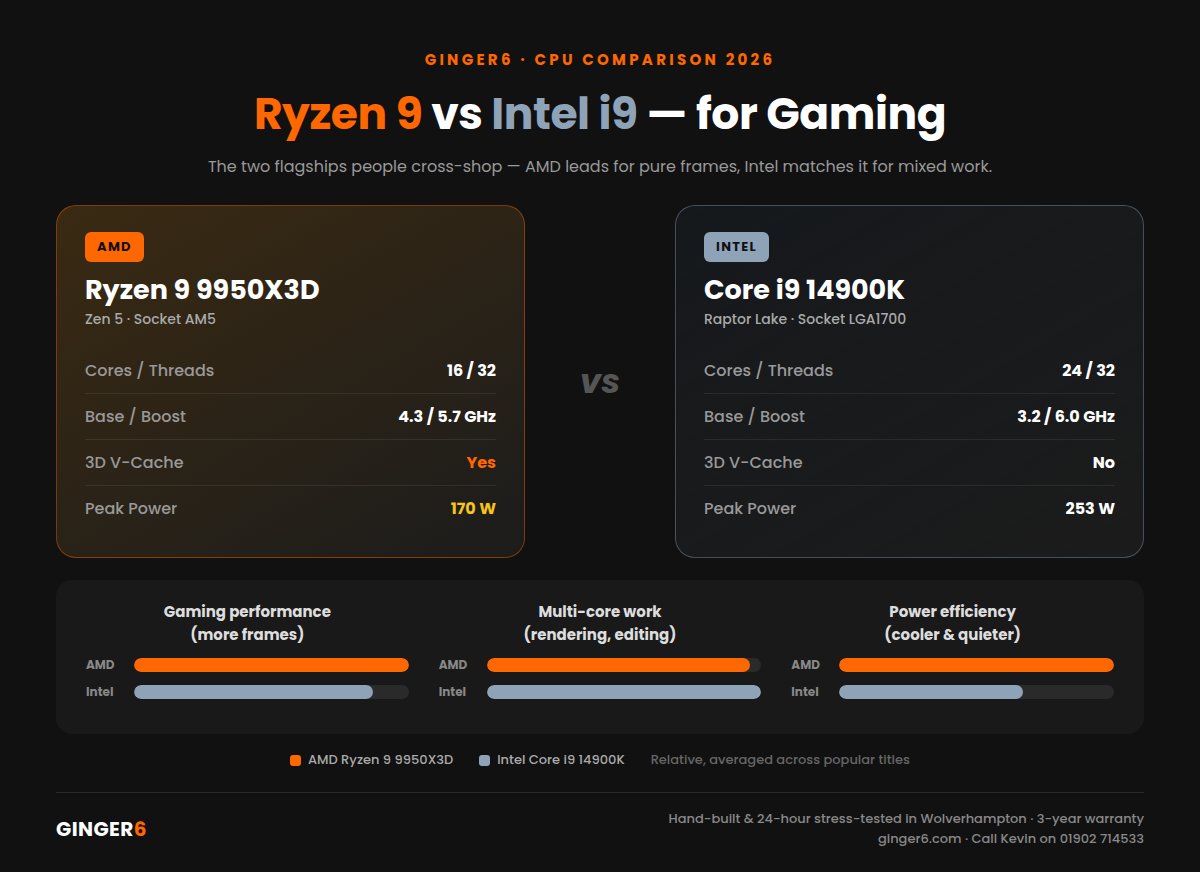
AMD Ryzen 9 vs Intel i9: Which Is Better?
The honest comparison across the parts most people are choosing between in 2026.
Every Ginger6 PC is hand-built and stress-tested for 24 hours in Wolverhampton. Call Kevin on 01902 714533 to talk through which chip fits your setup, or have a custom PC built your way on either platform.
The AMD Ryzen 9 Desktop Range: Specs at a Glance
AMD’s latest Ryzen 9 processors are the 9000 series (Zen 5). Here are the official specifications, and where the previous generation still fits.
The previous-generation Zen 4 Ryzen 9 chips, the 7950X3D, 7900X3D, 7950X, 7900X and 7900, are still capable, and although their release date is now a couple of years back you’ll still see them in reviews and at good prices; the 7900 (12 cores / 24 threads) in particular remains solid value. At CES 2026 AMD also announced the Ryzen 7 9850X3D, an 8-core gaming chip that edges past the 9800X3D. It’s a Ryzen 7, not a Ryzen 9, but worth knowing about if outright gaming value is your goal. If you want a hand with which Ryzen 9 (or Ryzen 7 X3D) makes sense for your build, that’s exactly the kind of question Kevin answers on the phone every day.
Intel i9 Today: From the 14900K to Core Ultra 9
One thing that trips people up: Intel has retired the “Core i9” name. The Core i9 14900K (24 cores, 32 threads, up to 6.0 GHz) was the last processor to carry it. Intel’s current flagship is the Core Ultra 9 285K, the Arrow Lake generation, which sits where the i9 used to.
The 285K keeps 24 cores but drops hyper-threading, so it runs 24 threads rather than 32. It’s more power-efficient than the 14900K and moves to the newer LGA1851 socket. In independent reviews it’s a strong productivity chip, but for gaming it’s marginally behind the older 14900K, and both trail a Ryzen 9 X3D in frame rates.
So when someone asks “core i9 vs ryzen 9” for gaming in 2026, the honest read is: Intel is excellent and rock-solid, AMD’s X3D is a step ahead for pure FPS. If you also do serious creative work, the gap closes and it becomes a genuine toss-up. We’ll tell you which way we’d lean for your exact use. No brand loyalty, no upsell.
Is Ryzen 9 Better Than i9 for Gaming?
Answer these three questions and the right choice between Ryzen 9 or Intel i9 becomes clear.
Mostly Gaming, or Gaming + Work?
Choose Ryzen 9 (X3D) if: gaming frame rates are your top priority. The 9950X3D’s 3D V-Cache makes it the fastest gaming CPU here, and a cheaper Ryzen 7 X3D often matches an i9 in games.
Either is great if: you also render, compile or export heavily: the 16-core Ryzen 9 9950X and Intel Core Ultra 9 285K are both superb at that.
What Resolution Do You Play At?
At 1080p: the CPU matters most and the Ryzen 9 X3D’s lead is at its biggest, worth chasing if you run a high-refresh 1080p monitor.
At 1440p or 4K: the graphics card decides the vast majority of your frames. Any of these chips will feel identical, so pick on price and the work you do alongside gaming.
Do You Want an Upgrade Path?
Choose Ryzen 9 if: you like the idea of dropping a future CPU into the same board. AMD’s AM5 socket has a long committed life.
Choose Intel if: you prefer the Core Ultra 9 285K’s efficiency and its current LGA1851 platform, or you’re matching an existing Intel setup.
Still weighing up Ryzen 9 or Intel i9? Call Kevin on 01902 714533. Tell him your three most-played games, your monitor, and your budget, and he’ll give you a straight answer with no sales pitch.
0% finance available via PayPal Pay in 3 on orders over £500. Free UK mainland delivery. Subject to status.
Ryzen 9 and Intel i9 Gaming PCs We Build
Two proven flagship routes, both hand-built and 24-hour stress-tested in Wolverhampton.
- Ryzen 9 9950X3D: 16 Cores / 32 Threads
- 3D V-Cache: class-leading gaming
- Paired with: RTX 5080
- AM5 platform: long upgrade life
- Core i9 14900K: 24 Cores / 32 Threads
- Quality cooling included as standard
- Paired with: RTX 5080
- Great for gaming + heavy multitasking
Common Questions About Ryzen 9 vs Intel i9
For pure gaming frame rates, yes. An AMD Ryzen 9 with 3D V-Cache (the 9950X3D) is generally the fastest option in 2026 because games make heavy use of its stacked cache. The Intel i9 14900K is close behind, and its successor the Core Ultra 9 285K is a touch further back for gaming but stronger in some productivity work. At 1440p and 4K the graphics card decides most of your frames, so all of them feel excellent with the right GPU. If you also do heavy editing or rendering, it becomes a genuine toss-up.
Ryzen 9 uses AMD’s Zen chiplet architecture on the AM5 socket, and its X3D models add 3D V-Cache that boosts gaming. Intel’s i9 uses a hybrid design of performance and efficiency cores. The top Ryzen 9 9950X3D and 9950X have 16 cores and 32 threads; the i9 14900K has 24 cores and 32 threads, while the newer Core Ultra 9 285K has 24 cores and 24 threads. In practice AMD leads for gaming, Intel is level for mixed creative work, and both are excellent all-round chips.
Choose a Ryzen 9 X3D if gaming frame rates are your priority, especially at 1080p or high-refresh play, the 9950X3D is the fastest gaming CPU here. Choose an Intel i9 (the 14900K or the Core Ultra 9 285K) if you want a proven all-rounder, prefer Intel’s platform, or do a lot of professional multi-threaded work alongside gaming. At 1440p and 4K either is superb, so decide on the work you do beside gaming and your budget. Call Kevin on 01902 714533 and he’ll match the right chip to your games and monitor.
The “Core i9” brand name has been retired. The Core i9 14900K was the last processor to carry it. Intel’s current flagship is the Core Ultra 9 285K from the Arrow Lake generation, which takes the place the i9 used to hold. The i9 14900K is still an excellent and widely available gaming chip, so it’s a perfectly sensible choice today. It simply sits on the older LGA1700 platform, while the Core Ultra 9 285K uses the newer LGA1851 socket and runs more efficiently.
It depends on the model. The current Ryzen 9 9950X3D and 9950X each have 16 cores and 32 threads, while the Ryzen 9 9900X3D and 9900X have 12 cores and 24 threads. These are the 9000 series (Zen 5) parts. The previous Zen 4 generation followed the same pattern: the 7950X3D and 7950X had 16 cores and 32 threads, and the 7900X, 7900X3D and 7900 had 12 cores and 24 threads. For gaming, all of them have more cores than you strictly need: the count matters most for editing, rendering and streaming.
The Ryzen 9 9950X3D is the best Ryzen 9 for gaming in 2026: its 3D V-Cache and 16 cores make it a class-leading gaming-and-creator chip. If you only game, you often don’t need a Ryzen 9 at all: a cheaper Ryzen 7 X3D such as the 9800X3D (or the newer 9850X3D announced for 2026) delivers almost the same gaming frames for less. For a deeper look, read our guide on which Ryzen 9 is best for gaming, or call Kevin on 01902 714533.
Yes. At 1440p and 4K the graphics card decides most of your frame rate, which is why a Ryzen 9 and an Intel i9 feel almost identical in most games at those resolutions. The CPU choice matters most at 1080p and on high-refresh monitors, where the Ryzen 9 X3D’s lead shows up. The practical takeaway: don’t overspend on the CPU at the expense of the GPU. Balance the two, and if you’re unsure, we’ll spec a build that puts the money where it earns the most frames.
Yes. Ginger6 builds custom gaming PCs around both AMD Ryzen 9 and Intel i9 and Core Ultra 9 processors, with no brand favouritism. Call Kevin on 01902 714533 and tell him your games, monitor resolution and budget, and he’ll recommend the right chip and match it to the right graphics card. Every build is assembled by hand in Wolverhampton, stress-tested for 24 hours, and backed by a 3-year warranty with free UK mainland delivery.
Still Deciding? More CPU Guides
Which Ryzen 9 Is Best for Gaming?
Narrowing it to AMD? We break down the Ryzen 9 range and when a Ryzen 7 X3D is the smarter buy.
Read the GuideIs an i5 Better Than an i9 for Gaming?
Before you pay for the flagship, see when a mid-range Intel chip is the sensible gaming choice.
Read the GuideAM5 vs AM4 for Gaming Desktops
Going AMD? Here’s why the AM5 platform your Ryzen 9 sits on matters for the years ahead.
Read the GuideMore CPU reading: should I buy an i5 or i7 · fixing a slow budget Ryzen 9 PC · build a custom AMD PC.
Ready to Choose Your Ryzen 9 or Intel i9 Gaming PC?
Whichever way you go, every Ginger6 build is hand-assembled in Wolverhampton, stress-tested for 24 hours, and backed by a 3-year warranty. The person who answers your call is the same person who builds your machine, building PCs since 2001.