




Gaming PCs Built for
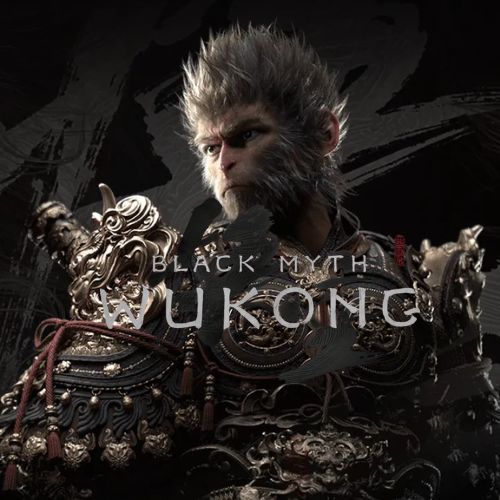
Black Myth: Wukong
Black Myth: Wukong is one of the most GPU-intensive titles ever released. Unreal Engine 5's Nanite geometry and Lumen global illumination push every hardware tier hard. DLSS or FSR is not optional above medium settings — it is what makes the game's visual ambitions accessible at mid-range and high-end hardware.
Browse the builds below or call Kevin on 01902 714533. Tell him your target resolution, whether ray tracing is a priority, and your budget — he will give you an honest assessment of what each tier delivers in this specific game.

Grid List
4 Item(s)
-
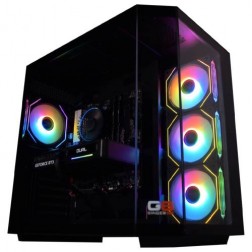 AMD Ryzen 7 8700f Nvidia RTX 5070 Gaming PC - G6 Fusion 800 X5
AMD Ryzen 7 8700f 8 core
A620M Motherboard
16GB+ DDR5 5200MHz
FAST 1TB M.2 NVMe SSD
12GB Nvidia RTX 5070 Graphics
300mbps Wifi
Windows 11 Home£1,579.99
£1,480.00
AMD Ryzen 7 8700f Nvidia RTX 5070 Gaming PC - G6 Fusion 800 X5£1,579.99
£1,480.00
AMD Ryzen 7 8700f 8 core
A620M Motherboard
16GB+ DDR5 5200MHz
FAST 1TB M.2 NVMe SSD
12GB Nvidia RTX 5070 Graphics
300mbps Wifi
Windows 11 Home
-
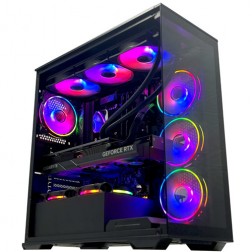 Intel Core i9 14900K Nvidia RTX 5080 Gaming PC - G6 Galactic U3
Intel Core i9 14900KF 24 core
Z790 Motherboard
32GB+ DDR5 5200MHz
FAST 1TB+ M.2 NVMe SSD
16GB Nvidia RTX 5080 Graphics
FAST Wifi & Bluetooth
Windows 11 Home£3,100.00
£2,909.99
Intel Core i9 14900K Nvidia RTX 5080 Gaming PC - G6 Galactic U3£3,100.00
£2,909.99
Intel Core i9 14900KF 24 core
Z790 Motherboard
32GB+ DDR5 5200MHz
FAST 1TB+ M.2 NVMe SSD
16GB Nvidia RTX 5080 Graphics
FAST Wifi & Bluetooth
Windows 11 Home
-
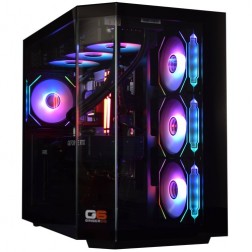 Intel Core Ultra 7 265K Nvidia RTX 5070 Ti Gaming PC - G6 Genesis U2
Intel Core Ultra 7 265Kf 20 core
B860 Motherboard
32GB+ DDR5 5200MHz Memory
FAST 1TB+ M.2 NVMe SSD
16GB Nvidia RTX 5070 Ti Graphics
FAST Wifi & Bluetooth
Windows 11 Home£2,509.99
£2,359.99
Intel Core Ultra 7 265K Nvidia RTX 5070 Ti Gaming PC - G6 Genesis U2£2,509.99
£2,359.99
Intel Core Ultra 7 265Kf 20 core
B860 Motherboard
32GB+ DDR5 5200MHz Memory
FAST 1TB+ M.2 NVMe SSD
16GB Nvidia RTX 5070 Ti Graphics
FAST Wifi & Bluetooth
Windows 11 Home
-
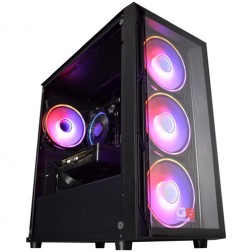 Intel Core i5 12400f RTX 5060 Pre Built Next Day Gaming PC - G6 ND 800
Intel Core i5 12400F 6 Core
H610 Motherboard
16GB DDR5 Memory
1TB M.2 NVMe SSD Drive
8GB Nvidia RTX 5060 Graphics
300MBPs Wifi
Windows 11 Home£1,121.95
£1,000.00
Intel Core i5 12400f RTX 5060 Pre Built Next Day Gaming PC - G6 ND 800£1,121.95
£1,000.00
Intel Core i5 12400F 6 Core
H610 Motherboard
16GB DDR5 Memory
1TB M.2 NVMe SSD Drive
8GB Nvidia RTX 5060 Graphics
300MBPs Wifi
Windows 11 Home
Grid List
4 Item(s)
What Does Black Myth: Wukong Actually Need?
These thresholds are honest, not aspirational. DLSS or FSR is assumed at every tier above entry. The game rewards higher hardware more visibly than almost any other title in this category.
Figures are estimates based on available benchmark data. Actual performance varies by CPU pairing, RAM speed, and system configuration. Kevin will confirm expected performance for your setup before you order.
What Each Budget Delivers in Black Myth: Wukong
Four honest assessments. This game rewards higher hardware more visibly than almost any other title. The descriptions below reflect what is actually achievable at each price point.

Around 60fps at 1080p medium with DLSS Performance enabled. The combat and the story are intact at this tier. What is not present is the full visual quality Black Myth: Wukong is designed to show — hair and cloth simulation, Nanite geometry at full resolution, and Lumen global illumination are all reduced at medium settings. The gap between medium and high in this game is visible at normal play distance. If your budget is fixed at this level, the game plays; it does not look like the trailers. If there is any flexibility, the step to mid-range produces a meaningful visual improvement specific to this game.

60 to 75fps at 1440p high with DLSS Balanced. High settings in Black Myth: Wukong are meaningfully better than medium — the Destined One's hair simulation, foliage density in forest environments, and the geometric detail on stone architecture are substantially improved. The RTX 5070's 12GB VRAM handles the 1440p high texture and geometry load without pressure. DLSS Balanced delivers solid image quality with the frame rate the game needs at this tier. A 1440p monitor is the right pairing. The step from budget to mid-range is the most impactful upgrade specific to this game.

1440p ultra with DLSS Quality at 60 to 80fps. This is the tier where Black Myth: Wukong looks as the developers intended it to look. Ultra settings enable full Nanite geometry detail, maximum Lumen quality, and high-fidelity hair and cloth simulation. The RTX 5070 Ti's 16GB VRAM handles the full asset pool without limitation. DLSS Quality at 1440p produces an image close to native resolution while maintaining the frame rate the game needs. For buyers who made their purchasing decision based on this game's visual ambition, this is the tier that justifies the investment.

4K ultra with hardware ray tracing and DLSS Quality. Even the RTX 5090 does not run Black Myth: Wukong at native 4K ultra with full ray tracing at consistently high frame rates — DLSS Quality at 4K is the realistic target. The visual outcome at 4K with ray tracing is extraordinary: the game's environments, the Destined One's armour and fur detail, and the particle effects in major boss encounters are among the most visually impressive moments in any current game. This tier is for buyers for whom Black Myth: Wukong's visual ambition was itself the reason for choosing a high-specification machine.
Why Black Myth: Wukong Is the Most Demanding Game in This Category
Black Myth: Wukong is the first major release to use Unreal Engine 5's full feature set simultaneously: Nanite virtual geometry, Lumen global illumination, and hardware ray tracing. Nanite changes the rendering pipeline fundamentally — rather than switching between pre-baked geometry levels of detail at distance, the engine streams and renders geometry at exactly the resolution the player can see it. No visible pop-in, but a substantially higher continuous GPU geometry workload than traditional rendering pipelines. Lumen replaces pre-baked lighting with fully dynamic global illumination, moving real-time lighting calculation from pre-processing to the GPU pipeline on every frame.
The hair and cloth simulation system is a separate real-time rendering workload. The Destined One's fur, the enemy creatures' layered surfaces, and the environmental cloth in monastery and village areas all run as independent physics-based simulations at high settings. In boss encounters where multiple simulated characters are present alongside complex Lumen lighting and detailed Nanite environments, the combined per-frame GPU workload exceeds what almost any other commercial game requires. This is not a sign of poor optimisation — it is the direct consequence of the visual targets the developers set out to achieve.
DLSS and FSR are what make the game's visual ambitions practical across mid-range and high-end hardware. At 1440p, DLSS Balanced or Quality mode provides the frame rate headroom the game needs while maintaining image quality that is close to native resolution. At 4K, DLSS Quality is the difference between playable and unplayable at ultra settings. Upscaling is not a compromise in Black Myth: Wukong — it is part of the intended performance strategy for the game.
Among all the open world and RPG titles on this site, Black Myth: Wukong is the one most likely to determine your GPU tier choice — not the other way around. If this game is a priority for your build, size the GPU for it first and the rest of your library will be covered.
Medium vs Ultra: The Visual Gap
Drag the slider to compare medium settings with DLSS Performance against ultra settings with DLSS Quality. Geometry detail, foliage density, and hair simulation quality show the widest visual gap of any game in this category.


Three Types of Black Myth Player

Black Myth: Wukong is the reason for the upgrade. The high-end build — RTX 5070 Ti, 16GB VRAM, Core i7 — is the minimum tier where the game runs at its intended visual quality at 1440p ultra with DLSS Quality. Kevin can confirm whether the RTX 5080 is worth the additional spend for your resolution target before you order. The 3-year warranty protects the investment through the game's ongoing content updates.

Wants to play Black Myth: Wukong without major visual compromises but is not spending enthusiast money. The mid-range build — RTX 5070, Core i7, 1440p — with DLSS Balanced at high settings is a genuinely good experience. Hair simulation, foliage, and architecture are all noticeably better than medium. The game's world is impressive at this tier. The step to high-end is meaningful for this specific game, but not essential for most players' enjoyment of it.

A budget build plays Black Myth: Wukong. Combat, story, and boss encounters are all accessible at 1080p medium. The visual fidelity is not what the game is designed to show, and that is worth knowing before you commit. If the game is the main reason for building a PC, stretching to mid-range is worth the effort. If the budget is genuinely fixed, the budget build plays it — with expectations set correctly from the start.
Call Kevin on 01902 714533 or email [email protected]. Tell him:
1. The games you play most often
2. Your monitor resolution and refresh rate
3. Whether you stream, record, or edit alongside gaming
4. Your approximate budget
No charge for the conversation. No pressure to buy.
Will This Build Cover Your Other Games?
Recommended Ginger6 Builds for Black Myth: Wukong
Three builds. Honest descriptions of what each one delivers in this specific game. Black Myth rewards moving up a tier more than almost any other title.
RTX 5060 with Core i5. Playable at 1080p medium with DLSS Performance at around 60fps. The game runs; the visual quality is below what Black Myth is designed to deliver. Honest starting point for a fixed budget. Combat and story fully intact.
RTX 5070 with Core i7. 1440p high settings with DLSS Balanced at 60 to 75fps. Genuinely good visual quality — hair simulation, foliage, and geometry detail all substantially better than medium. 12GB VRAM handles the 1440p high asset load. The most impactful tier upgrade specific to this game.
RTX 5070 Ti with Core i7 and 16GB VRAM. 1440p ultra with DLSS Quality at 60 to 80fps. Full Nanite geometry, maximum Lumen quality, high-fidelity hair and cloth simulation. The tier where the game looks as designed. The right build for buyers who specifically chose a PC for Black Myth: Wukong.
.jpg)
Thermal Management for the Sustained UE5 GPU Workload
Black Myth: Wukong's Nanite and Lumen systems run continuously, not just during combat. Unlike rasterised games where the GPU workload varies by scene complexity, UE5's dynamic geometry and lighting pipelines maintain sustained high GPU utilisation throughout exploration, cutscenes, and combat alike. A GPU receiving restricted airflow in this workload runs hotter across the full session, reducing sustained boost clocks and producing lower real-world frame rates than the card's specification implies. Airflow is not incidental to a Black Myth: Wukong build — it is part of delivering the performance the hardware is rated to provide.
Every Ginger6 build for Black Myth: Wukong is assembled with cable management handled specifically to maintain the airflow path to the GPU. Clearance between the GPU fans and adjacent cables, routing that avoids blocking the front intake path, and thermal confirmation during testing all address the sustained load this game places on the system. The 24-hour stress test confirms GPU thermal behaviour under extended load before dispatch — not just peak temperature at initial run-up, but sustained temperature and clock speeds over hours of continuous operation.
BIOS settings and memory profiles are configured before dispatch. XMP or EXPO profiles are enabled and verified for stability. For an RTX 5070 Ti or RTX 5080 build, the 24-hour stress test specifically confirms the GPU is sustaining its rated boost clock under the extended Unreal Engine 5 workload that Black Myth: Wukong represents. Every build is confirmed: thermal behaviour, processor and graphics stability, memory responsiveness, storage performance, and BIOS firmware stability.
Kevin's 3-year warranty protects a meaningful investment at the high-end and enthusiast tiers. For buyers spending £2000 or more on a build sized for this specific game, the warranty covers the machine through multiple game releases. Kevin is reachable on 01902 714533 if you need to decide between the RTX 5070 Ti and RTX 5080 for your target resolution and settings before you commit — the frame rate difference at your specific setup is worth confirming before purchase.
What Do Ginger6 Customers Say?
Over 1,100 verified reviews with a 93% five-star rating.
High-end buyers consistently highlight the same things: a build that performs exactly as specified, honest pre-sale advice, and support that continues well after delivery.
Read All Trustpilot ReviewsVery good after sales communication, excellent product, love my i9. Would highly recommend.
Wow, what a PC. This Ryzen 7 1800x/Strix GTX 1060 6Gb is a beast.
Great Service from the team at Ginger6. The custom built PC turned out even better than expected and my son is over the moon. Will definitely use these guys again!
Common Questions About Black Myth Builds
At 1080p medium with DLSS Performance, an RTX 5060 is the practical minimum for consistent 60fps. At 1440p high with DLSS Balanced, an RTX 5070 is required. At 1440p ultra with DLSS Quality, an RTX 5070 Ti. At 4K ultra with ray tracing, an RTX 5080 or RTX 5090. The game makes no concessions to lower-end hardware.
DLSS is essential above medium settings at 1440p and above. The game's Unreal Engine 5 Nanite and Lumen implementation is among the most GPU-intensive in any game released. Without DLSS, native 4K ultra is not practical on any current GPU. DLSS Balanced or Quality at 1440p is the recommended approach for mid-range Nvidia builds. FSR is available for AMD GPU users.
Yes, with significant compromises. A budget build with an RTX 5060 runs the game at 1080p medium settings with DLSS Performance at around 60fps. Ultra settings at 1080p are not achievable at consistent frame rates on a budget build. The gap between medium and high settings is visible at normal play distance in this game — more so than in most other open world titles.
8GB VRAM is the functional minimum at 1080p medium. 12GB is recommended for 1440p high settings. At 1440p ultra or 4K, 16GB VRAM is the practical minimum for the full texture and geometry load. The Nanite virtual geometry system streams a very large asset pool, pushing VRAM usage higher than most games at equivalent settings.
At 1080p on a budget build: medium settings with DLSS Performance. At 1440p on a mid-range build: high settings with DLSS Balanced. At 1440p on a high-end build: ultra settings with DLSS Quality. At 4K on an enthusiast build: ultra with ray tracing and DLSS Quality. Ray tracing adds significant load — enable it only if your GPU tier supports it with DLSS running.
The game uses Unreal Engine 5's most demanding features simultaneously — Nanite virtual geometry, Lumen global illumination, and hardware ray tracing. It is technically sophisticated rather than poorly optimised. Its demands are a product of the visual targets the developers chose. Patches have improved performance since launch, but it remains one of the most GPU-intensive titles available.
Both games are GPU and VRAM intensive with upscaling as a requirement. An RTX 5070 Ti with 16GB VRAM covers both at 1440p ultra with DLSS without separate compromises for each title. For 4K ultra across both, the RTX 5080 is the practical choice. Both games share the same high-VRAM, GPU-primary profile.
Nanite virtual geometry renders geometry at exactly the resolution the player can see without pre-baked level-of-detail switching — a higher continuous GPU workload than traditional pipelines. Lumen global illumination calculates real-time lighting on every frame rather than using pre-baked lighting data. Hair and cloth simulation runs as a separate real-time physics system. Together, these represent the most demanding visual feature combination in any current consumer game.
Find the Right Build for Black Myth: Wukong
Browse the gaming PC range or call Kevin directly. Tell him your target resolution, whether ray tracing is a priority, and your budget — he will confirm which GPU tier and VRAM specification is right for your setup.