





Gaming PCs Built for Minecraft
Vanilla Minecraft is a CPU and RAM game. Minecraft with shaders is a GPU and VRAM game. The build that runs one well does not automatically run the other well. Find the right spec for how you actually play.
Browse the builds below or call Kevin on 01902 714533. Tell him whether you run shaders or mods, your monitor resolution, and your budget — he will confirm the right build for your setup.

Grid List
7 Item(s)
-
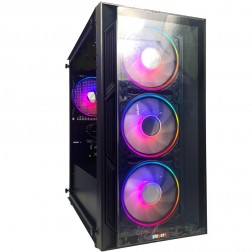 Intel Core i3 12100F RTX 3050 Gaming PC - G6 Vortex X1
Intel Core i3 12100F Quad core
H610M Motherboard
16GB+ DDR5 5200MHz Memory
1TB+ M.2 NVMe SSD
6GB Nvidia RTX 3050 Graphics
300mbps Wifi
Windows 11 Home£1,062.98
£999.99
Intel Core i3 12100F RTX 3050 Gaming PC - G6 Vortex X1£1,062.98
£999.99
Intel Core i3 12100F Quad core
H610M Motherboard
16GB+ DDR5 5200MHz Memory
1TB+ M.2 NVMe SSD
6GB Nvidia RTX 3050 Graphics
300mbps Wifi
Windows 11 Home
-
 AMD Ryzen 5 8400f RTX 3050 Gaming PC - G6 Fusion 600 X1
AMD Ryzen 5 8400f 6 core
a620M Motherboard
16GB+ DDR5 5200MHz
FAST 1TB M.2 NVMe SSD
6GB Nvidia RTX 3050 Graphics
300mbps Wifi
Windows 11 Home£1,138.71
£1,069.99
AMD Ryzen 5 8400f RTX 3050 Gaming PC - G6 Fusion 600 X1£1,138.71
£1,069.99
AMD Ryzen 5 8400f 6 core
a620M Motherboard
16GB+ DDR5 5200MHz
FAST 1TB M.2 NVMe SSD
6GB Nvidia RTX 3050 Graphics
300mbps Wifi
Windows 11 Home
-
 AMD Ryzen 5 8400f RTX 5050 Gaming PC - G6 Fusion 600 X2
AMD Ryzen 5 8400f 6 core
a620M Motherboard
16GB+ DDR5 5200MHz
FAST 1TB M.2 NVMe SSD
8GB Nvidia RTX 5050 Graphics
300mbps Wifi
Windows 11 Home£1,225.91
£1,154.99
AMD Ryzen 5 8400f RTX 5050 Gaming PC - G6 Fusion 600 X2£1,225.91
£1,154.99
AMD Ryzen 5 8400f 6 core
a620M Motherboard
16GB+ DDR5 5200MHz
FAST 1TB M.2 NVMe SSD
8GB Nvidia RTX 5050 Graphics
300mbps Wifi
Windows 11 Home
-
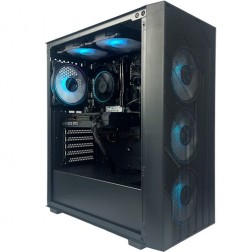 Intel Core i5 12400F Nvidia 8GB RTX 5050 Gaming PC - G6 Infinity X2
Intel Core i5 12400F 6 core
H610M Motherboard
16GB+ DDR5 5200MHz
1TB+ M.2 NVMe SSD
8GB Nvidia RTX 5050 Graphics
300mbps Wifi
Windows 11 Home£1,165.79
£1,094.99
Intel Core i5 12400F Nvidia 8GB RTX 5050 Gaming PC - G6 Infinity X2£1,165.79
£1,094.99
Intel Core i5 12400F 6 core
H610M Motherboard
16GB+ DDR5 5200MHz
1TB+ M.2 NVMe SSD
8GB Nvidia RTX 5050 Graphics
300mbps Wifi
Windows 11 Home
-
 AMD Ryzen 7 8700f RTX 5060 Ti Gaming PC - G6 Fusion 800 X3
AMD Ryzen 7 8700f 8 core
A620M Motherboard
16GB+ DDR5 5200MHz
FAST 1TB M.2 NVMe SSD
8GB Nvidia RTX 5060 Ti Graphics
300mbps Wifi
Windows 11 Home£1,476.71
£1,389.99
AMD Ryzen 7 8700f RTX 5060 Ti Gaming PC - G6 Fusion 800 X3£1,476.71
£1,389.99
AMD Ryzen 7 8700f 8 core
A620M Motherboard
16GB+ DDR5 5200MHz
FAST 1TB M.2 NVMe SSD
8GB Nvidia RTX 5060 Ti Graphics
300mbps Wifi
Windows 11 Home
-
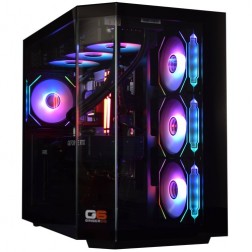 Intel Core Ultra 7 265K Nvidia RTX 5070 Ti Gaming PC - G6 Genesis U2
Intel Core Ultra 7 265Kf 20 core
B860 Motherboard
32GB+ DDR5 5200MHz Memory
FAST 1TB+ M.2 NVMe SSD
16GB Nvidia RTX 5070 Ti Graphics
FAST Wifi & Bluetooth
Windows 11 Home£2,573.49
£2,419.99
Intel Core Ultra 7 265K Nvidia RTX 5070 Ti Gaming PC - G6 Genesis U2£2,573.49
£2,419.99
Intel Core Ultra 7 265Kf 20 core
B860 Motherboard
32GB+ DDR5 5200MHz Memory
FAST 1TB+ M.2 NVMe SSD
16GB Nvidia RTX 5070 Ti Graphics
FAST Wifi & Bluetooth
Windows 11 Home
-
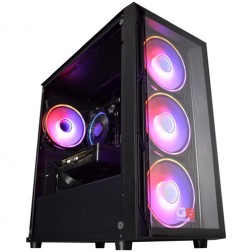 Intel Core i5 12400f RTX 5060 Pre Built Next Day Gaming PC - G6 ND 800
Intel Core i5 12400F 6 Core
H610 Motherboard
16GB DDR5 Memory
1TB M.2 NVMe SSD Drive
8GB Nvidia RTX 5060 Graphics
300MBPs Wifi
Windows 11 Home£1,191.53
£999.99
Intel Core i5 12400f RTX 5060 Pre Built Next Day Gaming PC - G6 ND 800£1,191.53
£999.99
Intel Core i5 12400F 6 Core
H610 Motherboard
16GB DDR5 Memory
1TB M.2 NVMe SSD Drive
8GB Nvidia RTX 5060 Graphics
300MBPs Wifi
Windows 11 Home
Grid List
7 Item(s)
What Does Minecraft Actually Need?
The answer changes entirely depending on whether you use shaders. Vanilla Minecraft asks almost nothing of your GPU. BSL or Complementary shaders at 4K ask as much as Cyberpunk 2077 at medium settings.
Figures are estimates based on available benchmark data as at . Actual performance varies by shader pack, Java version, render distance, and system configuration. Kevin will confirm expected performance for your setup before you order.
What Each Budget Delivers in Minecraft
Four honest assessments. What each tier achieves in vanilla and with shaders, where the limits are, and whether the next tier up is worth it for how you play.

Vanilla Minecraft runs beautifully at this tier — 200fps+ at 1080p with a large render distance, chunk loading that feels instant, and no performance issues during multiplayer. Light resource packs and smaller mod collections are fine. With basic shader packs like Sildur's Vibrant Lite, frame rates stay playable at 1080p. Full BSL or Complementary shaders strain this GPU at anything above 1080p low settings. If shaders are important to you, the mid-range tier is the practical starting point.

The build most Minecraft shader players land at. BSL or Complementary shaders run smoothly at 1080p and with DLSS or FSR enabled, 1440p becomes comfortable with some shader packs. Large modpacks including Fabric or Forge collections with 100 or more mods run without the heap allocation issues that affect lower-RAM configurations. This is also the build for players with sizeable mod servers who need consistent performance across long sessions rather than peak frame rates.

Full BSL or Complementary shaders at 1440p without DLSS enabled — consistent 60fps+ with headroom. With DLSS or FSR Quality mode active, frame rates climb above 100fps at 1440p on demanding shader packs. The step up from mid-range is justified if you target 4K with shaders or play other GPU-heavy titles alongside Minecraft. For pure Minecraft shader use at 1440p, the mid-range tier is already strong — this tier adds comfort and future-proofing.

Shaders at 4K with native rendering — no upscaling required for smooth performance on the most demanding packs. This tier is difficult to justify for Minecraft alone. The RTX 5080 is overspecified for even the heaviest shader configurations at 1440p. It makes sense if Minecraft is one of many titles played on the same machine, including 4K titles like Cyberpunk 2077 or Black Myth: Wukong, where the GPU earns its cost on every other game in the library.
Why Minecraft Is Two Different Games
Minecraft's Java Edition runs on a single thread for its primary simulation loop. That means the processor handling chunk generation, entity calculations, and world updates is doing so on one core at a time. The speed of that one core — not the total number of cores — is what determines how quickly the world loads around you during exploration and how smoothly the game runs when many entities are active. A modern mid-range CPU handles this without difficulty. An older processor with a slow single-core clock speed produces stuttering that more RAM or a better GPU cannot fix.
Java heap allocation is a separate constraint. Minecraft's launcher allows you to set how much system RAM the Java process uses. The default is often insufficient for large modpacks. With 16GB system RAM, the available headroom for a generous Java allocation is limited. With 32GB, you can allocate 8GB or more to the Java process without competing with the operating system and background applications. This is why 32GB RAM makes a tangible difference in large modpack environments where 16GB causes stutter and crash-to-desktop errors.
Shaders change everything. BSL Shaders, Complementary, and Iris shader packs replace Minecraft's standard renderer with a path-traced or ray-marched alternative. The GPU renders volumetric lighting, reflections, ambient occlusion, and shadow maps in real time. This is a GPU and VRAM workload that has no relationship to the CPU-bound nature of vanilla Minecraft. A budget GPU runs vanilla Minecraft at 300fps and BSL shaders at 15fps on the same system. The components that matter are reversed entirely depending on which version of the game you are running.
Both DLSS and FSR work with Minecraft shader mods via the Iris mod's built-in upscaling support. Enabling DLSS Quality or FSR Quality mode on a mid-range or high-end build recovers 30 to 60 percent of native frame rate with minimal visual difference at 1440p. If shader performance at higher resolutions matters, upscaling is worth enabling regardless of GPU tier.
Vanilla vs BSL Shaders — The Visual Difference
The same game. The same scene. Completely different hardware requirements. Drag to compare vanilla rendering at 1080p against BSL shaders at 4K.


Three Types of Minecraft Player

Plays survival or adventure mode, occasionally tries mods but keeps the install clean. Has no interest in shaders. The budget build with a fast Core i5 or Ryzen 5 and 16GB DDR5 covers everything this player needs without overspending on GPU power that the game will not use.

Plays primarily for the aesthetic. Spends time building and photographing scenes with dramatic lighting. Shader performance at 1440p is the benchmark. The mid-range build with an RTX 5060 Ti and Core i7 delivers smooth shader play at 1440p with DLSS enabled, and handles the wider game library alongside Minecraft.

Runs Vault Hunters, All the Mods, or similar large Forge and Fabric collections. The bottleneck is CPU single-core speed and Java heap allocation — the GPU is secondary. 32GB RAM is the essential spec here. The mid-range build with a Core i7 or Ryzen 7 handles the simulation overhead of large modpacks without the crashes that affect 16GB systems during peak activity.
Call Kevin on 01902 714533 or email [email protected]. Tell him:
1. The games you play most often
2. Your monitor resolution and refresh rate
3. Whether you stream, record, or edit alongside gaming
4. Your approximate budget
No charge for the conversation. No pressure to buy.
Will This Build Cover Your Other Games?
Recommended Ginger6 Builds for Minecraft
Three builds chosen for Minecraft buyers. Each is matched to a specific play style — vanilla, shader 1440p, or shader 4K.
Core i5 or Ryzen 5 with 16GB DDR5 and an RTX 5060. Fast single-core CPU keeps chunk loading smooth during exploration. GPU handles vanilla Minecraft well above 200fps at 1080p. Light shader packs work at 1080p low to medium settings.
Core i7 or Ryzen 7 with 32GB DDR5 and an RTX 5060 Ti. BSL or Complementary shaders at 1080p to 1440p with DLSS enabled. Enough RAM for large Forge and Fabric modpacks. The build that covers both shader play and heavy modpacks on the same machine.
Fast Core i7 or Ryzen 7 X3D with 32GB DDR5 and an RTX 5070 Ti. Full BSL shaders at 4K with DLSS Quality enabled runs smoothly. For players who build and photograph Minecraft scenes at the highest visual quality, and who want headroom for future shader releases.

Built for Long Sessions, Not Just Benchmarks
Minecraft players tend to spend longer uninterrupted sessions in front of their machines than most gaming genres. A creative project or a large modpack server can run for four or five hours without a break. The build needs to sustain comfortable operating temperatures across that whole period, not just during a 30-minute benchmark window.
Cable management inside a Minecraft build matters for the same reason it matters in any long-session game: airflow. Clean routing removes the restriction on air moving across the CPU cooler and through the case. Over a five-hour creative session, the difference between a well-routed and poorly-routed build is measurable in CPU temperatures, which in turn determines whether the processor holds its boost clock consistently or throttles back during intensive chunk generation.
Before dispatch, BIOS settings, XMP memory profiles, and firmware stability are confirmed. Java Edition benefits from DDR5 memory running at its rated speed — the XMP profile must be manually enabled in BIOS, and Ginger6 verifies it is active and stable before the machine ships. The 24-hour stress test covers thermal behaviour under load, processor and graphics stability during extended use, memory responsiveness and system stability, storage performance and consistency, and BIOS firmware stability.
Minecraft modpack players sometimes encounter launch issues weeks or months into a new modpack installation — Java version conflicts, heap allocation errors, or mod incompatibilities that produce confusing error messages. Kevin is reachable on 01902 714533 for exactly this kind of problem. The 3-year warranty covers the hardware, but Kevin's support extends to the software setup that makes your specific game configuration work. That conversation costs nothing.
What Do Ginger6 Customers Say?
Over 1,100 verified reviews with a 93% five-star rating.
Gaming buyers consistently highlight builds that perform exactly as specified, and support that is available after the machine arrives — not just at the point of sale.
Read All Trustpilot ReviewsBought computers from here for a while and custom PCs always come highest quality. Gaming PC I bought from them 6 years ago was still going strong with one or two part replacements at the 5 year point until I got a newer one. Great choice and customer service.
Fantastic service, easy website to use. Had a gaming machine built to my own spec. Build looked fantastic, really neat and tidy. One internal component needed sorting and the issue was fixed the same evening. After sale service was great and that is a key thing with a new build. The phone was answered on second or third ring when I called.
I recently had a custom gaming PC built and delivered by Ginger6, and I couldn't be more impressed. They took the time to understand my specifications and even made some great recommendations that really enhanced the final build. The cable management is immaculate, and they were so meticulous that even the screw heads were kept in perfect condition.
Common Questions About Minecraft Gaming PCs
A mid-range build with an RTX 5060 Ti or RX 9070, a Core i7 or Ryzen 7, and 16GB DDR5 is the practical starting point for BSL or Complementary shaders at 1080p to 1440p. With DLSS or FSR enabled via the Iris mod, frame rates are comfortable at 1440p on most shader packs. For shaders at 4K without upscaling, an RTX 5070 Ti is the recommended minimum. The GPU tier matters far more for shader performance than the CPU tier.
In vanilla mode, no. The GPU is almost idle in vanilla Minecraft at most settings — the CPU single-core speed and available RAM are the performance-determining components. A budget GPU delivers 200fps+ at 1080p vanilla without any GPU limitation. With shaders loaded, the answer reverses: the GPU and VRAM become the bottleneck and the CPU becomes secondary. The hardware needs depend entirely on whether you use shaders.
For large Forge or Fabric modpacks with 100 or more mods, 32GB system RAM is the recommended spec. This provides enough headroom to allocate 8GB or more to the Java process without the operating system competing for memory. With 16GB, larger modpacks cause heap allocation errors and crash-to-desktop behaviour during peak activity. Vanilla Minecraft and small mod collections run fine on 16GB.
Minecraft Java Edition's primary simulation loop runs on a single CPU thread. When the CPU cannot generate and load chunks quickly enough during exploration, the game stutters — regardless of GPU speed. This is especially noticeable with high render distances or during fast travel across unexplored terrain. A fast single-core processor resolves this. Insufficient Java heap allocation also causes stutter — allocating too little RAM to the Java process produces memory pressure that manifests as pauses during gameplay.
Yes, via the Iris Shaders mod which includes built-in support for both DLSS and FSR. Enabling DLSS Quality mode on an NVIDIA GPU, or FSR Quality mode on an AMD GPU, recovers significant frame rate with minimal visible quality reduction at 1440p and above. If you run shaders on a mid-range build and find performance marginal at your target resolution, enabling upscaling through Iris is the most effective improvement available without a hardware upgrade.
A fast Core i5 or Ryzen 5 covers vanilla Minecraft and light mods fully. For large modpacks, a Core i7 or Ryzen 7 with high single-core clock speed is the better choice — the extra performance headroom reduces stutter during mod initialisation and peak entity loads. Ryzen X3D processors offer marginally better performance for Minecraft at high render distances due to their cache advantages in single-threaded workloads, but the difference is not significant enough to justify the price premium for Minecraft alone.
A mid-range Minecraft shader build — RTX 5060 Ti, Core i7, 32GB DDR5 — handles most games at 1440p high settings comfortably. It also covers Valheim and Palworld well. For GPU-heavy titles like Cyberpunk 2077 at 4K ultra or Black Myth: Wukong at maximum settings, a higher-end GPU is needed. Call Kevin if you have a specific game list — he will confirm whether one build covers everything you play.
Basic shader packs such as Sildur's Vibrant Lite run on a budget build at 1080p low settings with playable frame rates. Full BSL or Complementary shaders at 1080p medium or above strain a budget GPU significantly — frame rates drop to levels that make the experience uncomfortable for extended play. For shader play at 1080p high settings or above, a mid-range build is the practical minimum. A budget build is the right choice if you play vanilla Minecraft or use lightweight resource packs only.
Find the Right Build for Minecraft
Browse the gaming PC range or call Kevin directly. Tell him whether you run shaders, your monitor resolution, and your budget. He will confirm the right build for your setup.