




4K Gaming PCs No Compromise
4K is where image quality becomes the priority. An RTX 5070 Ti or RTX 5080 paired with a Ryzen 9 or Core i9 delivers native 4K in flight simulation, AAA titles, and VR without the frame rate ceiling of a mid-tier GPU. Hand-built in Wolverhampton, stress-tested for 24 hours, and backed by a 3-year warranty. Builds from £2109.99.
Browse the builds below or call Kevin on 01902 714533. Tell him your games, monitor, and use case and he will confirm whether 4K is the right resolution for your setup.

Grid List
6 Item(s)
-
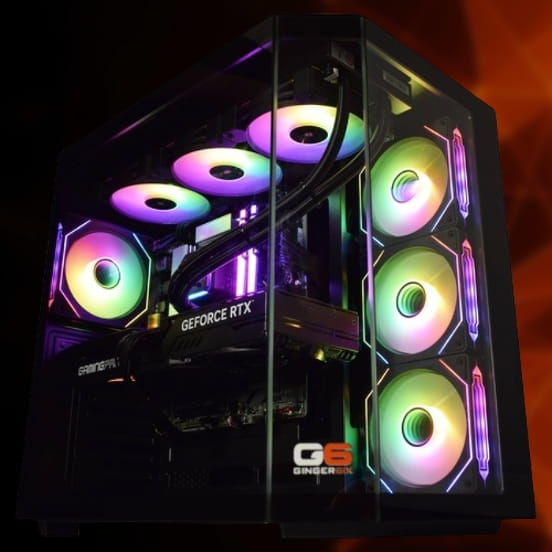
 Intel Core i9 14900K Nvidia RTX 5080 Gaming PC - G6 Galactic U3
Intel Core i9 14900KF 24 core
Z790 Motherboard
32GB+ DDR5 5200MHz
FAST 1TB+ M.2 NVMe SSD
16GB Nvidia RTX 5080 Graphics
FAST Wifi & Bluetooth
Windows 11 Home£3,153.51
£2,959.99
Intel Core i9 14900K Nvidia RTX 5080 Gaming PC - G6 Galactic U3£3,153.51
£2,959.99
Intel Core i9 14900KF 24 core
Z790 Motherboard
32GB+ DDR5 5200MHz
FAST 1TB+ M.2 NVMe SSD
16GB Nvidia RTX 5080 Graphics
FAST Wifi & Bluetooth
Windows 11 Home
-
 Intel Core Ultra 9 285K Nvidia RTX 5070 Ti Gaming PC - G6 Genesis U3
Intel Core Ultra 9 285K 24 core
B860 Motherboard
32GB+ DDR5 5200MHz Memory
FAST 1TB+ M.2 NVMe SSD
16GB Nvidia RTX 5070 Ti Graphics
FAST Wifi & Bluetooth
Windows 11 Home£2,944.02
£2,764.99
Intel Core Ultra 9 285K Nvidia RTX 5070 Ti Gaming PC - G6 Genesis U3£2,944.02
£2,764.99
Intel Core Ultra 9 285K 24 core
B860 Motherboard
32GB+ DDR5 5200MHz Memory
FAST 1TB+ M.2 NVMe SSD
16GB Nvidia RTX 5070 Ti Graphics
FAST Wifi & Bluetooth
Windows 11 Home
-
 AMD Ryzen 9 7900 Nvidia RTX 5080 Gaming PC - G6 Fusion 1200 X6
AMD Ryzen 9 7900 12 core
A620M Motherboard
16GB+ DDR5 5200MHz
FAST 1TB M.2 NVMe SSD
16GB Nvidia RTX 5080 Graphics
300mbps Wifi
Windows 11 Home£2,581.18
£2,424.99
AMD Ryzen 9 7900 Nvidia RTX 5080 Gaming PC - G6 Fusion 1200 X6£2,581.18
£2,424.99
AMD Ryzen 9 7900 12 core
A620M Motherboard
16GB+ DDR5 5200MHz
FAST 1TB M.2 NVMe SSD
16GB Nvidia RTX 5080 Graphics
300mbps Wifi
Windows 11 Home
-
 AMD Ryzen 9 7900 Nvidia RTX 5070 Ti Gaming PC - G6 Fusion 1200 X5
AMD Ryzen 9 7900 12 core
A620M Motherboard
16GB+ DDR5 5200MHz
FAST 1TB M.2 NVMe SSD
16GB Nvidia RTX 5070 Ti Graphics
300mbps Wifi
Windows 11 Home£2,248.12
£2,109.99
AMD Ryzen 9 7900 Nvidia RTX 5070 Ti Gaming PC - G6 Fusion 1200 X5£2,248.12
£2,109.99
AMD Ryzen 9 7900 12 core
A620M Motherboard
16GB+ DDR5 5200MHz
FAST 1TB M.2 NVMe SSD
16GB Nvidia RTX 5070 Ti Graphics
300mbps Wifi
Windows 11 Home
-
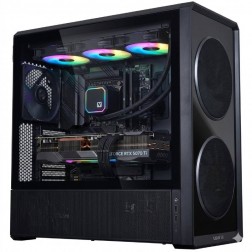 AMD Ryzen 9 9950X3D Nvidia RTX 5080 Gaming PC - G6 Apex 5
AMD Ryzen 9 9950X3D 16 core
X870 Motherboard
32GB+ DDR5 5200MHz
FAST 1TB M.2 NVMe SSD
12GB Nvidia RTX 5080 Graphics
FAST Wifi & Bluetooth
Windows 11 Home£3,417.59
£3,209.99
AMD Ryzen 9 9950X3D Nvidia RTX 5080 Gaming PC - G6 Apex 5£3,417.59
£3,209.99
AMD Ryzen 9 9950X3D 16 core
X870 Motherboard
32GB+ DDR5 5200MHz
FAST 1TB M.2 NVMe SSD
12GB Nvidia RTX 5080 Graphics
FAST Wifi & Bluetooth
Windows 11 Home
-
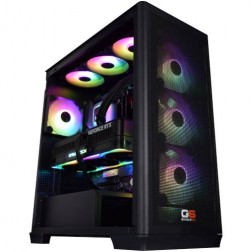 AMD Ryzen 9 9950X3D Nvidia RTX 5090 Gaming PC - G6 Apex 6
AMD Ryzen 9 9950X3D 16 core
X870 Motherboard
64GB+ DDR5 5200MHz
FAST 1TB M.2 NVMe SSD
32GB Nvidia RTX 5090 Graphics
FAST Wifi & Bluetooth
Windows 11 Home
AMD Ryzen 9 9950X3D Nvidia RTX 5090 Gaming PC - G6 Apex 6
AMD Ryzen 9 9950X3D 16 core
X870 Motherboard
64GB+ DDR5 5200MHz
FAST 1TB M.2 NVMe SSD
32GB Nvidia RTX 5090 Graphics
FAST Wifi & Bluetooth
Windows 11 Home
Grid List
6 Item(s)
What You Get with a 4K Gaming PC
4K gaming is the point where the hardware requirement outpaces what a mid-tier GPU can manage at target frame rates. The RTX 5070 Ti and RTX 5080 are the current minimum threshold for native 4K across demanding AAA titles and simulation software. Every Ginger6 4K build is hand-assembled in our Wolverhampton workshop with a processor matched to the GPU tier so neither component holds the other back.
Games This PC Handles at 4K
Typical frame rates at 4K on an RTX 5070 Ti or RTX 5080 with a matched Ryzen 9 or Core i9. Native 4K unless noted. Figures are estimates based on available benchmark data as at April 2026.
Who Actually Benefits from 4K Gaming?
The honest answer to who benefits from 4K gaming is narrower than marketing suggests. If you do not own a 4K monitor and have no firm plan to buy one, 4K hardware is wasted on your current setup — a 1440p gaming PC at the same budget delivers better gaming performance on a 1440p or 1080p panel than a 4K build producing output the screen cannot display. The buyers who genuinely benefit from 4K hardware are those with a 4K monitor already in place, those committed to buying one, flight and racing simulation buyers who prioritise visual fidelity above frame rate, content creators who need GPU headroom for 4K video work alongside gaming, and buyers for whom image quality is the primary goal rather than maximum competitive frame rates. If you want to compare resolution tiers across the full Ginger6 range, the gaming PC overview maps all options clearly.
At 3840x2160, the GPU processes roughly four times as many pixels per frame as it does at 1080p. That demands VRAM capacity and memory bandwidth at a level that mid-range cards cannot sustain across all current titles without stutter. The RTX 5070 Ti and RTX 5080 in Ginger6 4K builds carry the VRAM and bandwidth to handle native 4K at high and ultra settings across current titles. DLSS 4 Multi Frame Generation on Blackwell hardware can extend frame rates substantially in supported titles — the combination of native 4K rendering capability and DLSS 4 is what makes 4K at 60fps or above achievable across the full current game library, rather than only in less demanding titles. System RAM at 32GB is the correct baseline at this tier: simulation titles with dense procedural scenery, large open worlds, and concurrent background applications benefit from the additional headroom at 4K in ways that 16GB configurations do not cover.
The use cases where 4K delivers a genuinely distinct advantage over 1440p are flight and racing simulation, where visual fidelity at distance determines the quality of the experience, and GPU-accelerated content creation at 4K resolution. Microsoft Flight Simulator and DCS World at 4K on an RTX 5070 Ti or RTX 5080 produce a visual result that is not replicable at 1440p regardless of settings. iRacing and Forza Motorsport at 4K run at frame rates competitive with 1440p gaming on the same hardware — the image quality gain comes without the frame rate penalty that earlier GPU generations imposed at 4K in physics-heavy racing simulations. For buyers also editing 4K footage in DaVinci Resolve or Premiere Pro, the GPU is doing double duty and the additional VRAM on the RTX 5080 reduces render and export times in ways that lower-VRAM alternatives cannot match.
4K builds run the RTX 5070 Ti and RTX 5080 under sustained load that generates significantly more heat than mid-range configurations. The PSU must be sized to the peak draw of the GPU combination with headroom above the rated TDP, not calculated to match it. Ginger6 sizes the PSU for the actual build, not a generalised estimate for a card at this tier. Airflow matters more at 4K sustained load than it does for a 1080p build — the GPU runs at high utilisation for extended periods and the thermal behaviour of the case over hours of gaming determines whether boost clocks are maintained or reduced. Cable management here is directly connected to thermal performance, not just aesthetics. The 24-hour test is run at 4K workload before the machine ships, confirming that the thermal behaviour under real gaming conditions matches what the build was designed for.
Ginger6 has been building PCs in Wolverhampton since 2001. At 4K prices, the conversation before the order matters: Kevin will confirm whether 4K is the right resolution for your monitor and use case, and he will tell you directly if a 1440p build is the better answer for how you actually game. After the sale, the 3-year warranty covers a machine that represents a significant investment — parts, postage, and lifetime support from the person who built and configured it. If something needs attention at any point during those three years, you contact the same person who can look at the build specification and know exactly how it was put together.
Is a 4K Gaming PC Right for You?
Five buyer profiles where 4K hardware is the right choice rather than a higher-cost alternative to 1440p.
If you have a 4K panel or a specific one on your shortlist, the hardware question has a clear answer. A mid-tier GPU at 4K produces lower frame rates and lower settings than the same GPU at 1440p, and the visual difference is visible. An RTX 5070 Ti or RTX 5080 paired with the right processor gives your 4K monitor the signal it was built to receive. Without a 4K screen, there is no case for 4K hardware at any price.
Flight and racing simulation buyers have a different priority to mainstream gaming buyers. Frame rate matters, but visual fidelity at distance, cockpit detail, and ground texture resolution determine how absorbing the experience is. Microsoft Flight Simulator, DCS World, and iRacing at 4K on an RTX 5070 Ti or RTX 5080 produce a quality of image that 1440p at any settings cannot replicate. If simulation is your primary use case and you run a yoke, rudder pedals, or a full rig, the 4K tier is where the hardware investment shows the clearest return.
4K builds with an RTX 5070 Ti or RTX 5080 handle GPU-accelerated 4K video editing in DaVinci Resolve and Premiere Pro with shorter render and export times than a mid-tier alternative. If your machine serves both gaming and content creation, the GPU is working in both contexts and the additional VRAM on the higher-tier card reduces the likelihood of VRAM-constrained slowdown during complex timelines or heavy effects work.
Not every gaming PC buyer prioritises frame rate over visual quality. AAA open world titles, narrative games, and graphically detailed single-player experiences are often more enjoyable at 4K60 than at 1440p90, depending on the buyer. If you prefer a slower-paced AAA library and want the best possible image on a large 4K panel, this build is the correct choice and the RTX 5070 Ti is sufficient for that use case at 4K high to ultra settings.
High-resolution VR headsets require GPU headroom that mid-tier cards cannot sustain in demanding VR environments. Simulation and seated VR applications in particular benefit from the GPU compute available at this tier. If you plan to use a high-resolution headset for simulation, architectural walkthroughs, or VR gaming as a primary activity alongside desktop gaming, the 4K build tier gives your headset the performance it needs.
Talk to Kevin Before You Order
Kevin will tell you honestly whether 4K hardware is the right answer for your monitor and use case, or whether a 1440p build gives you more for your money in practice.
Tell Kevin:
No charge for the conversation. No pressure to buy.
Why Buyers Choose Ginger6 for 4K
93% of Ginger6 customers leave five-star reviews on Trustpilot, compared to 80% for PCSpecialist and 84% for Chillblast. That gap comes down to one thing. The person who sells you the PC is the same person who builds it and supports it afterwards.
Kevin carefully chose the exact right components at extremely competitive prices. He took the time to design and build the ultimate PC and burn-in and test every component for excellent stability.
Verbal communication is very important to me when dealing with a lot of money for a PC I had no idea about. My teenage son was unsure what parts he would need for a gaming PC. With Ginger6 my son ordered his dream PC and I was kept fully informed through the whole process.
Can’t recommend Ginger6 highly enough. Kevin was brilliant at answering my questions and recommending the best machine for my budget and purpose. It was exactly one week between ordering and delivery.
I emailed Kevin to be sure if what I put down to order was suitable, Kevin supported me to change a few things around and since having the PC for a few weeks it is absolutely amazing and a stunning looking PC. Also fast service and delivery too. I recommend Ginger6 as I will be upgrading from them in the future.
Ginger6 has been building gaming PCs from the same Wolverhampton workshop since 2001. Same phone number. Same approach. Same focus on getting the right gaming PC into the right hands.
GET STARTED
Ready to Order Your 4K Gaming PC?
Browse the current 4K builds, call Kevin direct, or send an email with your monitor spec and use case.
Browse 4K PCs
See all current 4K builds with full specs and pricing. Filter by GPU tier or use case.
Browse 4K PCsTalk to Kevin
Call and tell him your monitor, games, and use case. He will confirm whether the RTX 5070 Ti or RTX 5080 is right for your setup. No pressure to buy.
Call 01902 714533Email or Callback
Send your 4K monitor spec, use case, and budget. Kevin will reply with the right build for your setup.
Email UsFAQ
Frequently Asked Questions
4K gaming is worth it if you own a 4K monitor and play titles where visual fidelity is a priority. Simulation buyers, large-screen AAA buyers, and content creators who use the PC for 4K video work get a clear return on the additional hardware cost. If you do not own a 4K monitor, a 1440p build at the same budget delivers more gaming performance per pound. The hardware is ready for 4K. The question is whether your use case justifies it.
The RTX 5070 Ti is the current minimum for 4K gaming at high settings across demanding AAA titles. Below that tier, frame rates in titles such as Cyberpunk 2077 and Microsoft Flight Simulator at 4K ultra drop below 60fps without relying on DLSS upscaling. The RTX 5080 is the stronger choice if you want ray tracing at 4K or the maximum possible frame rates in the most demanding titles. Mid-tier cards can output 4K but not at the settings or frame rates that justify the resolution.
A 27-inch or 32-inch IPS panel at 4K and 60Hz or 120Hz is the standard pairing for a 4K gaming PC. LG, Asus, and Samsung all produce well-regarded 4K panels in this range. The RTX 5070 Ti reaches 60fps or above in most demanding titles at 4K, so a 60Hz panel is the minimum. A 120Hz 4K panel extracts additional benefit when DLSS Multi Frame Generation is active in supported titles. Call Kevin if you want a specific monitor recommendation alongside your build.
Yes. An RTX 5070 Ti or RTX 5080 paired with a Core i9 or Ryzen 9 handles 4K video editing in DaVinci Resolve and Adobe Premiere Pro well. GPU-accelerated colour grading, effects processing, and export benefit directly from the VRAM and compute available at this tier. If video editing is a primary use case alongside gaming, tell Kevin when you call so he can factor the workload into the CPU recommendation. The Core i9 is generally the stronger choice for sustained multi-core rendering workloads.
High-resolution VR headsets benefit directly from the GPU headroom available at this tier. In simulation and seated VR applications, the RTX 5070 Ti and RTX 5080 sustain higher render resolution and higher supersampling settings than mid-tier alternatives, which reduces the visual artefacts that cause discomfort in longer VR sessions. If VR is a significant part of your use case, tell Kevin so he can recommend the right GPU tier for your specific headset and applications.
The RTX 5070 Ti is the right starting point for 4K gaming at high settings across most current titles. The RTX 5080 is worth the additional cost if you use ray tracing at 4K regularly, play simulation titles at maximum settings with high AI traffic density, or want the longest possible upgrade cycle before the GPU becomes the bottleneck. Both cards handle 4K confidently. Call Kevin with your specific game list and he will tell you which is the right tier for your use case.
Yes. Every Ginger6 4K gaming PC is hand-built in our Wolverhampton workshop in the West Midlands. We have been building custom PCs in the UK since 2001. Every build is stress-tested for 24 hours before it ships, covered by a 3-year warranty, and delivered free to any UK mainland address. Call Kevin on 01902 714533 or email [email protected] to discuss a 4K build.
Still have questions? Kevin’s on 01902 714533 during working hours, or email [email protected] anytime.
Your 4K Build Is Ready to Configure
Ginger6 has been building custom PCs in Wolverhampton since 2001. The person who answers your call builds your machine and supports it after. 93% five-star reviews. 24-hour stress testing. 3-year warranty with lifetime support. No sales team. No call centre.