




1440p Gaming PCs The Sweet Spot
1440p is where image quality and frame rate stop trading against each other. An RTX 5060 Ti or RTX 5070 paired with a Ryzen 7 X3D or Core i7 handles today’s most demanding titles at 1440p high settings with headroom to spare. Hand-built in Wolverhampton, stress-tested for 24 hours, and backed by a 3-year warranty. Builds from £1200.
Browse the builds below or call Kevin on 01902 714533. Tell him your games, monitor, and budget and he will confirm whether 1440p is the right tier for you.

Grid List
9 Item(s)
-
 Intel Core Ultra 7 265Kf - 16GB RTX 5060 Ti Flight Sim PC - G6 Sonic FSX2
Intel Core Ultra 7 265Kf 20 core
B760 Motherboard
16GB+ DDR5 5200MHz
2x FAST 1TB M.2 NVMe SSD
16GB Nvidia RTX 5060 Ti Graphics
FAST Wifi & Bluetooth
Windows 11 Home£1,981.36
£1,859.99
Intel Core Ultra 7 265Kf - 16GB RTX 5060 Ti Flight Sim PC - G6 Sonic FSX2£1,981.36
£1,859.99
Intel Core Ultra 7 265Kf 20 core
B760 Motherboard
16GB+ DDR5 5200MHz
2x FAST 1TB M.2 NVMe SSD
16GB Nvidia RTX 5060 Ti Graphics
FAST Wifi & Bluetooth
Windows 11 Home
-
 Intel Core i7 12700F Nvidia RTX 5060 Ti Gaming PC - G6 Storm X3
Intel Core i7 12700F 12 core
H610 Motherboard
16GB+ DDR5 5200MHz
1TB+ M.2 NVMe SSD
8GB Nvidia RTX 5060 Ti Graphics
300mbps Wifi
Windows 11 Home£1,530.06
£1,439.99
Intel Core i7 12700F Nvidia RTX 5060 Ti Gaming PC - G6 Storm X3£1,530.06
£1,439.99
Intel Core i7 12700F 12 core
H610 Motherboard
16GB+ DDR5 5200MHz
1TB+ M.2 NVMe SSD
8GB Nvidia RTX 5060 Ti Graphics
300mbps Wifi
Windows 11 Home
-
 AMD Ryzen 7 8700f Nvidia RTX 5070 Gaming PC - G6 Fusion 800 X5
AMD Ryzen 7 8700f 8 core
A620M Motherboard
16GB+ DDR5 5200MHz
FAST 1TB M.2 NVMe SSD
12GB Nvidia RTX 5070 Graphics
300mbps Wifi
Windows 11 Home£1,735.41
£1,629.99
AMD Ryzen 7 8700f Nvidia RTX 5070 Gaming PC - G6 Fusion 800 X5£1,735.41
£1,629.99
AMD Ryzen 7 8700f 8 core
A620M Motherboard
16GB+ DDR5 5200MHz
FAST 1TB M.2 NVMe SSD
12GB Nvidia RTX 5070 Graphics
300mbps Wifi
Windows 11 Home
-
 AMD Ryzen 7 8700f RTX 5060 Ti Gaming PC - G6 Fusion 800 X3
AMD Ryzen 7 8700f 8 core
A620M Motherboard
16GB+ DDR5 5200MHz
FAST 1TB M.2 NVMe SSD
8GB Nvidia RTX 5060 Ti Graphics
300mbps Wifi
Windows 11 Home£1,476.71
£1,389.99
AMD Ryzen 7 8700f RTX 5060 Ti Gaming PC - G6 Fusion 800 X3£1,476.71
£1,389.99
AMD Ryzen 7 8700f 8 core
A620M Motherboard
16GB+ DDR5 5200MHz
FAST 1TB M.2 NVMe SSD
8GB Nvidia RTX 5060 Ti Graphics
300mbps Wifi
Windows 11 Home
-
 Intel Core Ultra 7 265Kf RTX 5060 Ti Next Day Gaming PC - G6 ND1300
Intel Core Ultra 7 265Kf 20 Core
H810M Gaming Wifi6
32GB DDR5 Memory
1TB M.2 NVMe SSD Drive
8GB Nvidia RTX 5060 Ti Graphics
WIFI6 & Bluetooth
Windows 11 Home£1,856.73
£1,664.99
Intel Core Ultra 7 265Kf RTX 5060 Ti Next Day Gaming PC - G6 ND1300£1,856.73
£1,664.99
Intel Core Ultra 7 265Kf 20 Core
H810M Gaming Wifi6
32GB DDR5 Memory
1TB M.2 NVMe SSD Drive
8GB Nvidia RTX 5060 Ti Graphics
WIFI6 & Bluetooth
Windows 11 Home
-
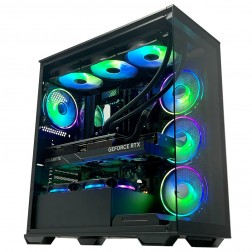 AMD Ryzen 7 7800X3D Nvidia RTX 5070 Gaming PC - G6 Apex3
AMD Ryzen 7 7800X3D 8 core
B650 Motherboard
32GB+ DDR5 5200MHz
FAST 1TB M.2 NVMe SSD
12GB Nvidia RTX 5070 Graphics
FAST Wifi & Bluetooth
Windows 11 Home£2,233.53
£2,099.99
AMD Ryzen 7 7800X3D Nvidia RTX 5070 Gaming PC - G6 Apex3£2,233.53
£2,099.99
AMD Ryzen 7 7800X3D 8 core
B650 Motherboard
32GB+ DDR5 5200MHz
FAST 1TB M.2 NVMe SSD
12GB Nvidia RTX 5070 Graphics
FAST Wifi & Bluetooth
Windows 11 Home
-
 AMD Ryzen 7 7800X3D Nvidia RTX 5060 Ti Gaming PC - G6 Apex2
AMD Ryzen 7 7800X3D 8 core
B650 Motherboard
32GB+ DDR5 5200MHz
FAST 1TB M.2 NVMe SSD
16GB Nvidia RTX 5060 Ti Graphics
FAST Wifi & Bluetooth
Windows 11 Home£2,135.48
£2,004.99
AMD Ryzen 7 7800X3D Nvidia RTX 5060 Ti Gaming PC - G6 Apex2£2,135.48
£2,004.99
AMD Ryzen 7 7800X3D 8 core
B650 Motherboard
32GB+ DDR5 5200MHz
FAST 1TB M.2 NVMe SSD
16GB Nvidia RTX 5060 Ti Graphics
FAST Wifi & Bluetooth
Windows 11 Home
-
 AMD Ryzen 7 7800X3D AMD Radeon RX 9070 XT Gaming PC - G6 Apex3 Radeon
AMD Ryzen 7 7800X3D 8 core
B650 Motherboard
32GB+ DDR5 5200MHz
FAST 1TB M.2 NVMe SSD
16GB Radeon RX 9070 XT Graphics
FAST Wifi & Bluetooth
Windows 11 Home£2,383.62
£2,239.99
AMD Ryzen 7 7800X3D AMD Radeon RX 9070 XT Gaming PC - G6 Apex3 Radeon£2,383.62
£2,239.99
AMD Ryzen 7 7800X3D 8 core
B650 Motherboard
32GB+ DDR5 5200MHz
FAST 1TB M.2 NVMe SSD
16GB Radeon RX 9070 XT Graphics
FAST Wifi & Bluetooth
Windows 11 Home
-
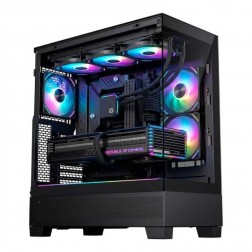 AMD Ryzen 7 9800X3D Nvidia RTX 5070 Ti Gaming PC - G6 Apex 4
AMD Ryzen 7 9800X3D 8 core
B650 Motherboard
32GB+ DDR5 5200MHz
FAST 1TB M.2 NVMe SSD
12GB Nvidia RTX 5070 Ti Graphics
FAST Wifi & Bluetooth
Windows 11 Home£2,765.65
£2,599.99
AMD Ryzen 7 9800X3D Nvidia RTX 5070 Ti Gaming PC - G6 Apex 4£2,765.65
£2,599.99
AMD Ryzen 7 9800X3D 8 core
B650 Motherboard
32GB+ DDR5 5200MHz
FAST 1TB M.2 NVMe SSD
12GB Nvidia RTX 5070 Ti Graphics
FAST Wifi & Bluetooth
Windows 11 Home
Grid List
9 Item(s)
What You Get with a 1440p Gaming PC
1440p is where most buyers land when they want the full gaming experience without paying for a 4K display and the GPU required to drive it. At this resolution, the image quality step up from 1080p is immediate and visible, and a matched build keeps frame rates competitive across both AAA and esports titles. Every Ginger6 1440p build is hand-assembled in our Wolverhampton workshop and configured to match the GPU to your intended resolution and workload.
Games This PC Handles at 1440p
Typical frame rates at 1440p high settings on an RTX 5060 Ti or RTX 5070 with a matched CPU. Figures are estimates based on available benchmark data as at April 2026.
Why 1440p Became the Default Resolution
1440p did not become the most common PC gaming resolution by accident. It sits at the point where the visual improvement over 1080p is immediately visible and the hardware cost stays within reach of most buyers. At 2560x1440, games are noticeably sharper — text, distant geometry, fine detail in textures. The monitor purchase decision is simple: any 1440p panel at 144Hz or faster extracts the full benefit of a 1440p build. 4K gaming requires a flagship GPU to hit comfortable frame rates across demanding titles, and the monitors cost significantly more. 1440p is where buyers who want quality without maximising budget land consistently, and the current generation of Blackwell GPUs serves this resolution better than any previous generation has.
At 1440p, VRAM matters more than it does at 1080p. Higher-resolution texture assets load into VRAM as the output resolution increases, and at 1440p ultra settings some titles benefit from 12GB or more. The RTX 5060 Ti and RTX 5070 in Ginger6 1440p builds carry sufficient VRAM for current titles without constraint, and the Blackwell architecture handles texture streaming without the frame time spikes that appear on underpowered configurations in open-world titles. DLSS 4 is available on both cards and adds headroom in supported titles, but the base frame rate at 1440p on either card is strong enough that upscaling is a choice rather than a requirement. The CPU pairing — Ryzen 7 X3D or Core i7 — is matched to the GPU to eliminate bottleneck at 1440p while leaving multi-core headroom for light streaming or recording alongside gaming. The G6 Apex 3 is exactly that pairing: a Ryzen 7 7800X3D with an RTX 5070, ready to order.
The use cases where 1440p delivers its clearest advantage over 1080p are open-world and AAA titles on a quality panel. Cyberpunk 2077, Elden Ring, and Baldur's Gate 3 at 1440p high settings show the gap clearly in both image quality and frame consistency. Warzone and Fortnite at 1440p still produce competitive frame rates above 130fps, which means buyers who play both AAA and competitive titles do not have to choose between them at this resolution. For buyers who also stream, the Ryzen 7 X3D or Core i7 pairing handles concurrent NVENC encoding without a measurable reduction in gaming frame rates — the RTX 5060 Ti and 5070 both include Blackwell's updated NVENC encoder, which produces AV1 streams at significantly better quality-to-bitrate ratios than previous generations.
A 1440p build sits in an interesting middle position thermally. The RTX 5060 Ti and RTX 5070 run warmer than entry-tier cards but are not the high-draw configurations that the 5080 and 5090 demand. The build can achieve a balance between performance and noise that is harder to hit at higher tiers — quiet enough for extended sessions, cool enough to maintain boost clocks across them. Ginger6 tunes the fan profile and airflow routing to that balance rather than defaulting to maximum fan speed. Memory XMP and BIOS settings specific to the CPU-GPU pairing are configured before the 24-hour test, which runs at the workload the machine will actually face: full 1440p gaming load, not synthetic benchmarks.
Ginger6 has been building PCs in Wolverhampton since 2001. Kevin will confirm the right GPU for your specific 1440p monitor — the answer differs between a 144Hz IPS panel and a 240Hz OLED, and between someone who plays competitive shooters and someone who plays open-world RPGs. He will also tell you honestly if your use case points toward 4K rather than 1440p before you order. The 3-year warranty covers parts and postage from day one. Lifetime support means a direct line to the builder, not a ticket system.
Is a 1440p Gaming PC Right for You?
Five buyer profiles where 1440p is the right resolution choice for your setup and games.
If you have a 1440p screen, the answer is straightforward. A 1080p build underuses the monitor, rendering at a lower resolution and upscaling the image rather than filling the pixel density your panel is designed for. A 1440p gaming PC gives your monitor the signal it was built to receive and extracts the full visual benefit you paid for when you bought the display.
If you have been gaming at 1080p and want the next meaningful step up, 1440p is the correct direction. The image quality difference is visible immediately and does not require learning a new workflow or changing how you game. A 1440p monitor at 144Hz or 165Hz paired with this build gives you a noticeably different experience from your current setup at a cost that stays within reach.
Buyers who play CS2 or Valorant as their main titles but also want to run Elden Ring or Cyberpunk at good settings are well-served at 1440p. The RTX 5060 Ti and RTX 5070 keep competitive frame rates above 165fps in esports titles and above 90fps in demanding AAA titles at 1440p. You do not have to choose a resolution for one type of game at the cost of the other.
1440p builds with a Ryzen 7 X3D or Core i7 handle light concurrent streaming and recording without a significant gaming performance penalty. If you stream to Twitch or YouTube at 1080p60 while gaming, this build manages both workloads. The Core i7 pairing is the stronger choice for streaming, as Intel’s encoder performs well at lower CPU overhead compared to software encoding on AMD.
4K gaming requires an RTX 5080 or RTX 5090 to run demanding titles at playable frame rates with ray tracing. At 1440p, the RTX 5070 delivers a similar visual experience at a significantly lower GPU cost. If your priority is image quality rather than the maximum possible resolution, 1440p gives you most of the benefit without the flagship GPU price tag.
Talk to Kevin Before You Order
Kevin will confirm whether 1440p is the right resolution for your monitor and games, or whether it is worth stepping up to 4K or staying at 1080p for a better frame rate at your budget.
Tell Kevin:
No charge for the conversation. No pressure to buy.
Why Buyers Choose Ginger6 for 1440p
93% of Ginger6 customers leave five-star reviews on Trustpilot, compared to 80% for PCSpecialist and 84% for Chillblast. That gap comes down to one thing. The person who sells you the PC is the same person who builds it and supports it afterwards.
Kevin carefully chose the exact right components at extremely competitive prices. He took the time to design and build the ultimate PC and burn-in and test every component for excellent stability.
Verbal communication is very important to me when dealing with a lot of money for a PC I had no idea about. My teenage son was unsure what parts he would need for a gaming PC. With Ginger6 my son ordered his dream PC and I was kept fully informed through the whole process.
Can’t recommend Ginger6 highly enough. Kevin was brilliant at answering my questions and recommending the best machine for my budget and purpose. It was exactly one week between ordering and delivery.
I emailed Kevin to be sure if what I put down to order was suitable, Kevin supported me to change a few things around and since having the PC for a few weeks it is absolutely amazing and a stunning looking PC. Also fast service and delivery too. I recommend Ginger6 as I will be upgrading from them in the future.
Ginger6 has been building gaming PCs from the same Wolverhampton workshop since 2001. Same phone number. Same approach. Same focus on getting the right gaming PC into the right hands.
GET STARTED
Ready to Order Your 1440p Gaming PC?
Browse the current 1440p builds, call Kevin direct, or send an email with your monitor spec and games list.
Browse 1440p PCs
See all current 1440p builds with full specs and pricing. Filter by GPU or budget.
Browse 1440p PCsTalk to Kevin
Call and tell him your games, monitor, and budget. He will confirm whether the RTX 5060 Ti or RTX 5070 is the right card for your setup. No pressure to buy.
Call 01902 714533Email or Callback
Send your monitor spec, games list, and budget. Kevin will reply with the right build for your 1440p setup.
Email UsFAQ
Frequently Asked Questions
1440p is the right choice unless you already own a 4K monitor or have a firm intention to buy one. 4K requires a flagship GPU (RTX 5080 or RTX 5090) to reach playable frame rates in demanding titles, which doubles or triples the GPU cost. At 1440p, the RTX 5060 Ti and RTX 5070 deliver high settings at 90fps or above across all current AAA titles without a flagship price tag. If you do not have a 4K monitor, 4K hardware is wasted spend.
A 27-inch IPS panel at 1440p and 144Hz or 165Hz is the standard pairing for a 1440p gaming build. At 27 inches, the 1440p resolution produces a noticeably sharper image than 1080p at the same size. Brands such as LG, Asus, and Samsung all offer reliable panels in this size and resolution range at £250 to £400. Call Kevin if you want a specific monitor recommendation alongside your PC build.
The RTX 5060 Ti is the correct starting point for 1440p high settings across most current titles. The RTX 5070 is worth the additional cost if you play the most demanding AAA titles at ultra settings, use ray tracing regularly, or want a longer upgrade cycle before the GPU becomes the bottleneck. Both cards handle 1440p confidently. Call Kevin if you are unsure which is right for your game library.
32GB is worth considering at 1440p if you stream while gaming, record footage, or run browser tabs, Discord, and editing software alongside your game. Gaming alone at 1440p does not require 32GB in 2026. 16GB is the correct starting point and keeps the build cost lower. If your workload involves concurrent applications or you want to future-proof for three to four years, 32GB is a sensible addition.
Yes. A 1440p build with a Ryzen 7 X3D or Core i7 handles light streaming to Twitch or YouTube at 1080p60 without a significant gaming performance penalty. The Core i7 is the stronger choice for streaming due to Intel’s onboard hardware encoder. If streaming is a primary use case rather than an occasional activity, tell Kevin when you call so he can factor that into the CPU recommendation.
A Ginger6 1440p gaming PC typically falls between £1200 and £1800 depending on the GPU tier and CPU pairing. The lower end of that range covers RTX 5060 Ti builds with a Ryzen 7 X3D or Core i7. The upper end covers RTX 5070 builds with a higher-specced processor and 32GB of RAM. All prices include a 3-year warranty, 24-hour stress testing, and free UK delivery.
At 1440p and above, the GPU does more of the work than at 1080p, so the CPU has a smaller impact on gaming frame rates than many buyers expect. However, the CPU still matters for sustained frame times and for workloads outside gaming. At 1440p, Ryzen 7 X3D is the strongest choice for pure gaming. Core i7 is the better choice if you stream, record, or use the PC for productivity alongside gaming. Kevin will recommend the right pairing based on your actual workload.
Still have questions? Kevin’s on 01902 714533 during working hours, or email [email protected] anytime.
Your 1440p Build Is Ready to Configure
Ginger6 has been building custom PCs in Wolverhampton since 2001. The person who answers your call builds your machine and supports it after. 93% five-star reviews. 24-hour stress testing. 3-year warranty with lifetime support. No sales team. No call centre.