




Data Science Workstations for Python, R, and Power BI
Ginger6 builds custom data science workstations for analysts, data engineers, and researchers who work with large datasets in Python, R, SQL, and Power BI and need a machine that handles the full dataset in memory without paging to disk. Every build is hand-assembled in Wolverhampton, stress-tested for 24 hours, and backed by a 3-year warranty.
The most common data science workstation mistake is under-speccing RAM. A DataFrame that is 10GB on disk expands significantly in memory when loaded with pandas. A machine with 128GB RAM removes the most common operational constraint in data science workflows without requiring a GPU workstation budget.
Browse the builds below or call Kevin on 01902 714533. Tell him your tools, your typical dataset sizes, and your budget, and he will confirm the right RAM and CPU configuration.
.jpg)

Grid List
4 Item(s)
-
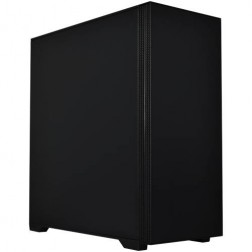 G6 Basalt — Software Development Workstation
An entry 12-core developer workstation for Visual Studio, Docker, WSL2, and light data science — built and stress-tested in Wolverhampton.
AMD Ryzen 9 9900X (12 Cores)
32GB DDR5 RAM
Nvidia RTX 5060 Ti 8GB
2TB NVMe SSD
Windows 11 Home
3-Year Warranty£2,067.72
£1,934.99
G6 Basalt — Software Development Workstation£2,067.72
£1,934.99
An entry 12-core developer workstation for Visual Studio, Docker, WSL2, and light data science — built and stress-tested in Wolverhampton.
AMD Ryzen 9 9900X (12 Cores)
32GB DDR5 RAM
Nvidia RTX 5060 Ti 8GB
2TB NVMe SSD
Windows 11 Home
3-Year Warranty
-
 G6 Graphite — Engineering and Developer Workstation
A 16-core professional workstation for microservices development, engineering simulation, large data science workflows, and AI/ML entry-level fine-tuning — built in Wolverhampton.
AMD Ryzen 9 9950X (16 Cores)
64GB DDR5 RAM
Nvidia RTX 5060 Ti 16GB
2TB NVMe SSD
Windows 11 Pro
3-Year Warranty£2,904.74
£2,729.99
G6 Graphite — Engineering and Developer Workstation£2,904.74
£2,729.99
A 16-core professional workstation for microservices development, engineering simulation, large data science workflows, and AI/ML entry-level fine-tuning — built in Wolverhampton.
AMD Ryzen 9 9950X (16 Cores)
64GB DDR5 RAM
Nvidia RTX 5060 Ti 16GB
2TB NVMe SSD
Windows 11 Pro
3-Year Warranty
-
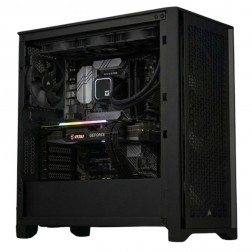 G6 Titanium — AI/ML and High VRAM Workstation
A high-VRAM professional workstation for PyTorch LoRA fine-tuning, large GPU rendering scenes, 8K video editing, and GPU-intensive development — powered by the Nvidia RTX 5080.
AMD Ryzen 9 9950X (16 Cores)
64GB DDR5 RAM
Nvidia RTX 5080 16GB VRAM
2TB NVMe + 2TB NVMe
Windows 11 Pro
3-Year Warranty£3,839.64
£3,604.99
G6 Titanium — AI/ML and High VRAM Workstation£3,839.64
£3,604.99
A high-VRAM professional workstation for PyTorch LoRA fine-tuning, large GPU rendering scenes, 8K video editing, and GPU-intensive development — powered by the Nvidia RTX 5080.
AMD Ryzen 9 9950X (16 Cores)
64GB DDR5 RAM
Nvidia RTX 5080 16GB VRAM
2TB NVMe + 2TB NVMe
Windows 11 Pro
3-Year Warranty
-
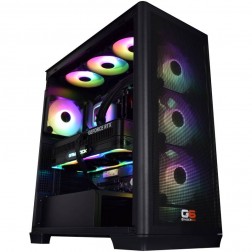 G6 Chromite — Large-Scale Engineering and Data Workstation
A high-capacity 16-core workstation for large ANSYS CFD simulation, very large data science datasets, local Kubernetes, and CPU rendering — built in Wolverhampton.
AMD Ryzen 9 9950X (16 Cores)
128GB DDR5 RAM
Nvidia RTX 5070 12GB
2TB NVMe + 2TB NVMe
Windows 11 Pro
3-Year Warranty£4,574.11
£4,294.99
G6 Chromite — Large-Scale Engineering and Data Workstation£4,574.11
£4,294.99
A high-capacity 16-core workstation for large ANSYS CFD simulation, very large data science datasets, local Kubernetes, and CPU rendering — built in Wolverhampton.
AMD Ryzen 9 9950X (16 Cores)
128GB DDR5 RAM
Nvidia RTX 5070 12GB
2TB NVMe + 2TB NVMe
Windows 11 Pro
3-Year Warranty
Grid List
4 Item(s)
What a Data Science Workstation Actually Needs
Data science is primarily a RAM and CPU workload. GPU matters only for GPU-accelerated libraries. Get RAM right first and the rest follows.
How a Ginger6 Data Science Workstation Handles Your Analysis
Performance descriptors reflect typical dataset sizes and tool configurations. Actual performance depends on data volume, operation complexity, and pipeline design.
Performance descriptors are indicative. Actual performance depends on project complexity, settings, and system configuration.
The Most Common Data Science Workstation Mistake Is Under-Speccing RAM
Data scientists consistently encounter the same frustration on under-specced hardware: a pandas operation on a large dataset produces a MemoryError, a Jupyter kernel crashes mid-analysis, or an ETL pipeline that should run in 20 minutes runs in 3 hours because the machine pages to disk. The fix in every case is more RAM, not a faster CPU. The insight is predictable, and it is almost always discovered after the machine is already in use rather than before the purchase.
pandas loads DataFrames into memory in full when transformations are applied. A 10GB CSV file does not consume 10GB of RAM when loaded with pandas. Type inference, copies created during chained operations, and the overhead of the DataFrame structure itself mean that a 10GB source file commonly requires 30 to 40GB of RAM to work with comfortably in a typical analytical workflow. A machine with 32GB RAM handling this file will page to disk during operations. A machine with 64GB RAM handles it without interruption. A machine with 128GB RAM handles multiple such datasets simultaneously, which matters for analysts who run several notebooks in parallel or who build pipelines that join large datasets in memory. Kevin's conversation before the order starts with dataset sizes, not with benchmark scores.
CPU core count is the second meaningful lever. scikit-learn's cross-validation, grid search, and many ensemble methods distribute across CPU cores natively with the n_jobs parameter. R's parallel processing packages and Dask distributed computation also scale with core count. A Ryzen 9 with 16 cores running a 100-iteration randomised search with 5-fold cross-validation completes in roughly one-sixteenth of the time of a single-core equivalent. For data scientists who run repeated model training cycles or long cross-validation searches, this difference is measurable in minutes per experiment and hours per day. For analysts working with SQL locally, the combination of fast NVMe storage and a capable CPU reduces query times on large local tables significantly. See the AI and ML workstations page if your workflow also includes deep learning training with PyTorch or TensorFlow, where GPU VRAM becomes the primary constraint.
Ginger6 builds every data science workstation for sustained computation under continuous load. A long cross-validation run or an ETL pipeline that processes data for hours runs the CPU at sustained utilisation throughout. The 24-hour stress test before dispatch confirms that the machine maintains its rated performance throughout that sustained load, and that BIOS settings prevent the CPU from throttling as the session continues. BIOS memory profiles are also confirmed so RAM runs at its rated speed, which matters for the bandwidth-intensive operations that dominate pandas and in-memory database workloads.
Kevin is available after delivery. If a new dataset scale exceeds the original spec, if a framework update changes memory behaviour, or if the workflow evolves toward GPU-accelerated processing, he is the first call. The 3-year warranty covers parts and return postage. Lifetime technical support is included, and for a data scientist or analyst whose work depends on the machine being available, that direct relationship with the person who built it has real operational value.
Data science workflows often expand into machine learning training and software development environments.
The right RAM amount depends on your largest typical dataset and how many notebooks you run simultaneously. Kevin will confirm the right amount before you order.
01902 714533Data Science Workstation Buyers at Ginger6
If your datasets regularly hit 5GB or above, 64GB RAM removes the out-of-memory risk during transformation and joining operations. For datasets above 20GB or for analysts running multiple notebooks simultaneously, 128GB is the practical configuration. A Ryzen 9 with high core count reduces the time spent on groupby and apply operations on large frames.
scikit-learn cross-validation and ensemble model training distribute across CPU cores. A Ryzen 9 with 16 cores reduces grid search and cross-validation time significantly. If you also use XGBoost or LightGBM GPU mode, an RTX 5070 adds GPU-accelerated gradient boosting that trains orders of magnitude faster than CPU-only on large tabular datasets.
Power BI Desktop loads data models into memory during report development. A large import-mode data model with multiple fact tables and complex DAX measures benefits from 64GB RAM and a Core i9 for visual rendering speed. Dataset refresh on large local datasets is also faster with more RAM and NVMe storage for local source files.
Dask and local Spark scale ETL workloads across CPU cores. A Ryzen 9 with 16 cores and 128GB RAM handles ETL pipelines that join large datasets in memory without spilling to disk. Fast NVMe storage reduces the time spent reading large Parquet or CSV source files at the start of each pipeline run.
R's memory model loads objects into RAM in full. Large mixed-effects models, Bayesian inference with Stan or brms, and bootstrap resampling on large datasets all benefit from generous RAM. 64GB covers most statistical modelling workflows. 128GB is appropriate for analysts working with very large longitudinal datasets or running multiple R sessions simultaneously.
No charge for the conversation. No pressure to buy.
- The software you use and the version
- Your typical dataset sizes and file formats
- Whether you run GPU-accelerated libraries
- Your approximate budget
What Workstation Buyers Say About Ginger6
93% of Ginger6 customers leave five-star reviews on Trustpilot, compared to 80% for PCSpecialist and 84% for Chillblast. The person who advises you on the spec is the same person who builds the workstation and supports it afterwards.
"The PC is excellent, with much speedier processing than I was previously experiencing. I have used Ginger 6 several times previously and will not hesitate to use them again as their service and follow up support is excellent."
"Excellent company to deal with. This is my third order and was as great as the first and second. Highly recommended."
"From the start of buying the pc to the delivery fantastic service. When we had a problem they sorted it fast and efficiently with no problems. I have used the company for years now as they are really good on all fronts."
"Great guy, great before and after sales. First class service. Highly recommended. Quality machines."
Ginger6 has been building custom workstations from the same Wolverhampton workshop since 2001. Same phone number. Same approach. Same focus on getting the right spec into the right hands.
Data Science Workstation Questions Answered
64GB is the practical starting point for DataFrames in the 5 to 15GB range on disk. A 10GB CSV file typically requires 30 to 40GB of RAM when loaded with pandas due to type inference and intermediate copies during operations. 128GB covers datasets up to 30 to 40GB on disk and allows multiple notebooks with different large datasets to run simultaneously without memory pressure. Kevin will confirm the right amount based on your typical file sizes.
Not for most data science workflows. If your work is primarily pandas, scikit-learn, R, and SQL, a mid-range GPU for display output is sufficient and the budget is better spent on RAM and CPU core count. GPU becomes relevant when you use XGBoost GPU mode, LightGBM GPU, RAPIDS cuDF/cuML for GPU-accelerated pandas equivalents, or PyTorch/TensorFlow for deep learning. Kevin will confirm whether GPU acceleration is relevant to your specific tool stack.
A local workstation offers iteration speed, no data transfer costs, and consistent availability without job queuing or session timeouts. For analysts who work with sensitive data that cannot leave a local environment, a local workstation is also the correct compliance choice. Cloud VMs remain the right choice for very large batch jobs that exceed local hardware capacity, or for teams that need to scale computation dynamically. Many analysts use both: a local workstation for exploratory analysis and a cloud instance for production pipeline runs at scale.
Yes, in most configurations. Kevin confirms at the spec stage how many RAM slots are available and how much the motherboard supports, so you can buy the right amount now and know exactly what the upgrade path looks like. Adding RAM later is one of the most straightforward desktop upgrades.
Builds are completed in 3 to 5 working days from order confirmation. The 24-hour stress test runs before dispatch. Delivery is free to UK mainland addresses.
Every Ginger6 workstation includes a 3-year warranty covering parts and return postage, plus lifetime technical support.
Ready to Work With Large Datasets Without Running Out of Memory?
Whether you know exactly how much RAM your datasets need or want help working through the right configuration, Ginger6 is here to help. No sales pressure. No upselling. Honest advice from a team that has been building custom workstations in Wolverhampton since 2001.
Browse Data Science Workstations
Browse our ready-configured data science workstations for Python, R, Power BI, and SQL. Each one lists the full spec.
Browse the BuildsTalk to Kevin
Tell him your tools, your typical dataset sizes, and your budget. He will confirm the right RAM amount and CPU configuration. No pressure to buy.
Call 01902 714533Email or Callback
Include your tools, dataset sizes, and budget. Kevin will come back with a RAM and CPU recommendation and a quote.
Email Kevin