




Gaming PCs Built for
Borderlands 4
Borderlands 4 is significantly more demanding than its predecessors. An 8-core CPU is the minimum specification, 16GB RAM is the floor, and an SSD is mandatory. Co-operative play adds CPU overhead that solo play does not carry. Find the right build for how your group plays below.
Browse the builds below or call Kevin on 01902 714533. Tell him whether you play solo or co-op, your monitor resolution, and your budget — he will confirm the right CPU and GPU pairing for the way your group plays.


Grid List
4 Item(s)
-
 Intel Core i5 12400F Nvidia RX 9060 XT Gaming PC - G6 Infinity X5
Intel Core i5 12400F 6 core
H610M Motherboard
16GB+ DDR5 5200MHz
1TB+ M.2 NVMe SSD
AMD Radeon RX 9060 XT 8GB Graphics
300mbps Wifi
Windows 11 Home£1,287.47
£1,209.99
Intel Core i5 12400F Nvidia RX 9060 XT Gaming PC - G6 Infinity X5£1,287.47
£1,209.99
Intel Core i5 12400F 6 core
H610M Motherboard
16GB+ DDR5 5200MHz
1TB+ M.2 NVMe SSD
AMD Radeon RX 9060 XT 8GB Graphics
300mbps Wifi
Windows 11 Home
-
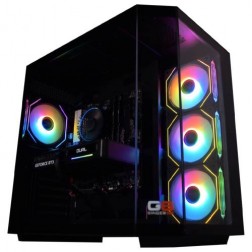 AMD Ryzen 7 8700f Nvidia RTX 5070 Gaming PC - G6 Fusion 800 X5
AMD Ryzen 7 8700f 8 core
A620M Motherboard
16GB+ DDR5 5200MHz
FAST 1TB M.2 NVMe SSD
12GB Nvidia RTX 5070 Graphics
433mbps Wifi
Windows 11 Home£1,735.41
£1,629.99
AMD Ryzen 7 8700f Nvidia RTX 5070 Gaming PC - G6 Fusion 800 X5£1,735.41
£1,629.99
AMD Ryzen 7 8700f 8 core
A620M Motherboard
16GB+ DDR5 5200MHz
FAST 1TB M.2 NVMe SSD
12GB Nvidia RTX 5070 Graphics
433mbps Wifi
Windows 11 Home
-
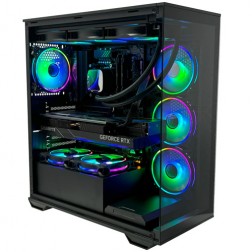 Intel Core Ultra 7 265Kf Nvidia RTX 5080 Gaming PC - G6 Galactic U2
Intel Core Ultra 7 265Kf 20 core
Z890 Motherboard
32GB+ DDR5 5200MHz
FAST 1TB+ M.2 NVMe SSD
16GB Nvidia RTX 5080 Graphics
FAST Wifi & Bluetooth
Windows 11 Home£2,933.95
£2,754.99
Intel Core Ultra 7 265Kf Nvidia RTX 5080 Gaming PC - G6 Galactic U2£2,933.95
£2,754.99
Intel Core Ultra 7 265Kf 20 core
Z890 Motherboard
32GB+ DDR5 5200MHz
FAST 1TB+ M.2 NVMe SSD
16GB Nvidia RTX 5080 Graphics
FAST Wifi & Bluetooth
Windows 11 Home
-
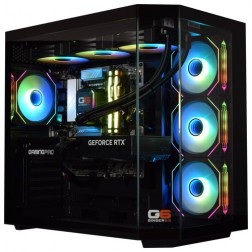 Intel Core Ultra 5 245K Nvidia RTX 5070 Ti Gaming PC - G6 Genesis U1
Intel Core Ultra 5 245Kf 14 core
B860 Motherboard
32GB+ DDR5 5200MHz Memory
FAST 1TB+ M.2 NVMe SSD
16GB Nvidia RTX 5070 Ti Graphics
FAST Wifi & Bluetooth
Windows 11 Home£2,614.93
£2,454.99
Intel Core Ultra 5 245K Nvidia RTX 5070 Ti Gaming PC - G6 Genesis U1£2,614.93
£2,454.99
Intel Core Ultra 5 245Kf 14 core
B860 Motherboard
32GB+ DDR5 5200MHz Memory
FAST 1TB+ M.2 NVMe SSD
16GB Nvidia RTX 5070 Ti Graphics
FAST Wifi & Bluetooth
Windows 11 Home
Grid List
4 Item(s)
What Hardware Does Borderlands 4 Need?
Official system requirements from Gearbox and 2K. The 8-core CPU minimum applies at all tiers — fewer cores will not run the game. Co-op play adds CPU load not present in solo sessions.
Specifications sourced from the official 2K support article. Borderlands 4 received patches post-launch addressing reported frame rate and memory issues — confirm current performance on the latest game version. Kevin will verify expected performance for your hardware configuration before you order.
What Each Budget Delivers in Borderlands 4
Four assessments covering solo and co-op use. The CPU is as important as the GPU in Borderlands 4 — particularly for buyers who host co-op sessions or stream simultaneously.

1080p at high settings with frame rates above 60fps. The Core i5 exceeds the 8-core minimum and handles solo play comfortably. For co-op, this tier is suitable for joining sessions as a client — hosting a four-player session adds CPU overhead that a Core i7 handles more reliably. FSR quality mode provides additional frame rate headroom. The cel-shaded visual style means 1080p high settings in Borderlands 4 looks noticeably better than equivalent settings in photorealistic titles at the same resolution. A strong starting point for solo buyers and co-op clients.

The recommended tier for Borderlands 4, covering every use case the game supports. 1440p at ultra settings above 100fps, co-op session hosting without frame rate compromise, and simultaneous streaming at 1080p60 without resource conflict between game and encode workloads. The Core i7 handles co-op host overhead — the additional CPU demand of simulating multiple player characters and processing network packets — without dropping frames during the busiest combat sequences. DLSS quality mode gives further frame rate headroom at 1440p. 32GB RAM keeps system memory clear across a full co-op session with Discord and browser running.

4K at high settings with consistent high frame rates using DLSS quality mode, or 1440p ultra at frame rates suited to a 240Hz display natively. The 16GB VRAM keeps texture quality clean at 4K during the fastest combat sequences where particle density is highest. For buyers with a 4K display who want Borderlands 4 at maximum resolution alongside Doom: The Dark Ages at 4K ultra, this build covers both without adjustment. Also handles simultaneous 1440p60 streaming with more headroom than the mid-range tier carries for particularly intensive co-op combat.

4K at ultra settings with DLSS 4 Multi Frame Generation on an RTX 50 series GPU delivering very high frame counts — Borderlands 4 was among the first titles to support MFG at launch. At this tier the GPU carries headroom for demanding titles beyond Borderlands 4, and the Core i9 handles co-op host duties for large sessions without constraint. Justified primarily for buyers who want a single build that covers the most demanding titles in the action and adventure category alongside Borderlands 4, rather than for Borderlands 4 alone.
The 8-Core Floor, Seamless Streaming, and Co-op Overhead
Borderlands 4 is a significant step up in PC hardware demands from Borderlands 3. The 8-core CPU minimum is not a recommendation — Gearbox confirmed publicly that the game is unplayable on processors with fewer cores regardless of clock speed. The reason is the seamless open world. Unlike previous Borderlands games that used loading screens between areas, Borderlands 4 streams its world continuously, keeping large areas of the map active in memory simultaneously. This background streaming is CPU and RAM intensive in a way that prior zone-based designs were not. The 100GB SSD requirement reflects the same priority — the engine needs fast sequential read speeds to stream world data without stutters.
Within the action and adventure category, Borderlands 4 sits at the more accessible end of the GPU demand range — where Doom: The Dark Ages requires ray tracing hardware and pushes GPUs hard at ultra, Borderlands 4's cel-shaded visual approach is lighter on GPU load at equivalent resolution targets. The GPU minimum is an RTX 2070, which Doom: The Dark Ages cannot run at any settings. This makes Borderlands 4 a useful starting point for buyers building their first capable gaming PC — accessible from mid-range hardware while remaining visually impressive.
Co-operative play is the hardware variable most buyers underestimate. When you host a four-player co-op session, your machine is simulating all four characters simultaneously, processing incoming network packets, and maintaining shared world state across all connected players. This adds CPU load that does not exist in solo play. A Core i5 or budget 8-core CPU handles solo comfortably but can produce frame drops during the most intense co-op encounters where all four players are in combat simultaneously. A Core i7 removes that constraint cleanly — if co-op is your primary use case, it is the right CPU tier regardless of which GPU you choose.
Medium vs Ultra — What the Difference Looks Like
Drag the slider to compare medium and ultra settings in Borderlands 4. Edge sharpness, particle density, and ambient lighting depth are the most visible differences. The cel-shaded style holds its character at both ends of the range.


Three Types of Borderlands 4 Buyer

The Co-op Group Host
You host regular four-player sessions with your group. The session host carries more CPU load than clients — character simulation, network packet processing, and world state management all run on your machine. A mid-range build with a Core i7 handles this reliably, keeping frame rates consistent during the most intense four-player combat without dropping while the CPU catches up. If your budget group members are running older hardware, your machine as host determines the session's overall stability. The Core i7 is the right CPU for this use case regardless of which GPU you pair it with.

The Solo Streamer
You play Borderlands 4 solo and broadcast at the same time. Streaming adds a continuous CPU encoding workload alongside the game — a budget 8-core CPU under sustained dual load can produce frame drops during the most particle-heavy sequences in a way that a Core i7 avoids. A mid-range build with a Core i7 and RTX 5070 handles 1440p ultra gaming and 1080p60 streaming simultaneously without resource conflict. If you stream at 1440p60, the encoding demand is higher — tell Kevin your target stream resolution and he will confirm the right configuration for your setup.

The First PC Buyer
Borderlands 4 is a strong first gaming PC title. The cel-shaded art style looks distinctive and vibrant at 1080p high settings — dramatically better than the console version on a properly calibrated monitor. A budget build at £999 to £1200 handles the game above 60fps at high settings with frame rates suited to a 144Hz display using FSR quality mode. The game also supports Fortnite, Apex Legends, and other accessible titles at high frame rates on the same build. The one thing to confirm is that your CPU has at least 8 cores — Kevin will verify this before your order is placed.
Not Sure Which Tier Is Right?
Call Kevin on 01902 714533 or email [email protected]. No charge for the conversation. Tell him:
- The games you play most often alongside Borderlands 4
- Your monitor resolution and refresh rate
- Whether you stream, record, or edit alongside gaming
- Your approximate budget
How Borderlands 4 Compares to Similar Titles
Ginger6 Builds for Borderlands 4
Three builds covering solo, co-op, and 4K use cases. All carry a Core i7 at mid-range and above — the right choice for co-op hosts and streamers. All carry a 3-year warranty and are hand-assembled in Wolverhampton.
Entry Borderlands 4 Build
RTX 5060 Ti + 10-core CPU. 1080p high above 60fps for solo play. Co-op client use. The 8-core minimum is exceeded — the game runs reliably. Upgrade to Core i7 for co-op hosting. Confirmed spec on request.
Core i7 RTX 5060 TiMid-Range Borderlands 4 Build
RTX 5070 + Core i7. 1440p ultra above 100fps. Handles co-op hosting, simultaneous 1080p streaming, and four-player sessions without frame rate compromise. The recommended tier for most Borderlands 4 buyers. Confirmed spec on request.
G6 Apex 3High-End Action and Adventure Build
RTX 5070 Ti + Core i7. 16GB VRAM. Covers Borderlands 4 at 4K high and Doom: The Dark Ages at 4K ultra. For buyers with a 4K display who want a single build across the full action and adventure category. Confirmed spec on request.
G6 Genesis U3
Built for Co-op Sessions and Sustained Play
Co-op gaming sessions run the CPU and GPU simultaneously for hours. When you are hosting a four-player session in Borderlands 4 while streaming, three workloads are running at once — game rendering, network packet processing, and video encoding. Ginger6 routes cables inside the case to keep airflow clear around both the CPU and GPU coolers. The thermal difference between a well-managed and poorly managed cable run accumulates across a three-hour co-op session in ways that affect sustained clock speeds, not just peak temperatures. This is the reason cable management is a build quality issue, not a cosmetic one.
Before dispatch, BIOS settings and XMP memory profiles are confirmed stable. A 24-hour test covers system stability under sustained CPU and GPU load, storage read consistency across the SSD that Borderlands 4 requires, and firmware stability. For a machine going into regular co-op sessions, that confirmation matters from day one.
Kevin is reachable after delivery. The 3-year warranty covers parts and labour. If the group has a settings question or anything needs attention after the machine arrives, you speak to the person who built it.
What Do Ginger6 Customers Say?
Over 1,100 verified reviews with a 93% five-star rating.
Customers highlight Kevin's practical advice on which spec to choose for their budget, the quality of the build on arrival, and the accessibility of support after delivery. Hand-built in Wolverhampton. Free UK delivery.
Read All Trustpilot ReviewsKevin was brilliant at answering my questions and recommending the best machine for my budget and purpose. It was exactly one week between ordering and delivery. The computer was for my son and is now the envy of all his friends.
Good communication through the build and quick advice on my questions as to whether I was selecting the right components. Would certainly trust these guys above some of the other sites out there.
Superb service, brilliant product. A really warm and helpful company, local too which is brilliant.
Common Questions About Borderlands 4 on PC
Borderlands 4 uses a seamless open world design rather than the zone-based structure of earlier entries. The engine streams world data continuously, keeping large areas active in memory simultaneously, which requires CPU cores dedicated to asset streaming alongside the cores handling game logic and rendering. Gearbox confirmed publicly that fewer than 8 cores causes the game to be unplayable regardless of clock speed — the streaming system requires the parallelism that additional cores provide. This is a genuine architectural requirement rather than a recommended optimisation, and it applies from minimum specifications.
On the CPU side, yes — particularly if you are hosting rather than joining. The session host simulates all four characters simultaneously, processes network packets from all connected players, and maintains the shared world state. This is additional CPU load that does not exist in solo play. A Core i7 handles it reliably; a budget 8-core CPU can show frame drops during the most intense four-player encounters where the CPU is under maximum simultaneous load. GPU requirements are essentially the same as solo play at your target resolution — the extra demand is CPU-side. If you are only ever joining sessions rather than hosting, the GPU is the primary hardware consideration.
DLSS 4 Multi Frame Generation is NVIDIA's latest upscaling and frame generation technology, available on RTX 40 and RTX 50 series GPUs. Where standard DLSS generates one AI-reconstructed frame per rendered frame, Multi Frame Generation generates multiple interpolated frames per rendered frame — producing frame rate multipliers well above what standard DLSS achieves. In Borderlands 4, which supported MFG at launch, this means an RTX 5070 or 5080 at 4K can deliver very high perceived frame rates from a lower number of natively rendered frames. The practical benefit is strongest at 4K where native rendering costs are highest. For buyers with RTX 40 or 50 series GPUs, MFG is a meaningful performance tool at 4K resolution in this title.
Borderlands 4 launched with reported frame rate drops and memory leak issues on PC that were widely covered. Gearbox released patches addressing these problems in the weeks following launch. The game's performance on the current patched version is substantially improved over launch day. Kevin will verify the current patch state and confirm expected performance on your hardware configuration before you order — this is a straightforward check and part of the normal pre-order process. If you have questions about specific settings or encountered issues on an earlier version of the game, Kevin can advise on current configurations that deliver stable performance.
Yes, on a mid-range build with a Core i7. Streaming adds continuous CPU encoding output alongside the game — at 1080p60, a Core i7 with an RTX 5070 handles both workloads simultaneously without resource conflict. The RTX 50 series GPU also includes hardware encoding (NVENC) which reduces the CPU cost of streaming significantly compared to software encoding. For 1440p60 streaming, the encoding demand increases — tell Kevin your target stream resolution and he will confirm the right configuration. Solo streaming at 1080p60 is achievable on a budget build with a capable 8-core CPU, but the headroom is tighter during the game's most particle-heavy sequences.
Every Ginger6 gaming PC carries a 3-year warranty covering parts and labour. Kevin is reachable by phone and email after delivery. For a build that will run regular co-op sessions, post-sale access to the person who built the machine is a meaningful part of the purchase. Every machine goes through a 24-hour test before dispatch, covering system stability under sustained load — appropriate for a game designed for extended session play.
Each player needs their own machine for online co-op. The right spec for the session host differs slightly from the right spec for a client player — the host carries CPU overhead that clients do not. If multiple people in your group are buying at the same time, call Kevin and discuss the group as a whole. He can confirm the right host build and suggest where clients can save budget without affecting the session experience. A five-minute call covering the group's setup saves money and prevents spec mismatches. Call Kevin on 01902 714533 and tell him how many machines the group needs.
Ready to Build for Borderlands 4?
Browse the gaming PC range or call Kevin. Tell him whether you host or join co-op sessions, your monitor resolution, and your budget. He will confirm the right CPU and GPU pairing for the way your group plays.