




Gaming PCs Built for
Battlefield 6
Battlefield 6 is the most GPU and VRAM-demanding game in the competitive shooter category. Large outdoor maps, destruction physics, and high player counts push hardware harder than CS2, Apex, or Fortnite. The right build leads with GPU power and starts at 12GB VRAM for 1440p play.
Browse the builds below or call Kevin on 01902 714533. Tell him your target resolution, whether you also play Apex or CS2, and your budget. He will confirm the right build.


Grid List
7 Item(s)
-
 AMD Ryzen 7 8700f Nvidia 16GB RTX 5060 Ti Gaming PC - G6 Fusion 800 X4
AMD Ryzen 7 8700f 8 core
A620M Motherboard
16GB+ DDR5 5200MHz
FAST 1TB M.2 NVMe SSD
16GB Nvidia RTX 5060 Ti Graphics
300mbps Wifi
Windows 11 Home£1,657.41
£1,559.99
AMD Ryzen 7 8700f Nvidia 16GB RTX 5060 Ti Gaming PC - G6 Fusion 800 X4£1,657.41
£1,559.99
AMD Ryzen 7 8700f 8 core
A620M Motherboard
16GB+ DDR5 5200MHz
FAST 1TB M.2 NVMe SSD
16GB Nvidia RTX 5060 Ti Graphics
300mbps Wifi
Windows 11 Home
-
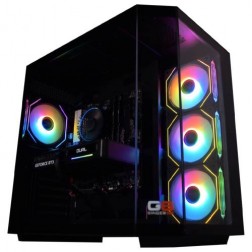 AMD Ryzen 7 8700f Nvidia RTX 5070 Gaming PC - G6 Fusion 800 X5
AMD Ryzen 7 8700f 8 core
A620M Motherboard
16GB+ DDR5 5200MHz
FAST 1TB M.2 NVMe SSD
12GB Nvidia RTX 5070 Graphics
300mbps Wifi
Windows 11 Home£1,735.41
£1,629.99
AMD Ryzen 7 8700f Nvidia RTX 5070 Gaming PC - G6 Fusion 800 X5£1,735.41
£1,629.99
AMD Ryzen 7 8700f 8 core
A620M Motherboard
16GB+ DDR5 5200MHz
FAST 1TB M.2 NVMe SSD
12GB Nvidia RTX 5070 Graphics
300mbps Wifi
Windows 11 Home
-
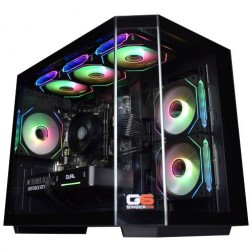 AMD Ryzen 5 8400f Nvidia RTX 5060 Ti Gaming PC - G6 Fusion 600 X5
AMD Ryzen 5 8400f 6 core
A620M Motherboard
16GB+ DDR5 5200MHz
FAST 1TB M.2 NVMe SSD
8GB Nvidia RTX 5060 Ti Graphics
300mbps Wifi
Windows 11 Home£1,374.11
£1,289.99
AMD Ryzen 5 8400f Nvidia RTX 5060 Ti Gaming PC - G6 Fusion 600 X5£1,374.11
£1,289.99
AMD Ryzen 5 8400f 6 core
A620M Motherboard
16GB+ DDR5 5200MHz
FAST 1TB M.2 NVMe SSD
8GB Nvidia RTX 5060 Ti Graphics
300mbps Wifi
Windows 11 Home
-
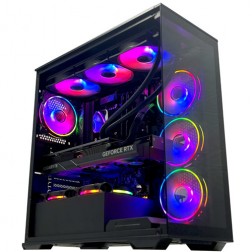 Intel Core i9 14900K Nvidia RTX 5080 Gaming PC - G6 Galactic U3
Intel Core i9 14900KF 24 core
Z790 Motherboard
32GB+ DDR5 5200MHz
FAST 1TB+ M.2 NVMe SSD
16GB Nvidia RTX 5080 Graphics
FAST Wifi & Bluetooth
Windows 11 Home£3,153.51
£2,959.99
Intel Core i9 14900K Nvidia RTX 5080 Gaming PC - G6 Galactic U3£3,153.51
£2,959.99
Intel Core i9 14900KF 24 core
Z790 Motherboard
32GB+ DDR5 5200MHz
FAST 1TB+ M.2 NVMe SSD
16GB Nvidia RTX 5080 Graphics
FAST Wifi & Bluetooth
Windows 11 Home
-
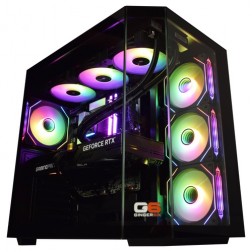 Intel Core Ultra 9 285K Nvidia RTX 5070 Ti Gaming PC - G6 Genesis U3
Intel Core Ultra 9 285K 24 core
B860 Motherboard
32GB+ DDR5 5200MHz Memory
FAST 1TB+ M.2 NVMe SSD
16GB Nvidia RTX 5070 Ti Graphics
FAST Wifi & Bluetooth
Windows 11 Home£2,944.02
£2,764.99
Intel Core Ultra 9 285K Nvidia RTX 5070 Ti Gaming PC - G6 Genesis U3£2,944.02
£2,764.99
Intel Core Ultra 9 285K 24 core
B860 Motherboard
32GB+ DDR5 5200MHz Memory
FAST 1TB+ M.2 NVMe SSD
16GB Nvidia RTX 5070 Ti Graphics
FAST Wifi & Bluetooth
Windows 11 Home
-
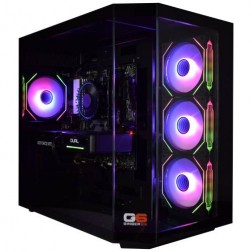 AMD Ryzen 9 7900 Nvidia RTX 5070 Ti Gaming PC - G6 Fusion 1200 X5
AMD Ryzen 9 7900 12 core
A620M Motherboard
16GB+ DDR5 5200MHz
FAST 1TB M.2 NVMe SSD
16GB Nvidia RTX 5070 Ti Graphics
300mbps Wifi
Windows 11 Home£2,248.12
£2,109.99
AMD Ryzen 9 7900 Nvidia RTX 5070 Ti Gaming PC - G6 Fusion 1200 X5£2,248.12
£2,109.99
AMD Ryzen 9 7900 12 core
A620M Motherboard
16GB+ DDR5 5200MHz
FAST 1TB M.2 NVMe SSD
16GB Nvidia RTX 5070 Ti Graphics
300mbps Wifi
Windows 11 Home
-
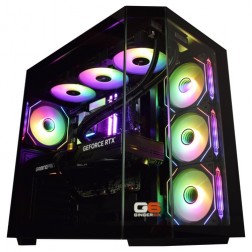 Intel Core i9 12900KF Nvidia RTX 5080 Gaming PC - G6 Typhoon X6
Intel Core i9 12900KF 16 core
B760M Motherboard
16GB+ DDR5 5200MHz Memory
FAST 1TB+ M.2 NVMe SSD
16GB Nvidia RTX 5080 Graphics
1733mbps Wifi & Bluetooth
Windows 11 Home£2,739.42
£2,574.99
Intel Core i9 12900KF Nvidia RTX 5080 Gaming PC - G6 Typhoon X6£2,739.42
£2,574.99
Intel Core i9 12900KF 16 core
B760M Motherboard
16GB+ DDR5 5200MHz Memory
FAST 1TB+ M.2 NVMe SSD
16GB Nvidia RTX 5080 Graphics
1733mbps Wifi & Bluetooth
Windows 11 Home
Grid List
7 Item(s)
What Does Battlefield 6 Need?
Battlefield 6 is the most GPU and VRAM-demanding game in this sub-hub. The figures below are based on comparable Battlefield titles and expected engine demands. Figures are drawn from independent Battlefield 6 benchmarks published in October 2025.
Performance figures are indicative and drawn from independent Battlefield 6 benchmarks published in October 2025. Actual performance varies with map, settings and the rest of the system. Call Kevin on 01902 714533 and he will confirm what to expect from a specific build.
What Each Budget Delivers in Battlefield 6
Battlefield 6 is the most demanding game in the competitive shooter sub-hub. These assessments are based on comparable Battlefield titles and expected engine demands.

Estimated 80 to 100fps at 1080p high settings. Battlefield 6 requires more GPU than CS2 or Apex at equivalent quality levels. The RTX 5060 Ti is the minimum for a playable experience at 1080p high. DLSS or FSR extends headroom on demanding maps with large player counts. The 16GB VRAM prevents texture streaming issues at 1080p high textures. If 1440p is your target, a mid-range or high-end build is necessary. This tier is best matched to 1080p play.

Estimated 80 to 100fps at 1440p high with DLSS Quality enabled. The RTX 5070's 12GB VRAM keeps texture quality stable across extended sessions including the most chaotic large-scale maps. This is the tier most Battlefield buyers land at when moving from 1080p to 1440p. It provides the visual step up that Battlefield's large outdoor environments reward, without the cost of 1440p ultra. Also covers Apex Legends at 1440p high and Fortnite at Epic settings on the same machine.

Estimated 80fps+ at 1440p ultra with DLSS Quality. Destruction effects, volumetric smoke from explosions, and long draw distances all rendered at maximum fidelity. 16GB VRAM. This is the tier for buyers who want Battlefield 6 as it is meant to look: large-scale warfare at the highest visual settings a 1440p display supports. Also covers 4K gaming in less demanding titles on the same machine.

4K ultra: the only tier where Battlefield 6 at maximum visual settings at 4K is realistic. DLSS Quality on the RTX 5080 delivers smooth frame rates at 4K ultra based on comparable Battlefield benchmarks. 16GB GDDR7 VRAM. This build is for players who own a 4K monitor and want Battlefield at its absolute best, while also having a machine that covers every other title at 4K ultra without compromise.
Why Battlefield 6 Needs a Different Conversation Than Any Other Shooter on This Page
Every other game in the competitive shooters category has a hardware profile where a mid-range build gets you close to the experience the game is designed to deliver. Battlefield 6 does not work that way. The game's large-scale outdoor environments, destruction physics, and high player counts create a GPU and VRAM workload that scales with the visual settings in a more dramatic way than CS2, Apex, or Fortnite. The visual difference between high and ultra settings in Battlefield 6 is substantial, and reaching ultra requires hardware that would be overspecified for any other title in this category.
Destruction physics are the primary reason Battlefield games are demanding in a unique way. Every destroyed wall, collapsed building, and cratered landscape is calculated in real time. In a match with 64 players all generating destruction simultaneously across a large map, the GPU is processing an environment that is continuously changing. This is fundamentally different to a static map in CS2 or the more contained destruction in other shooters. The draw call count in Battlefield, the number of separate rendering instructions sent to the GPU per frame, is among the highest of any multiplayer title.
VRAM requirements reflect this complexity. At 1440p ultra with high-resolution textures across a large, dynamically changing map, 8GB VRAM is not sufficient for uninterrupted texture quality. 12GB covers 1440p high settings. 16GB provides the buffer for 1440p ultra and 4K play without texture streaming interruptions during the most chaotic moments of a large match.
DLSS and FSR both work in the Battlefield series and both provide meaningful frame rate gains. An RTX 5070 at 1440p high with DLSS Quality is the recommended starting point: upscaling recovers 30 to 50 percent frame rate compared to native rendering, a larger gain than in less GPU-bound games. For a Battlefield 6 buyer, enabling DLSS or FSR Quality is not a compromise; it is the correct way to run the game at high fidelity settings.
1080p High vs 1440p Ultra: The Gap Is Larger Than in Other Shooters
Drag to compare. Battlefield's large outdoor environments show the visual step up from 1080p high to 1440p ultra more clearly than smaller-map shooters.


Three Types of Battlefield 6 Buyer

Plays at 1440p and values seeing the battlefield clearly: spotting enemies at distance, reading destruction in real time, and experiencing the large-scale visual spectacle Battlefield is known for. The mid-range build, RTX 5070 with Core i7, delivers 1440p high settings at a consistent frame rate with DLSS. The step up to the high-end tier is for players who want 1440p ultra without any compromise.

Plays Battlefield for the chaos: fast engagement, vehicle combat, and large-scale firefights. Less concerned with ultra visual fidelity, more focused on consistent frame rate. The mid-range build at 1080p high settings delivers strong frame rates with DLSS and handles CS2, Apex, and Fortnite on the same machine. The budget build is the accessible entry point if Battlefield is one of several games rather than the primary title.

Plays Battlefield for the large-scale experience and CS2 or Apex for competitive sessions. Needs one build that covers both use cases without compromise. The high-end build, RTX 5070 Ti with Core i9, delivers 1440p ultra in Battlefield and 240fps+ in CS2 and Apex on the same machine. The GPU handles Battlefield's VRAM demands and the CPU handles the competitive shooters' frame rate demands without either being the weak link.
Call Kevin on 01902 714533 or email [email protected]. Tell him:
1. The games you play most often
2. Your monitor resolution and refresh rate
3. Whether you stream, record, or edit alongside gaming
4. Your approximate budget
No charge for the conversation. No pressure to buy.
Will This Build Cover Your Other Games?
Recommended Ginger6 Builds for Battlefield 6
Three builds matched to Battlefield 6 resolution and settings targets, checked against independent Battlefield 6 benchmarks published in October 2025.
RTX 5060 Ti with Core i7. Estimated 80 to 100fps at 1080p high with DLSS. 16GB VRAM prevents texture streaming at 1080p high textures. The accessible entry point for Battlefield 6, which also covers Apex Legends at 240fps and CS2 at 300fps+ on the same machine.
RTX 5070 with fast Core i7 or Ryzen 7. Estimated 80 to 100fps at 1440p high with DLSS Quality. 16GB VRAM for sustained texture quality. The most popular Battlefield upgrade for players moving from 1080p. The visual step up in Battlefield's large outdoor environments is substantial at 1440p.
RTX 5070 Ti or RTX 5080 with Core i9. Estimated 80fps+ at 1440p ultra with DLSS. Maximum visual fidelity at 1440p: destruction effects, volumetric smoke, and high-draw-distance outdoor environments all rendered at full quality. Also covers 4K gaming in less GPU-intensive titles.

Built for a Game That Stresses Every Component Simultaneously
Battlefield 6 is unusual in that it stresses the GPU, CPU, and VRAM simultaneously in a way that most other games do not. A large match with destruction, vehicles, and 64 players generates GPU rendering load, CPU physics and AI calculations, and VRAM texture management all at the same time. A build that is strong in one area but weak in another shows its weakness in Battlefield specifically.
Cable management inside the case directly supports better airflow around the GPU, the component under the most sustained load in Battlefield. An RTX 5070 or RTX 5070 Ti running an extended Battlefield session at 1440p ultra generates significant heat. Restricted airflow causes the GPU to reduce its boost clock speed to manage temperature, which produces inconsistent frame delivery at the moments when the game is most demanding: large multi-squad engagements and destruction-heavy zones. Clean routing keeps the cooling path clear throughout a long session.
BIOS settings, memory profiles, and firmware stability are confirmed before dispatch. XMP or EXPO DDR5 profiles are enabled and tested under Battlefield-scale sustained load, not just light use. DLSS and FSR drivers are confirmed active and functioning correctly where relevant to the GPU in the build. Every build runs a 24-hour stress test covering thermal behaviour under sustained GPU and CPU load, memory responsiveness, storage performance, and BIOS firmware stability.
Kevin backs every Battlefield 6 build with a 3-year warranty. A game this demanding deserves support that continues after the machine arrives. Call 01902 714533 if anything needs attention.
What Do Ginger6 Customers Say?
Over 1,100 verified reviews with a 93% five-star rating.
Buyers of high-end builds consistently note the same things: a machine that performs as specified from day one, and a builder who answers the phone when something needs attention.
Read All Trustpilot ReviewsThe item arrived on the 21st, the estimated delivery was the 25th, considering it wasn't ordered until the evening of the 15th and needed to be built. They honoured a reduced list price without quibble. The PC has booted ok, came with a CD for windows 11 as well as a USB key with the drivers used for the build. Everything is in working order, fast machine which looks great. An honourable dealer, a great PC build, delivered fast.
Needed help with CPU running hot and very noisy when playing a game on pc. Phoned up to get help, took pc to them as they are local, they replaced the part and answered any questions, very helpful and friendly, and tested the pc to make sure it ran fine. Got home, tried out the game that was running high and it runs a lot lower temperature and is back to being as quiet as it was.
Good communication from the builder when I asked about shipping my own GPU. Overall the PC has been really good. Cable management was neat and tidy. Packaging was really good, everything well supported and nothing was out of place when it arrived.
Common Questions About Battlefield 6 Gaming PCs
An RTX 5070 with 12GB VRAM is the recommended starting point for 1440p high settings. For 1440p ultra, an RTX 5070 Ti with 16GB is the right choice, because 16GB is where texture streaming stops being a limit. Both benefit from DLSS Quality enabled. 12GB VRAM is the minimum for 1440p. 16GB provides headroom for sustained texture quality in large matches. Call Kevin on 01902 714533 and he will confirm what a specific build delivers.
12GB covers 1080p and 1440p high settings. 16GB is recommended for 1440p ultra and required for 4K. Battlefield games consistently use more VRAM than other competitive shooters: the combination of large outdoor environments, high-resolution textures, and dynamic destruction places sustained VRAM demand that smaller-map games do not.
Yes, significantly more so than in CS2 or Apex. Both are expected to work in Battlefield 6 based on the series' consistent upscaling support. At 1440p ultra, upscaling typically recovers 30 to 50 percent additional frame rate in Battlefield titles. In a game this GPU-intensive, enabling DLSS Quality or FSR Quality is not a compromise: it is the correct way to run the game at high fidelity settings.
Three factors set Battlefield apart. First, real-time destruction physics: every destroyed surface is calculated per frame across a large map with many players. Second, large outdoor environments with long draw distances and high foliage density generate more draw calls per frame than smaller-map shooters. Third, high player counts mean more character models, animations, and physics simulations running simultaneously. CS2 and Apex run on engines designed specifically for performance at high frame rates. Battlefield runs on an engine designed for large-scale visual spectacle.
Based on comparable titles, yes. Battlefield games are generally more demanding than Warzone at equivalent settings. Warzone at 1440p high is demanding, but Battlefield at ultra settings pushes the GPU harder due to destruction physics and higher player counts. The VRAM requirement at 1440p is similar between the two: 12GB is the minimum for both, 16GB provides headroom in sustained high-intensity moments.
Yes, though the GPU is the primary bottleneck at high quality settings. Battlefield games with large player counts place meaningful CPU load during large-scale engagements: physics calculations, AI, and player simulation all run on the processor. A fast Core i7 or Ryzen 7 covers this without becoming the bottleneck. Slower processors may produce frame drops specifically during the most chaotic multi-squad fights.
Yes. A high-end Battlefield 6 build covers Apex Legends at 1440p high with significant frame rate headroom. Apex is less GPU-intensive than Battlefield at comparable settings. CS2 is CPU-bound at high frame rates, and any build with a fast Core i7 or Ryzen 7 handles CS2 at 240fps to 360fps alongside Battlefield 6. A Battlefield build is the most demanding starting point in this sub-hub. It covers every other game in the category with headroom to spare.
Confirmed benchmark data has been available since October 2025, and our build recommendations now use it rather than pre-release estimates. Call 01902 714533 for current recommendations. Kevin will confirm the right build based on up-to-date benchmark data and current Ginger6 stock.
Find the Right Build for Battlefield 6
Browse the gaming PC range or call Kevin directly. Tell him your target resolution, whether you play Apex or Warzone alongside Battlefield, and your budget. He will confirm the right spec against current benchmark data.